
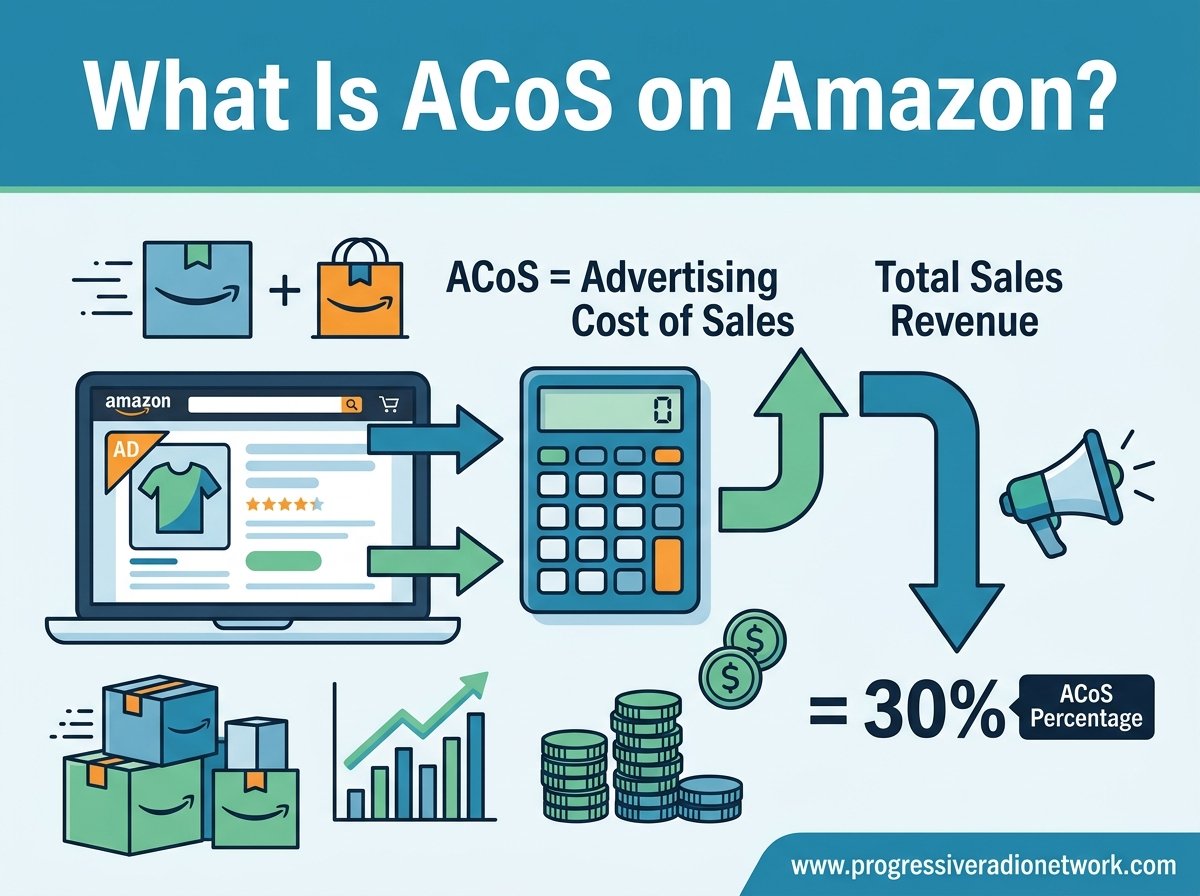
ACoS is the single most important metric for any Amazon seller running pay-per-click advertising. Short for Advertising Cost of Sale, ACoS tells you exactly what percentage of your attributed ad revenue goes toward ad spend. If you spend $50 on a Sponsored Products campaign and it generates $200 in sales, your ACoS is 25% — meaning a quarter of your advertising revenue went back into ads. Understanding this number, how to calculate it, and what counts as a “good” ACoS can mean the difference between a profitable Amazon business and one quietly bleeding margin.
In this guide, we break down everything you need to know about ACoS on Amazon for 2026. You will learn the exact ACoS formula, how to calculate break-even and target ACoS, how it compares to related metrics like TACoS and ROAS, and proven strategies to bring your ACoS down without throttling growth. Whether you are launching your first product or managing an established catalog with dozens of SKUs, the frameworks below will help you set realistic ad performance targets and make confident bidding decisions.
TL;DR — Key Takeaways About ACoS
ACoS stands for Advertising Cost of Sale. It measures the ratio of your Amazon ad spend to the revenue those ads generate, expressed as a percentage.
The ACoS formula is simple: (Ad Spend divided by Ad Revenue) multiplied by 100. For example, spending $50 to earn $200 in ad revenue gives an ACoS of 25%.
Break-even ACoS equals your profit margin before ad spend. If your profit margin is 30%, your break-even ACoS is 30% — anything above that and you are losing money on that campaign.
A good ACoS depends on your business stage. Most established sellers target 15 to 30%, while product launches often run 50% or higher to gain visibility and organic ranking.
ACoS and ROAS are inverse metrics. A 25% ACoS equals a 4x ROAS. Knowing both helps you communicate goals clearly with agencies, partners, or internal teams.
TACoS (Total Advertising Cost of Sale) factors in all revenue, including organic sales. It gives a fuller picture of overall advertising efficiency across your entire Amazon business.
To lower ACoS, focus on negative keyword management, bid optimization, listing quality, and conversion rate improvements rather than simply cutting ad budgets.
Understanding ACoS on Amazon
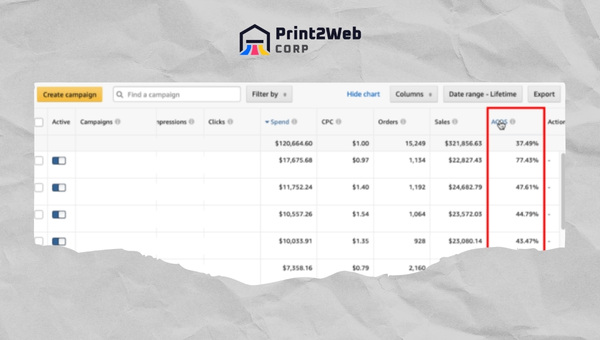
ACoS (Advertising Cost of Sale) is a metric unique to Amazon PPC that measures the efficiency of your advertising campaigns. Amazon calculates it automatically and surfaces it inside the Campaign Manager in Seller Central. The metric represents the percentage of attributed ad revenue that you spent on advertising to generate that revenue.
For example, if you spend $50 running a Sponsored Products campaign and those ads produce $200 in attributed sales, your ACoS is 25%. Amazon displays this percentage at the campaign, ad group, and keyword level, giving you granular control over where your advertising budget is working and where it is not.
Understanding ACoS matters because it directly reflects profitability. If your ACoS exceeds your profit margin, every sale generated by that campaign is effectively costing you money. Many sellers fall into the trap of chasing sales volume without monitoring ACoS, only to discover at the end of the month that their ad campaigns were unprofitable. Tracking ACoS at every level — account, campaign, and keyword — helps you catch these issues early and reallocate budget toward your best-performing targets.
ACoS vs ROAS: Understanding the Inverse Relationship
ROAS (Return on Ad Spend) is the mirror image of ACoS. While ACoS expresses ad spend as a percentage of revenue, ROAS expresses revenue as a multiple of spend. The two metrics communicate the same information from opposite angles, and many advertising professionals switch between them depending on context.
To convert between the two, the formula is simple. Divide 100 by your ACoS percentage to get your ROAS multiplier. So a 25% ACoS equals a 4x ROAS (100 divided by 25 equals 4). A 20% ACoS equals a 5x ROAS. A 50% ACoS equals a 2x ROAS. If you work with an advertising agency or a media buyer, they may report performance in ROAS rather than ACoS — understanding this conversion prevents costly miscommunications.
Why ACoS Matters for Your Amazon Business
ACoS is the fastest way to gauge whether a campaign is profitable at a glance. When you know your break-even ACoS, you can instantly evaluate any campaign without running a full profitability spreadsheet. This is especially valuable when managing multiple SKUs, product launches, and seasonal promotions simultaneously.
Beyond profitability, ACoS signals the health of your overall PPC strategy. A rising ACoS may indicate increased competition on your target keywords, a decline in listing conversion rate, or ad fatigue from stale creative. A falling ACoS often means your optimization efforts are paying off — better keyword targeting, improved listings, or stronger organic ranking feeding back into ad performance.
How to Calculate ACoS on Amazon
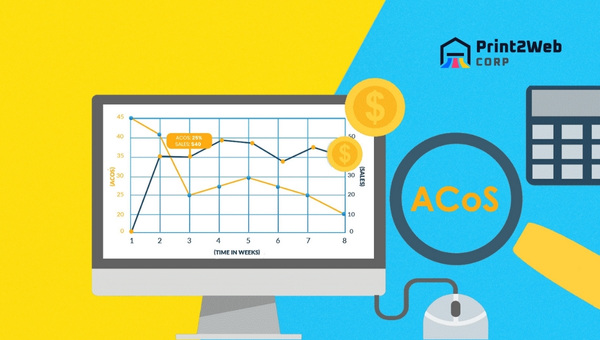
The ACoS formula is straightforward and worth memorizing. Take your total ad spend for a given period, divide it by the total ad revenue generated during that same period, then multiply by 100 to express the result as a percentage.
ACoS Formula: ACoS = (Ad Spend / Ad Revenue) x 100
Using the standard example: if you spend $50 on ads and earn $200 in attributed ad revenue, your ACoS is ($50 / $200) x 100 = 25%. That means for every dollar of revenue those ads produced, you spent 25 cents on advertising.
Amazon reports ACoS at multiple levels. At the account level, ACoS reflects your overall ad efficiency across every campaign combined. At the campaign level, you can compare Sponsored Products against Sponsored Brands or Sponsored Display. At the ad group level, you can isolate different product groupings within a single campaign. At the keyword level, ACoS tells you exactly which search terms are profitable and which are wasting budget. Most experienced sellers spend the majority of their optimization time at the keyword level, since that is where the most actionable decisions happen.
How to Find ACoS in Amazon Seller Central
If you are new to Amazon advertising, here is the exact path to find your ACoS data. Log in to Seller Central, then navigate to Advertising > Campaign Manager. From there, open any campaign to view performance metrics. If the ACoS column is not visible by default, click the Columns button at the top right of the data table, select Customize Columns, and check the box next to ACoS. You can also access historical ACoS data through Advertising > Advertising Reports, where you can download campaign, keyword, and placement reports for deeper analysis.
Step 1: Calculate Your Profit Margin First
Before setting any ACoS targets, you need to know your true profit margin. Start with your selling price and subtract every cost associated with getting the product to the customer: manufacturing cost, Amazon referral fees, FBA fulfillment fees, storage fees, inbound shipping, packaging, and any prep services. The number left over is your pre-ad profit margin expressed as a dollar amount.
For a worked example, imagine you sell a product for $30. Manufacturing costs $8, Amazon referral fees take 15% ($4.50), FBA fees are $4.20, and inbound shipping averages $1.30 per unit. Your total costs are $18, leaving $12 in profit before advertising. Divide that $12 by the $30 selling price to get a profit margin of 40%. This 40% is your break-even ACoS — the maximum you can spend on ads per dollar of revenue before you start losing money.
Step 2: Compare Profit Margin Against Your ACoS
Once you know both numbers, the comparison is simple. If your actual ACoS is below your profit margin (break-even ACoS), the campaign is profitable. If your ACoS equals your margin, you are breaking even on ad-attributed sales but still benefiting from organic ranking lift. If your ACoS exceeds your profit margin, every sale from that campaign is costing you money — though it may still be justified during a product launch or aggressive growth phase.
Using the example above, if your ACoS is 25% and your break-even is 40%, you have a 15-point profit cushion. You could increase bids to capture more market share before hitting break-even. If your ACoS is 45%, you are losing 5 points on every ad-attributed sale and need to either reduce spend or fix conversion issues immediately.
What Is a Good ACoS Percentage on Amazon?
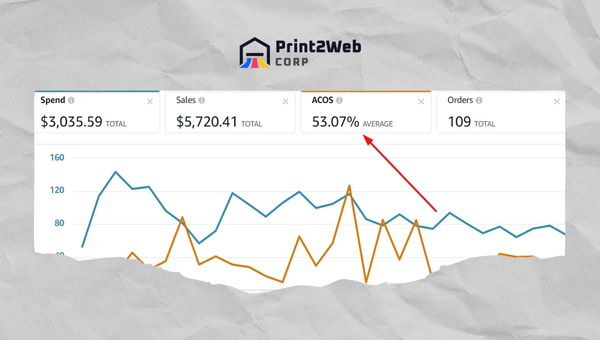
There is no universal “good” ACoS because the right number depends on your profit margins, product lifecycle stage, and strategic goals. That said, industry data and seller community benchmarks give us useful reference points. The average ACoS across most Amazon PPC campaigns falls between 25% and 35%. Sellers targeting profitability typically aim for 15 to 25%, while those in aggressive growth mode may accept 40% or even higher.
Reddit sellers on r/FulfillmentByAmazon consistently report that established products settle into the 15 to 30% range once campaigns mature and organic ranking builds. New product launches routinely see ACoS above 50% for the first several weeks, and experienced sellers often budget for that deliberately. Products with razor-thin margins — like low-ticket items or commoditized categories — may only support a 10 to 15% ACoS, while high-margin products like supplements or private label goods can profitably sustain 30 to 40%.
Break-Even ACoS Explained
Break-even ACoS is the exact ACoS percentage at which your advertising produces zero net profit and zero net loss on attributed sales. It equals your profit margin before advertising costs. Knowing this number is the single most valuable skill for Amazon advertisers, because it gives you an instant go-or-no-go signal for every campaign decision.
To calculate break-even ACoS, take your pre-ad profit per unit and divide it by your selling price, then multiply by 100. If you make $12 profit on a $30 product before ads, your break-even ACoS is ($12 / $30) x 100 = 40%. At exactly 40% ACoS, every ad-generated sale covers its own ad cost but contributes nothing to your bottom line. Below 40%, each sale adds profit. Above 40%, each sale loses money.
ACoS Benchmarks by Campaign Type
Different Amazon ad formats produce different ACoS profiles. Sponsored Products campaigns typically run the lowest ACoS because they target shoppers at the bottom of the funnel with high purchase intent. Automatic targeting campaigns often start with a higher ACoS than manual campaigns, but they are valuable for discovering new converting keywords.
Sponsored Brands campaigns usually carry a higher ACoS than Sponsored Products because they drive brand awareness and category-level discovery rather than direct product purchases. Sponsored Display and retargeting campaigns can have variable ACoS depending on whether you are defending your own listings or targeting competitors. Setting different ACoS targets for each campaign type — rather than expecting one uniform number across your account — produces more realistic performance expectations.
ACoS vs TACoS: What Is the Difference?
TACoS (Total Advertising Cost of Sale) is a broader metric that every Amazon seller should understand alongside ACoS. While ACoS only measures ad spend against ad-attributed revenue, TACoS measures total ad spend against total revenue — including organic sales that had no advertising attribution. This distinction matters because as your products build organic ranking, a larger share of revenue comes from non-ad sources, and TACoS naturally falls even if ACoS stays flat.
TACoS Formula: TACoS = (Total Ad Spend / Total Revenue) x 100
For example, if you spend $1,000 total on ads in a month and generate $10,000 in total revenue (including both ad-attributed and organic sales), your TACoS is 10%. Of that $10,000, perhaps $4,000 came from ad-attributed sales and $6,000 came organically. Your ACoS would be ($1,000 / $4,000) x 100 = 25%, but your TACoS of 10% reflects the healthier overall picture.
The comparison between the two metrics tells a story about your business health. If ACoS is high but TACoS is low and falling, your ad spend is successfully driving organic ranking growth — a sign to keep investing. If both ACoS and TACoS are rising, your ad efficiency is degrading across the board and you need to investigate conversion rates, competition levels, and listing quality.
The breakdown below summarizes the key differences between ACoS and TACoS for quick reference.
Definition: ACoS measures ad spend against ad-attributed revenue only. TACoS measures ad spend against total revenue including organic.
Formula: ACoS = (Ad Spend / Ad Revenue) x 100. TACoS = (Ad Spend / Total Revenue) x 100.
What it tells you: ACoS shows individual campaign efficiency. TACoS shows overall business advertising efficiency.
Healthy target range: ACoS typically 15 to 30% for established products. TACoS typically 10 to 15% for established brands with organic presence.
Best used for: ACoS for day-to-day bid and keyword decisions. TACoS for monthly strategic planning and overall budget allocation.
Many Amazon aggregators managing multiple brands rely on TACoS at the portfolio level because it captures the full impact of advertising across organic and paid channels. Individual sellers, by contrast, often default to ACoS for tactical decisions because it is what Amazon surfaces inside Campaign Manager. The most effective advertisers monitor both.
Setting Your Target ACoS
Target ACoS is the percentage you actively aim for based on your desired profit margin after advertising. It is not the same as break-even ACoS — your target should always be lower to ensure you are generating actual profit on every ad-attributed sale. The formula is: Target ACoS = Profit Margin Before Ads minus Desired Profit Margin After Ads.
Using our earlier example with a 40% pre-ad profit margin, if you want to retain 15% profit after advertising, your target ACoS is 40% minus 15% = 25%. This means you can comfortably spend up to 25% of ad revenue on ads and still walk away with a 15-point margin. Setting this number explicitly — and communicating it to anyone managing your campaigns — keeps everyone aligned on what success looks like.
The Three-Stage ACoS Framework: Launch, Growth, Profit
Effective Amazon sellers do not apply a single ACoS target across their entire business. Instead, they adjust targets based on where each product sits in its lifecycle. The three-stage framework below is widely used by experienced advertisers and agencies.
Stage 1: Product Launch (High ACoS Expected)
During a product launch, your primary goal is visibility and data collection, not immediate profit. Expect ACoS to run 50% or higher for the first 2 to 6 weeks. You are bidding aggressively on competitive keywords to generate initial sales velocity, build review momentum, and signal to Amazon’s algorithm that your product deserves organic ranking. Cutting ad spend too early in this stage — a mistake forum sellers frequently warn against — can starve your product of the traction it needs to break into organic results.
Amazon private label sellers are especially familiar with this phase, since new brands have no existing organic presence and must buy their way into visibility through aggressive PPC bidding.
Stage 2: Growth Phase (Moderating ACoS)
Once a product has accumulated reviews, sales history, and some organic ranking, ACoS should begin trending downward. The growth phase typically targets 25 to 35% ACoS. At this point, you are refining keyword targets, building out negative keyword lists, and shifting budget from broad discovery campaigns toward proven converters. Organic sales start contributing a meaningful share of total revenue, which improves TACoS even if ACoS holds steady.
Stage 3: Profit Maximization (Lowest ACoS)
Established products with strong organic ranking and mature ad campaigns can target 12 to 20% ACoS. Budget goes toward defending top keyword positions, retargeting previous visitors, and capturing share from competitors. Many sellers running their Amazon business operations at this stage shift their focus from ACoS alone to TACoS, since organic sales provide a buffer that allows for more aggressive defensive bidding without hurting overall profitability.
Other Metrics to Monitor Alongside ACoS
ACoS never tells the full story in isolation. Several companion metrics provide context for why your ACoS is moving in a particular direction and what levers you can pull to change it.
1. Click-Through Rate (CTR)
CTR measures how often shoppers click your ad after seeing it. A low CTR with high impressions suggests your ad creative, main image, or price is not compelling enough to earn clicks. Improving your main product image, adjusting the title for clarity, or testing different bid positions can lift CTR and, by extension, improve ACoS since you generate more clicks per impression dollar.
2. Conversion Rate (CVR)
Conversion rate measures how many clicks turn into purchases. This is one of the most powerful ACoS levers because improving your listing directly lowers the cost per sale. Strong reviews, compelling A+ content, competitive pricing, and high-quality images all lift conversion rate. Sellers who invest in building trust with reviews consistently see conversion rate improvements that ripple into lower ACoS across their campaigns.
3. Cost Per Click (CPC)
CPC reflects how much you pay each time a shopper clicks your ad. Lowering CPC through smart bid management directly reduces ACoS, assuming conversion rate holds steady. However, cutting bids too aggressively can drop your ad placement below the fold and eliminate clicks entirely — a common mistake that tanks both sales volume and organic ranking momentum.
4. Impressions
Impressions tell you how often Amazon is displaying your ads. A sudden drop in impressions may indicate increased competition, budget caps being reached too early in the day, or relevance scoring changes. Monitoring impressions alongside ACoS helps you distinguish between a real efficiency problem and a simple visibility problem.
How to Lower ACoS on Amazon: Proven Strategies
Reducing ACoS is not about slashing budgets — it is about making each advertising dollar work harder. The strategies below represent the highest-impact tactics that experienced Amazon sellers use to bring ACoS down without sacrificing sales volume or organic ranking growth.
1. Build a Strong Negative Keyword List
Negative keywords are the single most underused ACoS lever on Amazon. By adding search terms that consistently generate clicks but never convert to your negative keyword list, you stop wasting spend on irrelevant traffic. Run a Search Term Report every two weeks during active campaigns and add any term with more than 5 clicks and zero conversions to your negative list. This alone can reduce ACoS by 10 to 20% within a month for many sellers.
2. Optimize Your Product Listing
Your listing is your landing page. If it does not convert, no amount of bid optimization will rescue your ACoS. Focus on a clear, benefit-driven title, a high-quality main image that stands out in search results, five or more supplementary images showing the product in use, and A+ content that addresses common buyer objections. Optimizing your product listings for conversion is the highest-leverage ACoS improvement you can make, since every percentage point of conversion rate gain compounds across every keyword you bid on.
3. Refine Bid Strategy by Placement
Amazon allows you to adjust bids by placement — Top of Search, Rest of Search, and Product Pages. Most conversions come from Top of Search placement, so many sellers apply a 25 to 50% bid premium there. Review your placement reports to see where your conversions actually come from and shift bid adjustments accordingly. This prevents overpaying for low-converting placements while staying competitive where it matters most.
4. Use Dayparting and Week Parting
Conversion rates fluctuate by time of day and day of week. Many sellers find that late-night hours produce high click volumes but low conversion rates, since browsers are shopping without intent to buy. If you use a third-party PPC management tool, experiment with dayparting schedules that concentrate spend during your highest-converting windows. Even within Amazon’s native tools, you can use budget caps to prevent early-day spend from exhausting before your peak evening hours.
5. Separate Campaign Types by Goal
Running auto and manual campaigns with the same ACoS target creates confusion. Auto campaigns serve as keyword discovery tools and should have a higher acceptable ACoS. Exact match manual campaigns target proven converters and should have a lower target. Brand defense campaigns targeting your own brand name should have the lowest ACoS of all, since those shoppers are already looking for you. Setting separate targets per campaign type prevents you from judging a discovery campaign by profit-campaign standards.
5 Common ACoS Mistakes to Avoid
Forum discussions on r/FulfillmentByAmazon reveal that sellers make the same handful of ACoS mistakes repeatedly. Recognizing these pitfalls early can save weeks of wasted spend and stalled ranking growth.
Mistake 1: Cutting Ad Spend Too Aggressively
When sellers see a high ACoS, the instinct is to slash bids or pause campaigns. This often backfires because it chokes off the sales velocity that feeds Amazon’s organic ranking algorithm. A better approach is to reduce bids incrementally — 5 to 10% at a time — while simultaneously improving listing quality and adding negative keywords. This preserves visibility while incrementally improving efficiency.
Mistake 2: Treating ACoS as the Only Metric That Matters
ACoS measures ad-attributed efficiency, but it does not capture the organic sales lift that advertising generates. Many sellers who obsess over hitting a specific ACoS number end up under-investing in ads and losing organic market share to competitors. Always evaluate ACoS alongside TACoS, total revenue, organic ranking, and overall profit margin.
Mistake 3: Applying One ACoS Target to Every Campaign
Using a blanket ACoS target ignores the reality that different campaigns serve different purposes. Discovery campaigns, brand defense campaigns, and competitor conquesting campaigns all have fundamentally different expected returns. Set ACoS targets at the campaign level based on each campaign’s strategic role, not at the account level.
Mistake 4: Ignoring ACoS at the Keyword Level
Account-level and campaign-level ACoS averages hide the performance extremes happening at the keyword level. A single high-spend keyword with terrible conversion can drag your entire campaign ACoS up while dozens of profitable keywords go unnoticed. Review keyword-level reports weekly and reallocate budget from poor performers to your best converters.
Mistake 5: Panicking Over High ACoS During Launches
New sellers frequently panic when launch-phase ACoS hits 60 or 70%. Experienced sellers expect and budget for this. The key is to set a defined launch runway — typically 4 to 8 weeks — during which a higher ACoS is acceptable because the goal is ranking and review velocity, not immediate profit. Set a calendar reminder to re-evaluate after the launch window rather than reacting emotionally to each day’s numbers.
Frequently Asked Questions
What is ACoS in Amazon?
ACoS (Advertising Cost of Sale) is a metric that measures the ratio of your Amazon ad spend to the revenue generated from those ads, expressed as a percentage. The formula is (Ad Spend divided by Ad Revenue) multiplied by 100. For example, spending $50 on ads that generate $200 in sales gives an ACoS of 25%.
What is a good ACoS percentage on Amazon?
A good ACoS depends on your profit margins and product stage. For established products, most sellers target 15 to 30% ACoS. The average across Amazon PPC campaigns is 25 to 35%. During product launches, ACoS of 50% or higher is common and often acceptable as you build organic ranking.
How do you calculate ACoS on Amazon?
Divide your total ad spend by your total ad-attributed revenue, then multiply by 100 to get a percentage. For example, if you spent $50 on ads and earned $200 in attributed sales, your ACoS is ($50 / $200) x 100 = 25%. Amazon calculates this automatically and displays it in Campaign Manager under Advertising Reports.
What ROAS is 25% ACoS?
ROAS is the inverse of ACoS. To convert, divide 100 by your ACoS percentage. A 25% ACoS equals a 4x ROAS (100 divided by 25 equals 4). Similarly, a 20% ACoS equals a 5x ROAS, and a 50% ACoS equals a 2x ROAS.
Do you want ACoS to be high or low?
Generally, a lower ACoS means you are spending less relative to ad revenue, which supports profitability. However, an extremely low ACoS (under 10%) may indicate you are under-investing in ads and missing growth opportunities. The right target depends on your business stage: lower for profit maximization, higher for launches and growth.
What is the difference between ACoS and TACoS?
ACoS measures ad spend against ad-attributed revenue only, while TACoS (Total Advertising Cost of Sale) measures ad spend against total revenue including organic sales. ACoS is best for day-to-day campaign decisions, while TACoS gives a broader view of overall advertising efficiency as your organic sales grow.
How can I reduce my ACoS on Amazon?
The most effective strategies are building strong negative keyword lists, optimizing your product listing for higher conversion rates, adjusting bids by placement (especially Top of Search), using dayparting to concentrate spend during high-converting hours, and setting separate ACoS targets for discovery versus conversion campaigns.
What is break-even ACoS?
Break-even ACoS is the ACoS percentage at which your ad spend exactly equals your profit margin on attributed sales, producing zero net profit or loss. It equals your pre-ad profit margin. If your profit margin is 40%, your break-even ACoS is 40% — anything above that means each ad sale loses money.
How do I find my ACoS in Amazon Seller Central?
Log in to Seller Central and go to Advertising, then Campaign Manager. Open any campaign to view ACoS in the performance table. If the column is not visible, click Columns at the top right, select Customize Columns, and check the ACoS box. You can also download detailed ACoS reports under Advertising Reports.
Conclusion
Mastering ACoS on Amazon is not about chasing a single golden number. It is about understanding the relationship between your ad spend, your profit margins, and the stage your product occupies in its lifecycle. A 25% ACoS might be outstanding for one seller and catastrophic for another, depending entirely on their cost structure and strategic goals. The sellers who win are the ones who calculate break-even ACoS for every product, set realistic targets by campaign type and lifecycle stage, and adjust those targets as their organic ranking and conversion rates evolve over time.
Pair your ACoS tracking with TACoS for the full picture, monitor companion metrics like conversion rate and CTR to diagnose movement, and avoid the common trap of cutting spend reactively when numbers spike. With the frameworks and strategies in this guide, you have everything you need to run profitable Amazon PPC campaigns in 2026 and beyond. Start by calculating your break-even ACoS for your top-selling product today — that single number will transform how you evaluate every advertising decision going forward.
Leave a Reply