
Amazon processes over 2 billion product searches every month, yet most sellers only convert a small fraction of those shoppers into paying customers. If your listing pulls in plenty of clicks but buyers vanish before hitting the Add to Cart button, your conversion rate is silently draining revenue every single day. Learning how to Boost Your Amazon Conversion Rate is no longer optional in 2026 — it is the difference between a listing that scales and one that stalls.
The average Amazon shopper makes a purchase decision in under 15 seconds. That means your title, main image, price, and review profile need to do the heavy lifting almost instantly. Sellers who master conversion rate optimization routinely out-earn competitors with twice their traffic, because they squeeze more revenue from every single session Amazon sends their way.
This guide breaks down everything from the exact conversion rate formula Amazon uses internally, to tiered benchmarks by category, to the specific tools and tactics top-performing sellers rely on in 2026. Whether you are troubleshooting a new listing stuck at 4% or trying to push an established product from decent to dominant, the strategies ahead are designed to produce measurable lift. We will reference real case studies, including the widely cited Think Crucial experiment that produced a 10% conversion rate boost and a 30% sales increase through listing optimization alone.
Here is what this guide covers:
- The precise Amazon conversion rate formula and where to find your numbers in Seller Central
- Tiered benchmarks showing what poor, average, excellent, and dangerously high conversion rates look like across categories
- How Amazon FBA and Prime eligibility create a 74% versus 13% conversion gap
- Amazon badges, strikethrough pricing, coupons, and other trust signals that move the needle
- Keyword research tools, A/B testing platforms, and listing optimization frameworks used by top sellers
- Mobile optimization, return rate reduction, Q&A section strategy, and catalog health management
By the end, you will have a complete, actionable checklist to Boost Your Amazon Conversion Rate and keep it climbing. Let us start with the fundamentals.
What is the Amazon Conversion Rate?
The Amazon conversion rate measures the percentage of shoppers who visit your product detail page and actually complete a purchase. It is the single most telling indicator of whether your listing resonates with buyers. A high rate means your images, copy, price, and reviews are working together to convert browsers into buyers. A low rate signals that something on the page is pushing people away before checkout.
Amazon refers to this metric internally as the Unit Session Percentage, which appears in your Business Reports. Some sellers also encounter the term Order Item Session Percentage. Both terms describe the same core calculation: how many sessions resulted in an order. Understanding this terminology matters because the exact label you see depends on which report view you open inside Seller Central.
The rate matters far beyond simple curiosity. Amazon’s ranking algorithm treats conversion rate as a major ranking signal. When your listing converts well, Amazon rewards it with better organic placement, more impressions in search results, and lower costs per click in advertising campaigns. That means improving your conversion rate compounds over time, driving both free organic traffic and cheaper paid traffic simultaneously.
Conversely, a weak conversion rate tells Amazon that shoppers do not find your product compelling, and the platform will gradually reduce your visibility regardless of how much you spend on ads. This is why sellers on forums like Reddit’s FulfillmentByAmazon community frequently report a downward spiral — low conversion leads to lower ranking, which leads to even fewer sessions, which further depresses sales velocity.
Conversion Rate Formula: The Exact Math
The Amazon conversion rate formula is straightforward. You divide your total orders by your total sessions, then multiply by 100 to express the result as a percentage:
Conversion Rate = (Total Orders / Total Sessions) x 100
For example, if your listing received 2,000 sessions last month and generated 120 orders, your calculation would be 120 divided by 2,000, which equals 0.06. Multiply by 100 and you get a 6% conversion rate. That single number tells you exactly how efficiently your listing turns traffic into revenue.
Note that Amazon uses sessions, not page views, as the denominator. A single shopper who clicks through three different pages on your listing still counts as one session. This distinction matters because it means your conversion rate reflects unique shopping visits rather than total clicks, giving you a cleaner picture of buyer intent and listing effectiveness.
Amazon also tracks Unit Session Percentage at the child ASIN level, which means you can see conversion rates for each specific variation of your product. This granularity lets you identify whether a particular color, size, or bundle is underperforming relative to the rest of your catalog, so you can optimize individually rather than guessing at the parent level.
How To Find The Conversion Rate On Amazon?
Finding your conversion rate in Amazon Seller Central takes about thirty seconds once you know the navigation path. Amazon has reorganized the Reports menu over the years, so the steps below reflect the current 2026 interface layout. Follow these four steps precisely:
- Log in to Seller Central at sellercentral.amazon.com using your primary seller account credentials. If you manage multiple marketplaces, select the specific marketplace you want to analyze first.
- Navigate to Reports, then Business Reports in the main navigation menu. The Business Reports dashboard opens to an overview of your account performance, including sales, traffic, and conversion metrics at the account level.
- Click on Detail Page Sales and Traffic by Child Item in the left sidebar menu. This report breaks down performance for each individual ASIN rather than aggregating at the parent or account level, which is what you need for actionable optimization.
- Locate the Unit Session Percentage column in the report table. This column displays your conversion rate as a percentage. You can adjust the date range at the top of the page to compare performance across weeks, months, or custom periods, and export the data as a CSV for deeper analysis in spreadsheet tools.
One important detail: Amazon updates Business Reports on a roughly 24-hour delay, and the most recent 24 to 72 hours of data may fluctuate as returns and cancellations are processed. For the most stable read, look at trailing 7-day or 30-day windows rather than obsessing over single-day swings.
For sellers enrolled in Brand Registry, the Brand Analytics dashboard offers an even richer view. It includes Search Query Performance data, which shows you the exact search terms shoppers used before clicking on your listing. This helps you understand whether your traffic is qualified — a critical distinction, since high traffic with low conversion often means you are attracting the wrong shoppers.
Also Read: How to Track Your Etsy Order Easily? – Ultimate Guide
Analyzing Good Conversion Rates Across Various Industries
There is no universal good conversion rate on Amazon. The number that counts as excellent in one category might signal trouble in another. Before setting optimization targets, you need to understand the benchmarks for your specific industry, the difference between Prime and non-Prime traffic, and the surprisingly real danger of a conversion rate that runs too high.
The most striking data point in Amazon conversion benchmarks comes from the gap between Prime and non-Prime shoppers. According to widely cited data from Sellbrite, Prime-eligible products convert at roughly 74%, while non-Prime products convert at approximately 13%. That is not a typo — Prime listings convert at nearly six times the rate of their non-Prime counterparts. This single statistic underscores why fulfillment strategy, which we cover in detail later, is one of the most powerful levers you have.
Tiered Conversion Rate Benchmarks
Instead of a single number, think in tiers. The framework below helps you diagnose where your listing stands and what action to take. These ranges represent general marketplace averages and will shift somewhat by subcategory, price point, and competition level.
- Poor (under 5%): Your listing has a conversion problem. Shoppers arrive but are not convinced to buy. Common culprits include weak main images, uncompetitive pricing, too few reviews, missing Prime eligibility, or traffic from irrelevant keywords. Immediate optimization is needed.
- Average (5% to 10%): You are in the normal range for most product categories. This is a solid baseline, but significant upside remains. Focused improvements to images, copy, pricing, and reviews can push you into the excellent tier.
- Excellent (10% to 20%): Your listing is performing well above average. Shoppers trust your product and your page communicates value effectively. Continue A/B testing to find incremental gains, but your foundation is strong.
- Too High (above 25%): Counterintuitively, this can signal a problem. An unusually high conversion rate often means your traffic is too narrow — you are only reaching highly qualified shoppers and missing a larger audience. Expanding keyword targeting and ad reach can actually increase total sales even if your conversion rate drops slightly.
Good Conversion Rate For Different Industries
Benchmarks vary significantly by category because price points, purchase frequency, and competition intensity all influence buyer behavior. Use these ranges as a sanity check against your own numbers rather than an absolute target.
- Fashion and Apparel (3% to 8%): Fashion benefits from impulse buying and lower price points on accessories, but sizing uncertainty holds some buyers back. Listings with size charts and fit guidance convert at the higher end.
- Electronics (1% to 4%): High prices and intense comparison shopping suppress conversion rates. Electronics buyers often research across multiple listings before committing, so A+ Content and detailed spec breakdowns matter enormously here.
- Health and Beauty (3% to 10%): This category spans a wide range. Inexpensive consumables like lip balm convert at fashion-like rates, while premium supplements behave more like electronics with extended decision cycles.
- Books (8% to 15%): Books convert exceptionally well, especially niche nonfiction and series titles where readers have strong intent. Genre specificity is the biggest driver — a tightly targeted book can consistently exceed 10%.
- Home and Kitchen (5% to 12%): This broad category rewards lifestyle imagery, infographics showing product dimensions, and clear use-case demonstrations in the image carousel.
The key takeaway is to benchmark against your specific subcategory, not the marketplace average. A 6% conversion rate that is mediocre in Books might be excellent in Electronics. Always pair your benchmarking with a review of what the top three sellers in your niche are doing differently on their listings.
Also Read: How to Freelance as a Student? – Insider Tips for Success
Tips to Increase Your Amazon Conversion Rates
Now we move from measurement to action. The tactics below represent the most impactful levers for lifting your conversion rate in 2026. While improving your conversion rate maximizes the value of existing traffic, you can also improve your Amazon search rankings to create a compounding effect — better rankings drive more sessions, and a higher conversion rate squeezes more sales from each one.

Optimize Your Product Pages
Your product detail page is your storefront, sales pitch, and checkout counter combined into one scrollable experience. Every element on the page either builds buyer confidence or erodes it. Optimization starts with the fundamentals: title, images, bullet points, and description, then extends to A+ Content, pricing displays, and review positioning.
Your product title carries the most weight for both search ranking and click-through rate (CTR). Amazon allows up to 200 characters in most categories, and you should use that space strategically. Lead with your primary keyword, follow with your brand and product name, then include the most important distinguishing features. Avoid keyword stuffing — a title that reads unnaturally will suppress CTR and drag your conversion rate down even if it ranks well.
Beyond the title, make sure every factual detail on your page is accurate and current. Outdated specifications, missing dimensions, or incorrect compatibility information creates buyer hesitation. Include customer testimonials in the form of highlighted review snippets if your category supports them, and make sure all images are high resolution with zoom enabled.
Reducing Delivery Time
Delivery speed is one of the most underestimated conversion levers on Amazon. Research consistently shows that 28% of online shoppers will abandon their cart if the estimated delivery time is too long. On Amazon, where shoppers are conditioned to expect fast shipping, slow delivery estimates directly suppress your conversion rate before the buyer even reads your product description.
The single most effective solution is Fulfillment by Amazon (FBA). When Amazon handles storage, packing, and shipping from its own fulfillment centers, your products become Prime eligible and display the Prime delivery badge in search results. This instantly signals speed and reliability to shoppers, and it is the primary reason Prime-eligible products convert at roughly 74% compared to 13% for non-Prime listings.
If FBA is not viable for your business, consider Seller Fulfilled Prime, which lets you display the Prime badge while shipping from your own warehouse, provided you meet Amazon’s strict delivery speed requirements. For non-Prime sellers, work with reliable couriers to minimize handling time, set accurate ship-by dates in your listing, and communicate delivery estimates clearly so buyers know exactly what to expect. For more on managing customer delivery expectations, see our guide on delivery management on Amazon.
FBA and Prime Eligibility Impact
Amazon FBA deserves its own discussion because no single decision affects your conversion rate more than how you fulfill orders. The numbers speak for themselves: Prime-eligible products convert at 74% while non-Prime listings convert at just 13%. That gap represents the combined power of fast shipping, the Prime badge as a trust signal, and the psychological commitment Prime members have to shopping within their subscription.
FBA also removes operational friction that hurts conversion indirectly. When Amazon handles fulfillment, you benefit from automated returns processing, customer service coverage, and consistent packaging standards. These factors reduce negative reviews and return rates, both of which feed back into higher conversion over time.
The trade-off is cost. FBA fees, storage fees, and long-term storage penalties can eat into margins, especially for low-priced products. Run the math on your unit economics before switching. For most sellers in competitive categories, the conversion lift from Prime eligibility more than offsets the additional fulfillment costs, but every product is different.
Build Profound Keyword Research
Keyword research on Amazon is fundamentally different from traditional SEO. You are not trying to rank a website — you are trying to match the exact phrases shoppers type into Amazon’s search bar when they are ready to buy. Generic keywords bring traffic, but buyer-intent keywords bring conversions. The right keyword strategy ensures that the shoppers landing on your page actually want what you are selling.
Modern Amazon keyword research requires specific tools. Helium 10 offers Cerebro for reverse ASIN lookup and Magnet for broad keyword discovery, giving you search volume estimates and competitor keyword data. Jungle Scout includes Keyword Scout, which surfaces related search terms and seasonal trends. Amazon’s own Brand Analytics, available to Brand Registry sellers, provides the Search Query Performance report showing exactly which queries drive impressions and clicks for your ASINs.
Here is a structured approach to keyword research that consistently improves conversion rates:
- Reverse-engineer your top competitors using Helium 10 Cerebro. Enter the ASINs of the three best-selling products in your niche and identify the keywords they all rank for. These shared keywords represent the core search vocabulary for your category.
- Filter for buyer-intent phrases that include modifiers like “for,” “with,” “best,” or specific use cases. A keyword like “stainless steel water bottle” brings browsers, while “insulated stainless steel water bottle for hiking” brings buyers.
- Populate your backend search terms with relevant keywords that did not fit naturally into your title and bullets. Amazon allows up to 250 bytes of backend search terms per product. Use every byte strategically, avoiding duplicates and focusing on terms that expand your discoverable surface area.
- Track keyword rankings over time using Helium 10 Keyword Tracker or Jungle Scout Rank Tracker. Monitor which keywords drive the highest conversion rates through Brand Analytics Search Query Performance, and double down on those terms in your listings and PPC campaigns.
A common mistake is targeting high-volume keywords that attract the wrong audience. A listing optimized for a broad term may rank well and receive heavy traffic, but if that traffic does not convert, Amazon interprets the low conversion rate as a quality signal and reduces your ranking. Always prioritize relevance and conversion intent over raw search volume.
Leverage A+ Content
A+ Content, formerly known as Enhanced Brand Content, transforms your product description from plain text into a rich, visual selling tool. Available exclusively to sellers enrolled in Amazon Brand Registry, A+ Content lets you add comparison charts, lifestyle imagery, brand story modules, and formatted text blocks that standard descriptions cannot match. According to Amazon’s own data, A+ Content can increase conversion rates by 5% to 15% depending on the category.
To access A+ Content, you must have an active Brand Registry enrollment, which requires a registered trademark for your brand. Once enrolled, you can choose from a library of pre-built modules or create custom layouts. The most effective A+ Content pages use a combination of comparison charts to differentiate against competitors, brand story modules to build emotional connection, and rich image modules that show the product in real-world use.
Premium A+ Content, available to sellers who meet additional sales thresholds, unlocks even more powerful modules including video, interactive comparison tables, and animated carousels. If you qualify, the investment in Premium A+ typically pays for itself through measurable conversion lifts. Even standard A+ Content, however, gives you crawlable text that Amazon indexes for search, expanding your keyword footprint beyond what your title and bullets can hold.
Price Competitively
Pricing is the fastest lever you can pull to influence conversion rate, and Amazon gives you several pricing-specific tools that go far beyond simply setting a number. The key is understanding how Amazon displays price signals to shoppers and using each one strategically.
Strikethrough pricing is one of the most powerful trust signals on Amazon. When you set a List Price (also called the suggested retail price) that is higher than your current selling price, Amazon displays the original price with a strikethrough line and shows the savings amount in green. This visual cue triggers the buyer’s perception of getting a deal, and it can lift conversion rates significantly without requiring you to actually discount your product.
Coupons are another high-impact pricing tool. When you create a coupon — either a fixed amount or a percentage off — Amazon displays a green coupon badge directly in search results and on your product page. This badge catches the eye of scrolling shoppers and creates an additional incentive to click through and purchase. Coupons are particularly effective for new listings that need an early conversion boost to signal product-market fit to Amazon’s algorithm.
Beyond these Amazon-specific features, competitive monitoring matters. Use tools like Helium 10 Profits or Jungle Scout’s pricing tracker to watch competitor price changes in real time. Dynamic pricing — adjusting your price based on demand, competitor actions, and inventory levels — helps you maintain a competitive position without manually checking the marketplace daily. The goal is not always to be the cheapest, but to be within a range that buyers perceive as fair given your review count, images, and brand trust.
Discounts, Coupons, and Promotions
Beyond strikethrough pricing and basic coupons, Amazon offers several promotional tools that can drive conversion rate spikes when used strategically. Social media promo codes allow you to offer deeper discounts that shoppers claim through shared links, useful for product launches and influencer campaigns. Lightning Deals and 7-Day Deals place your product in Amazon’s dedicated Deals page, driving a burst of qualified traffic that often converts at higher-than-average rates due to the urgency factor.
Coupon psychology is worth understanding. A percentage-off coupon tends to outperform a fixed-amount coupon for products priced under roughly $25, because the shopper perceives a larger percentage as a bigger saving. For higher-priced items, a fixed dollar amount off often feels more substantial. Test both formats and monitor which produces a better conversion lift in your specific price range.
Promotional pricing should be used deliberately, not constantly. If your product always shows a coupon or is perpetually on sale, shoppers begin to discount the urgency and the perceived value of the promotion drops. Reserve promotions for strategic moments — new product launches, seasonal peaks, inventory clearance — and let your standard price carry the weight during normal selling periods.
Product Variations and Bundles
Product variations and bundles are an often-overlooked conversion lever. When you create a variation family (such as multiple colors, sizes, or styles under one parent ASIN), you consolidate reviews, sales history, and traffic into a single listing. This means a new color variation benefits immediately from the social proof accumulated by existing variations, which dramatically shortens the trust-building phase for new shoppers.
Variations also capture shoppers who landed on your listing but would have bounced if their preferred option was not available. A shopper searching for a blue version of your product will convert if they see it in your variation selector, but they will leave if your listing only offers the black model. The more relevant options you present, the higher the probability that any given shopper finds exactly what they want.
Bundles take this concept further by combining complementary products into a single purchasable unit. A bundle of a phone case and screen protector, for example, captures shoppers who want both items and prefer the convenience of a single purchase. Bundles also let you occupy a different price point and keyword space than your individual products, expanding your reach in search results.
Mobile Optimization
The majority of Amazon shoppers now browse and buy on mobile devices, yet most sellers optimize their listings for desktop viewing. This mismatch silently destroys conversion rates because mobile shoppers experience your page differently. Bullet points that look balanced on a wide screen can become a wall of text on a phone. Images that communicate clearly at full size may lose critical detail when scaled to a mobile display.
Mobile optimization starts with your main image. Since mobile shoppers see it first and largest, it must be instantly readable at small sizes. Avoid clutter, ensure the product fills the frame, and use a pure white background as Amazon requires. Your first bullet point is equally critical on mobile because it is the only bullet that displays above the fold before the shopper scrolls — pack it with your single most compelling benefit.
Title length behaves differently on mobile, where Amazon truncates titles after roughly 70 to 80 characters. Make sure your most important keywords and your brand name appear within that mobile-visible window. Long titles that read well on desktop can become cut off and confusing on a phone, suppressing CTR before the shopper ever reaches your page.
Product videos are particularly powerful on mobile, where motion captures attention more effectively than static images. If you are Brand Registry enrolled, add at least one short video showing your product in use. Mobile shoppers who watch a video convert at significantly higher rates than those who only see images.
Return Rate Optimization
Your return rate and your conversion rate are more connected than most sellers realize. Amazon’s algorithm monitors return rates as a quality signal — a high return rate tells the platform that buyers are disappointed after purchase, which can suppress both your ranking and your conversion rate over time. Reducing returns is therefore not just a cost-saving exercise but a conversion optimization strategy.
The most common cause of returns is a mismatch between buyer expectations and the actual product. This means every return often points back to a listing deficiency. If shoppers return your product because it was smaller than expected, your images or description failed to communicate accurate dimensions. If returns cite quality issues, your product photography may have oversold the build.
Audit your return reasons monthly using Seller Central’s Returns Reports. Patterns in return comments reveal exactly which listing elements to fix. Add dimension infographics to your image carousel, clarify material specifications in your bullets, and use A+ Content comparison modules to set accurate expectations. Each return you prevent through better listing accuracy also prevents a future negative review that would have suppressed your conversion rate further.
Catalog Management and Listing Health
Listing suppression is a silent conversion killer. When Amazon flags your listing for a policy violation or missing required attribute, it can suppress the listing from search results entirely or strip key features like the Buy Box. You may not even realize it has happened until your sales and conversion rate inexplicably drop. Many sellers on forums describe sudden conversion drops with no obvious cause — listing suppression is often the answer.
Check your listing health regularly through Seller Central’s Listing Quality dashboard and the Fix Your Products report. Common suppression triggers include missing main images, non-compliant image backgrounds, incomplete required attributes like manufacturer part numbers, or restricted category compliance issues. Resolve every flagged item immediately, as even a partially suppressed listing can lose significant traffic and conversion momentum.
Catalog management also means keeping your listing’s backend data current. Update your backend search terms as keyword trends shift, refresh product dimensions if packaging changes, and ensure your variation relationships are structured correctly. A clean, healthy catalog gives Amazon’s algorithm confidence in your listing, which supports both ranking stability and conversion rate consistency.
Listing suppression recovery is time-sensitive. The longer your listing stays suppressed, the more ranking momentum you lose, and rebuilding that momentum takes far longer than the initial suppression. Set up alerts through Seller Central or third-party tools like Helium 10 to notify you the moment a listing status changes, so you can respond before the damage compounds.
Q&A Section Optimization
The Customer Questions and Answers section on your product page is one of the most underutilized conversion tools available. Shoppers who read the Q&A section are typically in the final decision stage, looking for specific information that your bullets and description did not address. Every unanswered question is a potential lost sale, and every vague or generic answer leaves doubt in the buyer’s mind.
Monitor your Q&A section weekly and respond to new questions within 24 hours. Provide detailed, specific answers that go beyond restating your bullet points. If a shopper asks about compatibility, give a definitive yes or no with context. If they ask about dimensions, confirm the exact measurements and reference your product images where those dimensions are shown.
Pay attention to recurring questions — they reveal gaps in your listing. If multiple shoppers ask the same question about size, material, or compatibility, that information should be added to your bullets or images proactively. A well-maintained Q&A section also serves as fresh, keyword-rich content that Amazon indexes, which can help your listing surface for long-tail search queries you had not explicitly targeted.
Implementing Strategies to Boost Sales
Conversion rate optimization does not happen in isolation. The most effective sellers combine listing improvements with active review generation, strategic advertising, and disciplined testing to create a flywheel effect. Each improvement reinforces the others, and together they produce conversion rates that competitors struggle to match.

Amazon Badges and Trust Signals
Amazon badges are visual trust signals that appear on your listing in search results and on the product page. They communicate credibility at a glance, often before the shopper even reads your title. Two badges matter most for conversion rate: Amazon’s Choice and the Best Seller badge.
The Amazon’s Choice badge is awarded algorithmically to products that combine competitive pricing, Prime eligibility, high availability, fast shipping, and strong return rates. It appears as a small badge with a checkmark in search results. Products with the Amazon’s Choice badge consistently outperform similar products without it, because the badge functions as a direct endorsement from Amazon’s own recommendation engine. The badge is particularly powerful for voice shopping through Alexa, where Amazon’s Choice products are the ones Alexa recommends by default.
The Best Seller badge, recognizable by its orange ribbon icon, is awarded to the product with the highest sales volume in its specific category or subcategory. It rotates dynamically as sales rankings change, which means it can be won and lost quickly. Profitero research and similar studies have shown that badges like these can produce measurable conversion lifts, with some categories seeing double-digit improvements when a badge is present.
You cannot directly apply for either badge. Instead, you earn them by excelling at the fundamentals this guide covers — competitive pricing, Prime eligibility through FBA, strong review velocity, low return rates, and consistent in-stock availability. Focus on building a listing that genuinely deserves badge recognition, and Amazon’s algorithm will take care of the rest.
Strategize Reviews And Ratings
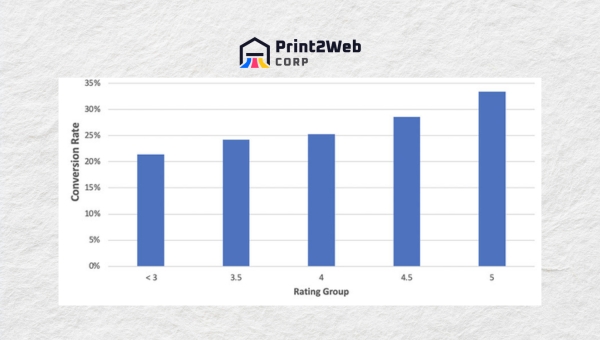
Reviews are the social proof that makes or breaks conversion on Amazon. According to data from Sellbrite, reaching 50 reviews correlates with a 4.6% conversion rate boost — a significant lift that directly translates to increased sales. Buyers trust other buyers, and a listing with hundreds of detailed positive reviews converts at a dramatically higher rate than one with only a handful of brief comments.
Earning those first 50 reviews is the hardest part. Amazon’s Vine program is designed to solve this exact problem for new products. Through Vine, Amazon sends your product to a curated group of trusted reviewers in exchange for honest feedback. For new listings with zero reviews, Vine is the fastest legitimate path to building initial social proof and kickstarting your conversion rate.
Beyond Vine, implement a structured review generation strategy. Tools like FeedbackFive and other review automation platforms help you send compliant follow-up emails to buyers, requesting reviews without violating Amazon’s communication policies. The FollowUp email tool, recommended by Sellbrite and others, automates this process so you can scale review requests without manual effort. For a comprehensive approach to managing and improving your reviews, see our detailed Amazon review strategies guide.
- Encourage reviews proactively through Amazon’s Request Review button in Seller Central, which sends a compliant review request to each buyer within 5 to 30 days of purchase.
- Respond to negative reviews professionally to show future shoppers that you stand behind your product. A thoughtful response to a 1-star review can actually increase buyer confidence more than a dozen unanswered 5-star reviews.
- Surface your best reviews by ensuring they contain keywords and detailed experiences that future shoppers will find helpful when scanning your review section.
Advertise Effectively
Amazon advertising and conversion rate share a bidirectional relationship. Higher conversion rates make your ads more profitable because you pay per click, so every converted click improves your return on ad spend. Conversely, well-targeted ads drive qualified traffic that converts at higher rates, which signals product quality to Amazon and lifts your organic ranking. Understanding your advertising cost efficiency through ACoS is essential when running PPC campaigns, as a high conversion rate combined with efficient ad spend creates the best possible ROI.
Amazon offers three primary ad formats, each serving a different stage of the buyer journey:
- Sponsored Products place your individual listings at the top of search results for the keywords you target. These are the workhorse of Amazon PPC and the best starting point for most sellers. Use exact match campaigns for your highest-converting keywords to maintain tight control over which searches trigger your ads.
- Sponsored Brands showcase your brand logo, a custom headline, and a selection of products in a banner format. Available to Brand Registry sellers, these ads build brand recognition and are particularly effective for capturing shoppers early in their search session.
- Sponsored Display retargets shoppers who previously viewed your product or similar products, following them across Amazon and even to external sites. This format recaptures buyers who left without purchasing, often converting them on a second exposure.
Campaign optimization matters as much as campaign creation. Use Brand Analytics to identify your highest-converting search terms and shift budget toward them. Add negative keywords aggressively to prevent your ads from showing on irrelevant searches that drain budget without converting. Run regular search term reports and prune underperforming placements weekly. A well-optimized PPC campaign with a high conversion rate drives down your ACoS (Advertising Cost of Sales) and improves your RoAS (Return on Ad Spend), creating a virtuous cycle where efficient advertising feeds back into even better organic performance.
Role of Testing In Increasing Sales

Every recommendation in this guide should be validated through testing. What works for one product, category, or audience may not work for yours. The most successful Amazon sellers treat their listings as living experiments, constantly testing small changes and letting data — not assumptions — guide their optimization decisions. Think Crucial, a brand frequently cited in Amazon case studies, achieved a documented 10% conversion rate boost and a 30% sales increase simply by systematically testing and refining their listing elements.
Using A/B Split Test
A/B testing on Amazon has become significantly more accessible in 2026. Amazon’s own Manage Your Experiments tool, available within Seller Central for Brand Registry sellers, lets you test two versions of your listing elements — title, bullet points, product description, and A+ Content — against each other. Amazon splits traffic between the variants and reports which version converts better, giving you statistically valid results without needing third-party tools.
For pre-launch testing and rapid consumer feedback, PickFu is the tool most recommended by experienced sellers and agencies. PickFu lets you create quick polls where real shoppers vote between two listing images, titles, or price points. You get qualitative feedback explaining why shoppers prefer one option, which goes beyond raw conversion numbers to help you understand buyer psychology. Splitly is another platform that automates A/B testing across your Amazon listings, running continuous tests on pricing, titles, and images.
Test one variable at a time to isolate its impact. The most common elements to test include:
- Product title: Test keyword placement, length variations, and feature emphasis. Even small title changes can produce meaningful CTR and conversion differences.
- Main image: Test product angle, background variations, and the inclusion of secondary elements like text overlays where permitted by Amazon’s image guidelines.
- Bullet points: Test benefit-led versus feature-led copy, ordering of points, and different phrasing of your primary value proposition.
- Price points: Test small incremental price changes to find the optimal balance between margin and conversion rate. Sometimes a slightly higher price converts better because it signals premium quality.
Run each test long enough to reach statistical significance — typically 7 to 14 days depending on your traffic volume. Premature conclusions based on a few days of data often lead to wrong decisions. Once a test concludes, implement the winning variant and immediately begin testing the next element. Conversion rate optimization is a continuous process, not a one-time project.
Developing Compelling Product Descriptions
Your product description and supporting content are where hesitant buyers convert into confident purchasers. This section covers how to structure your bullet points, images, and pricing presentation to maximize the probability that a scrolling shopper becomes a paying customer. Every word and image should serve the goal of answering the buyer’s unspoken question: “Is this the right product for me?”
Benefits of Benefit-Oriented Bullet Points
Amazon allows up to five bullet points per listing, and each one is prime conversion real estate. The most effective sellers follow a proven five-bullet structure that leads with the buyer’s benefit rather than the product’s feature. Shoppers do not buy features — they buy outcomes. Your bullets should translate every specification into a tangible benefit the shopper can visualize experiencing.
A strong five-bullet structure looks like this:
- Lead bullet — primary benefit: Open with the single most compelling reason a shopper should choose your product. This is the bullet mobile shoppers see first, so it must instantly communicate your core value proposition.
- Second bullet — key differentiator: Explain what makes your product different from the alternatives the shopper is comparing it against. Be specific about materials, technology, or design advantages.
- Third bullet — use case or application: Describe a realistic scenario where the product solves a problem. Help the shopper picture themselves using it.
- Fourth bullet — technical specifications: Provide the hard numbers — dimensions, capacity, compatibility — that detail-oriented shoppers need to confirm fit and suitability.
- Fifth bullet — guarantee or social proof: Close with a satisfaction guarantee, warranty information, or a reference to your review count. This final bullet removes remaining purchase hesitation.
Keep each bullet under 250 characters for readability on mobile devices. Lead with a capitalized benefit phrase followed by a colon, then the supporting detail. This format lets scanning shoppers extract value from your bullets even if they only read the first few words of each line.
Importance of High-Quality Images
Images are the single most influential element on your product page. Shoppers form their first impression within milliseconds of seeing your main image, and that impression colors every subsequent element they view. Amazon has specific image requirements that every seller must follow, and exceeding those minimums is what separates high-converting listings from average ones.
Amazon requires your main image to have a pure white background (RGB values of 255, 255, 255), with the product filling at least 85% of the frame. The image must be at least 1000 pixels on the longest side to enable Amazon’s zoom feature, which lets shoppers pinch and zoom on mobile or hover-zoom on desktop. Images smaller than 1000 pixels cannot activate zoom, and listings without zoom consistently convert at lower rates.
Beyond the main image, Amazon allows up to eight additional images per listing. Use every slot strategically:
- Infographic images: Overlay text on your product images to communicate key dimensions, materials, or features at a glance. Infographics are especially powerful on mobile, where text-heavy descriptions are harder to read.
- Lifestyle images: Show your product being used in a realistic setting so shoppers can visualize owning it. Context transforms a product photo into an aspirational image.
- Detail close-ups: Provide macro shots of texture, stitching, or build quality that reassure buyers about craftsmanship.
- Product videos: If you are Brand Registry enrolled, add at least one video. Videos demonstrate product function, build emotional connection, and significantly lift conversion rates on both desktop and mobile.
Pricing Strategies
Pricing strategy on Amazon extends well beyond picking a number. The platform offers specific pricing display features that influence how shoppers perceive value, and understanding these features lets you present your price in the most compelling possible way.
- Competitive pricing monitoring: Use tools like Helium 10 or Jungle Scout to track competitor prices in real time. Maintain awareness of the price range in your category so you can position yourself strategically rather than guessing.
- Dynamic pricing: Adjust your price based on demand patterns, inventory levels, and competitor movements. Automated repricing tools like SellerSnap or RepricerExpress can manage this at scale, keeping you competitive without constant manual oversight.
- Value-based pricing: Price based on the perceived value your product delivers, not just your cost plus margin. A product with superior reviews, A+ Content, and brand trust can command a premium over generic alternatives without suppressing conversion rate.
- Strikethrough pricing and coupons: Combine a realistic List Price with your selling price to display savings, and layer a coupon on top for maximum visual impact in search results.
The goal is not always to be the cheapest option. Many sellers find that their conversion rate actually improves at a slightly higher price point because the elevated price signals premium quality to shoppers. Test multiple price points and let conversion data — not intuition — guide your final number. Applying these strategies effectively is what allows you to Boost Your Amazon Conversion Rate while protecting your margins.
Also Read: Cancel Kindle Unlimited Today: Steps to End Subscription
FAQs
How do I increase my Amazon conversion rate?
To increase your Amazon conversion rate, focus on optimizing your main image, title, and bullet points; becoming Prime eligible through FBA; pricing competitively with strikethrough pricing and coupons; earning reviews through the Vine program and automated follow-up emails; and using A+ Content to build buyer trust. A/B test each element using Amazon’s Manage Your Experiments or PickFu to find what converts best for your specific audience.
What is a good conversion rate for Amazon?
A good Amazon conversion rate depends on your category. In general, 5% to 10% is average, 10% to 20% is excellent, and above 25% may indicate your traffic is too narrow. Prime-eligible products convert at roughly 74% versus 13% for non-Prime listings. Always benchmark against your specific subcategory rather than the marketplace average, as books may convert at 10% to 15% while electronics typically range from 1% to 4%.
What is the Amazon conversion rate formula?
The Amazon conversion rate formula is (Total Orders divided by Total Sessions) multiplied by 100. This gives you the percentage of shopping sessions that resulted in a purchase. Amazon refers to this metric as Unit Session Percentage in Seller Central Business Reports. You can find it under Reports, then Business Reports, then Detail Page Sales and Traffic by Child Item.
Does FBA increase conversion rate on Amazon?
Yes, FBA significantly increases conversion rate. Prime-eligible products fulfilled by Amazon convert at approximately 74%, while non-Prime products convert at roughly 13%. This six-fold difference reflects the power of fast shipping, the Prime badge as a trust signal, and Prime members’ commitment to shopping within their subscription. For most sellers, the conversion lift from FBA more than offsets the additional fulfillment costs.
How do Amazon badges affect conversion rate?
Amazon badges like Amazon’s Choice and Best Seller serve as visual trust signals that appear in search results and on product pages. Products with these badges consistently outperform similar products without them, with some categories seeing double-digit conversion lifts. You earn badges through competitive pricing, Prime eligibility, strong reviews, low return rates, and consistent availability rather than applying directly.
Can my Amazon conversion rate be too high?
Yes, a conversion rate above 25% can signal that your traffic is too narrow. If you are only reaching highly qualified shoppers through exact-match keywords, you may be missing a larger audience that would also convert at a profitable rate. Expanding your keyword targeting and advertising reach can lower your conversion rate slightly while increasing total sales volume and revenue.
How to improve Amazon CVR?
To improve your Amazon CVR (conversion rate), optimize your listing images, bullets, and A+ Content; switch to FBA for Prime eligibility; implement competitive pricing with coupons and strikethrough pricing; generate reviews through Vine and automated follow-up emails; refine your keyword targeting to attract buyer-intent traffic; and run continuous A/B tests on title, images, and price using Manage Your Experiments or third-party tools.
Conclusion
Boosting your Amazon conversion rate is not about finding a single trick or hack. It is the cumulative result of dozens of small optimizations working in concert — a sharper main image, a benefit-led first bullet, a strategically placed coupon, a faster fulfillment method, a thoughtfully answered customer question. Each improvement adds a fraction of a percentage point to your conversion rate, and together they transform a struggling listing into a top performer.
The data is clear on where to start. If your product is not Prime eligible, switching to FBA is the single highest-impact move you can make, given the 74% versus 13% conversion gap. If you are already Prime enrolled, focus on your main image quality, your review count (aim for that 50-review threshold that delivers a documented 4.6% lift), and your A+ Content depth. Layer in strikethrough pricing and coupons for immediate conversion signals, then commit to systematic A/B testing to find every incremental gain.
Remember the Think Crucial case study — a 10% conversion rate boost and a 30% sales increase came from disciplined optimization, not luck. The same approach is available to every seller willing to put in the work. Start with the fundamentals, measure relentlessly, test continuously, and your conversion rate will climb. That is how you Boost Your Amazon Conversion Rate in 2026 and beyond — one data-driven improvement at a time.
Leave a Reply