
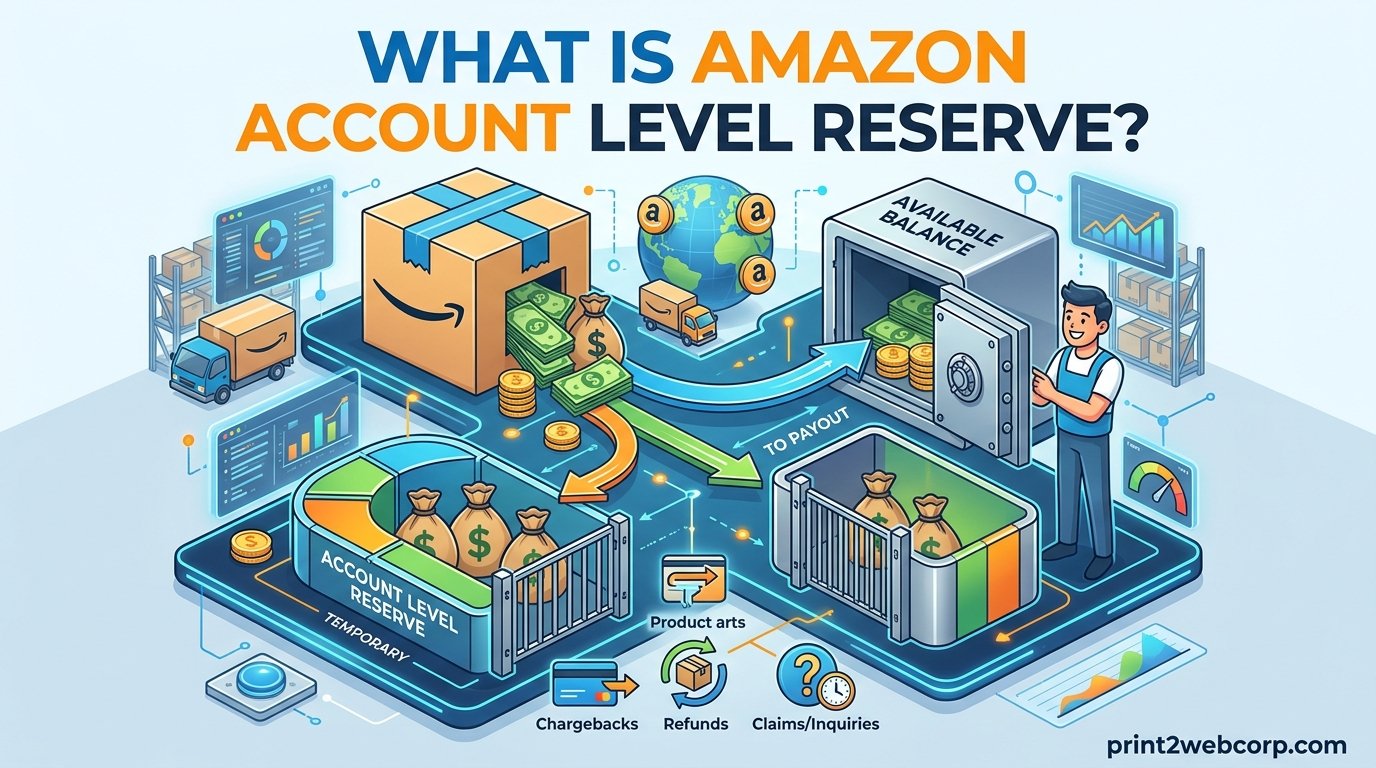
Amazon Account Level Reserve is a temporary cash hold that Amazon places on a portion of your seller payouts to cover potential refunds, A-to-z Guarantee claims, and chargebacks. If you sell on Amazon, this hold directly affects when your earnings land in your bank account. With the introduction of the DD+7 policy in March 2026, the way Amazon times fund releases has shifted, making it more important than ever to understand exactly how reserves work.
For many sellers, especially those running lean operations or scaling during peak seasons, a reserve can mean the difference between restocking inventory on time and watching sales slip away. I have worked with sellers who had thousands of dollars locked in reserve while scrambling to cover supplier invoices. The frustration is real, but the system follows predictable rules once you know what to look for.
This guide breaks down every aspect of Amazon Account Level Reserve in 2026, including how Amazon calculates the hold, how DD+7 changes the timeline, what the reserve tiers mean, and practical strategies to reduce or manage your reserve amount. Whether you are a new seller waiting on your first payout or a high-volume merchant planning cash flow for Q4, the information here will help you plan with confidence.
What this guide covers:
Clear definition of Account Level Reserve and how DD+7 stacks with it
The difference between reserved inventory and account level reserve
How Amazon calculates reserve amounts with dollar examples
Step-by-step guidance on viewing your reserve in Seller Central
Tier system breakdown and how to move between tiers
Strategies for reducing your reserve and managing cash flow
What Is Amazon Account Level Reserve?
Account Level Reserve is the amount of money Amazon sets aside from your seller earnings to ensure you have sufficient funds to cover any financial obligations that may arise after a sale. These obligations include customer refunds, A-to-z Guarantee claims, chargebacks, and return-related costs. Think of it as a rolling security deposit that Amazon holds temporarily and releases back to you once the hold period expires.
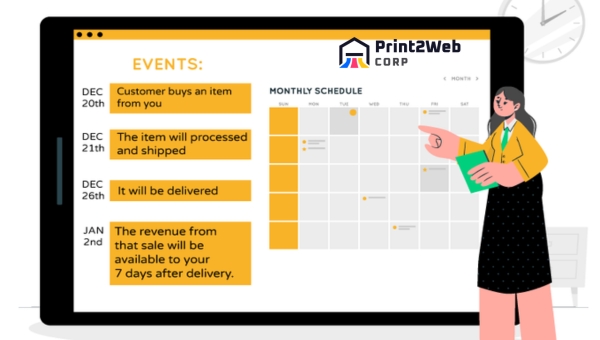
Amazon applies this hold to virtually all seller accounts, though the amount and duration vary based on your performance history, sales volume, and how long you have been selling. New sellers typically face the most aggressive holds, while established merchants with strong track records see significantly lower reserve requirements. The reserve is not a penalty or a fee. It is a risk-management mechanism designed to protect buyers and Amazon itself from financial exposure if a seller fails to meet obligations.
With the DD+7 policy now in effect as of March 2026, Amazon additionally holds funds based on the delivery date of each order rather than just the shipment or transaction date. This means your reserve is calculated on a rolling basis that accounts for orders delivered within the past seven days, stacked on top of any existing account level reserve. The combined effect can extend the time between making a sale and receiving your payout.
Sellers often ask whether the reserve ever goes away entirely. The short answer is that it shrinks as your account matures and your performance metrics stay strong. Some long-term sellers with ten or more years of history and excellent metrics may qualify for next-day disbursements, which dramatically reduces the practical impact of any remaining reserve. But for the majority of active sellers, some level of reserve hold remains a normal part of selling on Amazon.
Also Read: Amazon A10 Algorithm: Unlock Sales & Boost Rankings
Reserved Inventory vs Account Level Reserve: Clearing Up the Confusion
One of the most common sources of confusion among Amazon sellers is the difference between “reserved inventory” and “account level reserve.” These sound similar but refer to entirely different things. Mixing them up can lead to incorrect assumptions about your cash flow and fulfillment status.
Reserved inventory refers to physical stock in Amazon’s fulfillment centers that is temporarily set aside for a specific purpose. This could be inventory being transferred between fulfillment centers, units pending customer orders, or items being processed for returns. It is a fulfillment and logistics status, not a financial hold. You can view your reserved inventory in Seller Central under Inventory > Manage FBA Inventory, where it appears as part of your total FBA inventory breakdown.
Account level reserve, on the other hand, is a cash hold on your earnings. It has nothing to do with physical products sitting in a warehouse. Instead, it represents a portion of your sales revenue that Amazon withholds temporarily to cover potential disputes or refunds. You find this information under Payments in Seller Central, not under Inventory.
The practical takeaway is that reserved inventory affects your sellable stock levels and order fulfillment, while account level reserve affects your bank account balance. Sellers who confuse the two sometimes panic when they see a large “reserved” number, not realizing one refers to units and the other to dollars.
The Role of Amazon Account Level Reserves in Seller Protection
Amazon Account Level Reserve serves multiple protective functions that benefit the marketplace ecosystem as a whole. Understanding these functions helps sellers see the reserve not as an arbitrary penalty but as a structured mechanism that keeps the platform functional and trustworthy.
Risk Mitigation for Buyer Claims
When a buyer files an A-to-z Guarantee claim, requests a refund, or disputes a charge, Amazon needs funds available to resolve the situation quickly. The reserve ensures that money is already set aside rather than chasing a seller who may have already withdrawn their earnings. This is especially relevant for FBM sellers who handle their own fulfillment and customer service. If you want to understand the broader operational challenges of merchant fulfillment, our Amazon FBM guide covers the intersection of self-fulfillment and financial holds in detail.
Fraud Prevention
The reserve acts as a deterrent against fraudulent sellers who might list products, collect payments, and disappear without fulfilling orders. Because funds are not immediately disbursed after a sale, bad actors cannot simply cash out and vanish. The hold period gives Amazon time to verify that orders were delivered and that buyers are satisfied before releasing the full payout.
Performance Incentive
Amazon ties reserve levels directly to seller performance metrics. Sellers who maintain low Order Defect Rates, ship on time, and resolve customer issues promptly tend to see lower reserve holds over time. This creates a built-in incentive to maintain high operational standards. Optimizing for the Amazon A10 algorithm naturally improves the performance metrics that influence your reserve tier.
Platform-Wide Financial Stability
From Amazon’s perspective, maintaining reserves across millions of seller accounts creates a buffer that keeps the platform solvent even during periods of high return volume or widespread disputes. For sellers, this means a more stable marketplace where buyers feel confident making purchases. That buyer confidence translates into more sales for everyone, even if the reserve temporarily limits access to some earnings.
Understanding Amazon Reserve Tiers
Amazon assigns sellers to different reserve tiers based on account age, order volume, and performance metrics. Each tier comes with different hold percentages and release timelines. Moving up through the tiers is one of the most effective ways to reduce the impact of reserves on your cash flow.

The breakdown below summarizes how each tier works so you can quickly see where your account stands and what is required to advance.
Tier Comparison at a Glance:
Tier I (New Sellers): 100% of payments from the past 7 days are held, plus any amounts tied to unresolved disputes. All new Amazon Pay merchants start here.
Tier II (Established Sellers): Amazon holds the greater of either 3% of your daily processed payments averaged over the preceding 28 days or the total value of unresolved disputes. Requires at least one year on Amazon Pay with 100+ orders, or 100+ orders within six months with an ODR below 1%.
Tier II-Plus (Top Performers): Only amounts related to unresolved transaction disputes are held. Requires meeting Tier II standards while maintaining an ODR below 1% averaged over the past 60 days. Dropping to or above 1% ODR reverts you to Tier II.
Each tier reflects increasing trust from Amazon based on your demonstrated selling history. The jump from Tier I to Tier II is the most significant, as it moves you from a near-total hold to a percentage-based hold that typically frees up the majority of your earnings. Advancing from Tier II to Tier II-Plus further reduces the hold to only disputed amounts.
Amazon reviews tier eligibility automatically based on your ongoing performance. There is no application process or request form. The key metric to watch is your Order Defect Rate, which must stay below 1% to maintain or advance your tier. A sudden spike in negative feedback, A-to-z claims, or chargebacks can push your ODR above threshold and trigger a downgrade.
Also Read: eBay vs Amazon Showdown – Which Dominates for Sellers?
DD+7 Policy: How It Changes the Reserve Equation
In March 2026, Amazon introduced the DD+7 policy, which stands for Delivery Date plus 7 days. Under this policy, Amazon holds payment for an order until seven days after the order is marked as delivered. This is separate from and in addition to your account level reserve, meaning both mechanisms can affect your payout simultaneously.
Before DD+7, Amazon primarily calculated reserve holds based on transaction and shipment dates. The shift to delivery date means that funds are tied up for longer in cases where shipping takes additional time. For FBM sellers using slower shipping methods, the impact is especially noticeable because the delivery confirmation date directly controls when the 7-day clock starts.
Here is how DD+7 stacks with your account level reserve in practice. When an order is delivered, Amazon starts a 7-day hold under DD+7. At the same time, your account level reserve may still be withholding a percentage of your daily processed payments. The result is that your available balance at any given disbursement is reduced by both the DD+7 hold and the reserve hold combined.
For sellers using FBA, the DD+7 impact is generally minimal because Amazon controls the fulfillment and delivery timeline. Packages are delivered quickly and tracked precisely, so the 7-day hold begins sooner. For FBM sellers, choosing faster shipping options and ensuring prompt delivery confirmation can help minimize the DD+7 delay.
How Amazon Calculates Your Account Level Reserve
Amazon does not publish an exact formula for reserve calculations, but the system is based on several identifiable factors. Understanding these inputs helps you anticipate how much money may be held at any given time and plan your cash flow accordingly.
Key Factors in Reserve Calculation
Trailing sales volume: Amazon looks at your recent sales history, typically over a 14 to 28 day window, to estimate how much revenue is at risk.
Return rate: If your products or category have historically high return rates, Amazon will hold more to cover expected refund volume.
Account age and tier: Newer accounts and lower tiers carry higher reserve percentages.
Unresolved disputes: Any open A-to-z claims, chargebacks, or pending refunds add directly to the reserve amount.
Category risk profile: Gated categories and high-risk product types (electronics, supplements, collectibles) may trigger higher reserves.
Estimating Your Reserve: A Practical Formula
While Amazon’s exact calculation is proprietary, you can estimate your reserve using a straightforward three-step formula. This gives you a working number for cash flow planning.
Step 1: Calculate your average daily sales by dividing your trailing 14-day gross sales by 14.
Step 2: Multiply your average daily sales by your category return rate (typically 5-15% depending on your product type).
Step 3: Multiply that result by your reserve window in days (usually 14 to 28 days, or up to 90 for new sellers or high-risk accounts).
Example 1: A seller doing $50,000 per month in gross sales with a 10% return rate and a 14-day reserve window would calculate: ($50,000 / 30 = $1,667 daily sales) x 10% = $167 per day at risk. Then $167 x 14 days = approximately $2,333 in estimated reserve. At the upper end with a 28-day window, that figure could reach roughly $4,667.
Example 2: A high-volume seller doing $200,000 per month with a 7% return rate and a 14-day window would calculate: ($200,000 / 30 = $6,667 daily sales) x 7% = $467 per day at risk. Then $467 x 14 days = approximately $6,533. With a 28-day window, the reserve could reach roughly $13,067.
These are estimates, not exact figures. Your actual reserve may be higher or lower depending on Amazon’s internal risk assessment. But having a ballpark number helps you avoid surprises when your disbursement arrives and the available balance is lower than expected.
How to View Your Reserve in Seller Central
Many sellers do not realize they can check their reserve amount at any time through Seller Central. Amazon provides this information in the Payments section, though it is not always immediately obvious where to look.
Finding Your Account Level Reserve
Log in to Seller Central and navigate to the Payments menu.
Select Account Summary to see your current total balance, available balance, and account level reserve amount.
For a detailed transaction-level view, go to Payments > Transaction View and filter by date range to see individual transactions marked as deferred or held.
For historical data, use Payments > Statement View to review past settlement periods and track how your reserve has changed over time.
You can also check Reports > Payments for a chart showing your reserve trends across multiple settlement cycles.
The difference between your total account balance and your available balance is essentially your reserve. If your total balance shows $3,517 but your available balance is only $275, that gap represents funds being held in reserve. This is a scenario many sellers on Reddit have reported, and it usually resolves as the hold period expires for each batch of transactions.
Common Triggers for Reserve Increases
Reserve amounts are not static. They fluctuate based on changes in your selling activity, performance, and account circumstances. Understanding what triggers an increase helps you anticipate and mitigate sudden cash flow disruptions.
Sales Spikes and Volume Surges
When your sales volume jumps significantly, Amazon’s reserve calculation adjusts upward because more revenue means more potential refund exposure. Sellers often report reserve increases during Q4, Prime Day, or after running a successful advertising campaign. The system is designed to scale with your sales, which means peak selling periods can temporarily tie up more cash than expected.
Category Changes and Seasonal Patterns
Adding products in categories with higher historical return rates can increase your reserve. For example, moving from selling books to electronics or apparel typically raises your risk profile. Seasonal variations also play a role, as return rates tend to spike after the holiday season when gift recipients send items back.
Account Health and Performance Drops
A sudden increase in A-to-z claims, negative feedback, or chargeback rates will signal elevated risk to Amazon’s system. Even a short burst of poor performance can push your ODR above 1%, triggering a tier downgrade and a corresponding increase in reserve percentage. Monitoring your Amazon reviews and addressing customer complaints quickly helps keep these metrics in check.
Policy Changes and Bank Account Updates
Changing your bank account details can trigger a temporary 3-day hold on disbursements as Amazon verifies the new account. Policy changes like the DD+7 rollout can also alter your effective reserve timeline. Staying informed about Amazon policy updates helps you avoid being caught off guard.
Negative Account Level Reserve Explained
Some sellers notice their account level reserve showing as a negative number in Seller Central and wonder what that means. A negative reserve indicates that Amazon has released more funds than the current reserve calculation calls for, effectively creating a surplus in your available balance.
This can happen when your sales volume decreases after a period of high activity. Since the reserve is based on trailing sales data, a drop in recent sales means the calculated reserve amount shrinks. If Amazon had previously held more than the new calculation requires, the difference becomes available to you and may show as a negative adjustment.
A negative reserve is generally good news for your cash flow, as it means additional funds are being released. However, it is typically temporary. As your sales volume picks back up, the reserve calculation will adjust upward again and the negative balance will normalize. Sellers who pause selling for a week or two often see this effect, as one Reddit seller noted: the more you sell, the more Amazon reserves, and if you stop selling for a couple of weeks, they release most of it.
Reserve Release Process and Payment Timeline
Understanding when and how Amazon releases reserve funds helps you plan your financial obligations with greater accuracy. The release process follows Amazon’s standard settlement cycle, which is typically bi-weekly (every 14 days) for most sellers.
Standard Bi-Weekly Disbursement
Amazon processes disbursements on a rolling 14-day cycle. At the end of each cycle, Amazon calculates your available balance by subtracting the current reserve from your total account balance. The available funds are then transferred to your linked bank account via ACH, which typically takes 3 to 5 business days to appear.
For example, if your settlement period covers January 1 through January 14, Amazon calculates the reserve based on trailing data as of January 14 and disburses the available balance shortly after. Funds from orders delivered late in the cycle may not be available until the following disbursement, depending on DD+7 timing.
ACH Same Day and Next-Day Options
Some sellers qualify for faster payment options. ACH Same Day can reduce the bank transfer time from 3-5 business days to the same day, though availability depends on your bank and account eligibility. Sellers with ten or more years of history and consistently strong performance metrics may qualify for next-day disbursements, which shortens the cycle from 14 days to daily payouts.
These faster options do not eliminate the reserve itself, but they do reduce the gap between when funds become available and when they reach your bank. If your business depends on rapid cash turnover, qualifying for these programs can significantly improve your operational flexibility.
Challenges Faced by FBM Sellers Due to Account Level Reserve
Selling on Amazon through the FBM (Fulfillment by Merchant) model comes with distinct challenges when it comes to account level reserves. Because FBM sellers manage their own storage, packaging, shipping, and customer service, the reserve can create compounding operational pressures.
FBM sellers face unique challenges when dealing with reserves. Learn more about Amazon FBM fulfillment and how it intersects with account level reserves. The core difficulty is that FBM sellers bear the full cost of operations upfront, purchasing inventory, paying for shipping materials, and covering storage, while a significant portion of their revenue may be locked in reserve.
Delayed cash flow: When 90% or more of a bi-weekly payout is held in reserve, FBM sellers may lack the liquid capital needed to restock inventory or pay suppliers on time. Multiple Reddit sellers have reported receiving only 10% of their usual disbursement amount due to sudden reserve increases.
Compounding operational costs: The time and effort spent understanding reserve calculations, communicating with Amazon support, and adjusting financial plans adds overhead that FBM sellers operating on thin margins can ill afford.
Business interruption risk: If reserve-related issues compound with account health problems, sellers risk temporary suspensions that halt revenue entirely. One seller on the Amazon Seller Forums reported having payouts withheld for 57 days while opening 14 support cases to resolve the issue.
Q4 and peak season strain: During peak selling periods, when inventory investment is highest, reserves also tend to increase due to sales volume surges. This creates a perfect storm where the seller needs cash the most but has the least access to it.
Staying proactive is the best defense. Monitoring your reserve amount regularly, maintaining strong performance metrics, and keeping a working capital buffer can help you weather the periods when reserves spike. For sellers considering diversification, comparing eBay vs Amazon as selling channels can reduce single-platform cash flow dependency.
Also Read: Amazon Private Label Secrets: Start Your Business Now!
Strategies for Managing and Reducing Reserves
While you cannot eliminate account level reserve entirely, you can take concrete steps to reduce its size and minimize its impact on your business operations. The strategies below cover both reducing the reserve amount itself and managing your cash flow when reserves are high.

Steps to Avoid Getting an Account Level Reserve Increase
Preventing your reserve from increasing is far easier than trying to reduce it after the fact. These proactive measures help keep your account in good standing and your reserve calculations as low as possible.
Maintain performance metrics above threshold: Keep your Order Defect Rate well below 1%, ship orders on time, respond to customer messages within 24 hours, and maintain positive Amazon reviews that signal buyer satisfaction.
Monitor sales activity for anomalies: Sudden spikes can trigger automatic reserve increases. If you expect a surge (such as during a promotion), plan your cash flow accordingly so you are not caught short.
Handle returns efficiently: Process refunds promptly and master Amazon return processes to minimize return-related disputes that inflate your reserve.
Stay current with policy updates: Amazon periodically updates its reserve policies and seller requirements. Understanding changes like DD+7 before they affect your payouts gives you time to adapt.
Avoid gated or high-risk categories if possible: Products in electronics, supplements, and collectibles carry higher return and dispute rates. If your business model allows, focusing on lower-risk categories can keep your reserve percentage lower.
Cash Flow Management When Reserves Are High
Even with strong performance metrics, reserves can still tie up significant capital. These strategies help you maintain operational stability during periods of high reserve holds.
Build a working capital buffer: Set aside enough cash to cover at least 30 days of operating expenses separate from your Amazon payouts. This buffer absorbs the gap between when you spend money on inventory and when Amazon releases your earnings.
Use business credit cards strategically: Many experienced sellers use business credit cards to bridge the gap between purchasing inventory and receiving Amazon disbursements. This allows you to restock without waiting for reserve funds to release.
Negotiate supplier payment terms: Extending net-30 or net-60 terms with suppliers gives you more time to sell through inventory and receive Amazon payouts before payment is due.
Explore Amazon Lending: Amazon offers short-term financing to eligible sellers based on sales history. These loans can provide working capital during periods when reserves are restricting cash flow. Terms and eligibility are determined by Amazon’s internal assessment.
Diversify across fulfillment models: Your fulfillment model choice affects how reserves impact your cash flow. FBA sellers generally experience less disruption because Amazon handles fulfillment and the DD+7 timeline is shorter.
Addressing A-to-Z Guarantee Claims and Their Influence on Reserves
Amazon’s A-to-z Guarantee claims are one of the most direct triggers for reserve increases. Each unresolved claim adds to your reserve amount, and a pattern of claims can push your ODR above the 1% threshold, triggering a tier downgrade.
Respond within 72 hours: Amazon gives sellers a window to respond to claims before stepping in. A prompt, professional response with evidence of delivery or fulfillment can resolve claims in your favor.
Provide detailed, factual documentation: Include tracking numbers, delivery confirmations, communication logs with the buyer, and any other evidence that supports your case.
Offer reasonable solutions: When the claim has merit, offering a replacement or refund quickly can prevent the claim from escalating and protect your performance metrics.
Follow Amazon’s claim response guidelines: Amazon provides specific instructions for how to format and submit claim responses. Following these guidelines improves your chances of a favorable outcome.
Track claim patterns: If you notice multiple claims from the same product or category, investigate root causes such as listing inaccuracies, quality issues, or shipping delays. Fixing the underlying problem prevents future claims.
Handling claims with speed and professionalism does more than protect your reserve amount. It builds a reputable seller profile that signals trustworthiness to both Amazon and your customers.
Also Read: Amazon A10 Algorithm: Unlock Sales & Boost Rankings
FAQs
How long does Amazon hold account level reserve?
Amazon typically holds reserve funds for 14 to 28 days, though new sellers or accounts with elevated risk may see holds extending up to 90 days. The DD+7 policy, introduced in March 2026, adds an additional 7-day hold starting from each order’s delivery date. Funds are released on a rolling basis as the hold period for each batch of transactions expires.
Why is my Amazon account level reserve so high?
Your reserve can increase due to several factors: a sudden surge in sales volume (especially during Q4 or promotions), a rise in return rates or A-to-z claims, adding products in high-risk categories, changes to your bank account details, or a drop in account health metrics pushing your ODR above 1%. Amazon recalculates the reserve dynamically based on trailing sales data and performance, so any change in these inputs can cause the reserve amount to shift.
How do I reduce my Amazon account level reserve?
To reduce your reserve, focus on keeping your Order Defect Rate below 1%, shipping orders on time, responding to A-to-z claims within 72 hours, processing refunds promptly, and maintaining positive customer feedback. Advancing from Tier I to Tier II reduces the hold from 100% of recent payments to approximately 3% of daily processed payments. Reaching Tier II-Plus further reduces the hold to only unresolved dispute amounts.
Can my Amazon account level reserve be negative?
Yes, a negative account level reserve can appear when Amazon has released more funds than the current reserve calculation requires. This typically happens when your sales volume drops after a period of high activity, causing the trailing reserve calculation to shrink. The negative balance means additional funds have been made available to you, but it is temporary and will normalize as your sales volume increases again.
What is the DD+7 policy on Amazon?
The DD+7 policy, introduced in March 2026, requires Amazon to hold payment for each order until 7 days after the order’s delivery date. DD+7 stands for Delivery Date plus 7 days. This hold is separate from and stacks on top of your existing account level reserve. The policy primarily affects FBM sellers using slower shipping methods, since the hold timer does not start until delivery is confirmed.
How do I check my account level reserve in Seller Central?
Log in to Seller Central and go to Payments u0026gt; Account Summary to see your total balance, available balance, and current reserve amount. For transaction-level detail, use Payments u0026gt; Transaction View and filter by date. For historical trends, check Payments u0026gt; Statement View or Reports u0026gt; Payments for a visual chart of your reserve over time.
What is the difference between reserved inventory and account level reserve?
Reserved inventory refers to physical stock in Amazon fulfillment centers that is temporarily set aside for transfers, pending orders, or returns processing. It is a logistics status. Account level reserve is a cash hold on your earnings to cover potential refunds and claims. It is a financial hold. You view reserved inventory under Inventory u0026gt; Manage FBA Inventory and account level reserve under Payments in Seller Central.
What are the two types of Amazon seller accounts?
Amazon offers Individual and Professional seller accounts. Individual accounts charge a per-item fee with no monthly subscription, suitable for sellers doing fewer than 40 sales per month. Professional accounts carry a monthly subscription fee but offer no per-item fee, access to advertising tools, and eligibility for top placement on product detail pages. Both account types are subject to account level reserve policies.
Conclusion
Amazon Account Level Reserve is a permanent feature of selling on the platform, but it does not have to derail your business. By understanding how the reserve is calculated, how the DD+7 policy affects your payout timeline, and what tier you fall into, you can forecast your available balance with reasonable accuracy and plan your cash flow accordingly.
If you are a new seller, the priority is advancing from Tier I to Tier II as quickly as possible by building order volume and maintaining a low Order Defect Rate. If you are an established seller, focus on keeping your ODR below 1%, responding to A-to-z claims promptly, and building a working capital buffer that absorbs periods when reserves spike. For high-volume sellers, exploring faster payment options like ACH Same Day or next-day disbursements can significantly reduce the practical impact of reserve holds.
The DD+7 policy represents the most significant change to Amazon’s payment timeline in years, and its effects are still being felt across the seller community in 2026. Staying informed about policy updates, monitoring your reserve amount regularly in Seller Central, and implementing the strategies outlined in this guide will help you maintain healthy cash flow and keep your Amazon business running smoothly.
Leave a Reply