
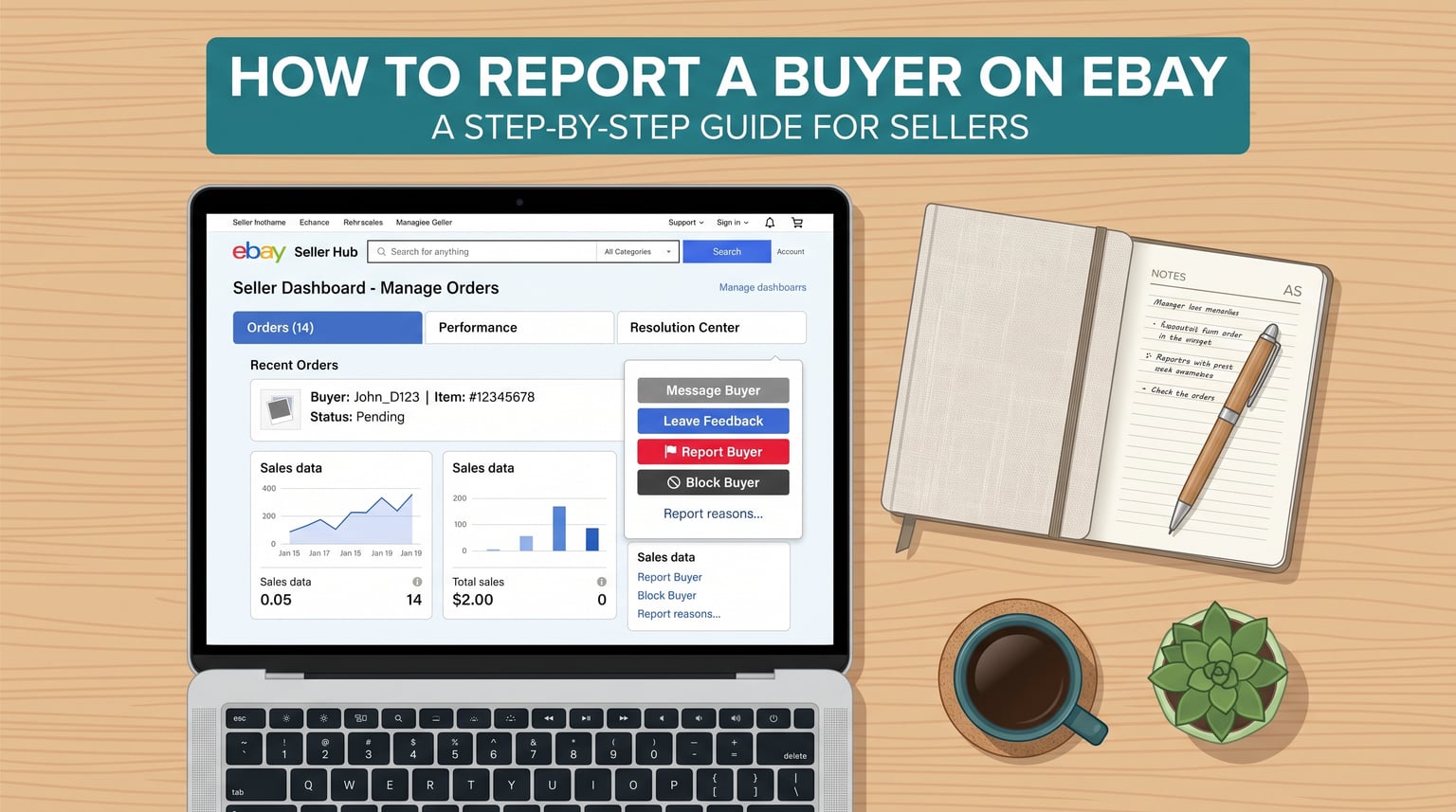
Running an eBay store means dealing with the occasional buyer who pushes boundaries, files false claims, or tries to game the system. Knowing how to report a buyer on eBay the right way can protect your seller metrics, your feedback score, and your bottom line. The reporting process changed significantly over the past couple of years, and outdated guides still floating around reference navigation paths that no longer work.
I have helped sellers navigate eBay disputes for years, and the single most common mistake I see is confusing a policy violation report with a resolution process. They are two completely different tools with different outcomes. Reporting flags a buyer’s account for eBay’s review team. Resolution processes handle specific order problems like unpaid items and return disputes. Using the wrong one wastes time and leaves your issue unresolved.
This guide covers the current 2026 reporting workflow, eBay’s six specific reportable violations, what happens after you file a report, and what to do when eBay sides with the buyer. You will also learn about seller protections, fee credits, and when to escalate beyond eBay entirely.
Understanding When to Report a Buyer on eBay
eBay explicitly states that you should only report a buyer when you believe they are violating marketplace policies. If you have a problem with a specific order, such as a non-payment or a return dispute, eBay wants you to use its resolution processes instead. This distinction matters because the report tool is not designed to fix individual transactions.

According to eBay’s current seller policies, here are the six specific violations that warrant a formal report:
- Demanding something not offered in the listing: The buyer insists on extras, discounts, or services that were never part of your original listing terms. For example, demanding free expedited shipping after purchasing a standard shipping item.
- Making a false claim: The buyer states the item is defective or not as described when evidence shows otherwise. This includes buyers who damage items intentionally and then file a Significantly Not As Described (SNAD) claim.
- Misusing the eBay Money Back Guarantee or returns system: The buyer weaponizes the returns process to get refunds they are not entitled to, such as returning a different item than the one you shipped or claiming non-receipt after tracking shows delivery.
- Asking to complete the sale off eBay: The buyer tries to move the transaction to a private payment method, email, or another platform. This violates eBay’s policy and removes your seller protections entirely.
- Abusing the bid retraction process: A buyer repeatedly retracts bids on auction items to manipulate pricing or sabotage listings, rather than using the retraction tool for its intended legitimate purposes.
- Excessive messaging with no intention to buy: The buyer floods your inbox with messages, questions, or demands but has no genuine interest in completing a purchase. This wastes your time and can border on harassment.
Any of these behaviors gives you grounds to file a report. Document everything: save screenshots of messages, keep copies of the listing as it appeared at sale time, and note any discrepancies in the buyer’s claims. Strong documentation is what makes eBay’s review team take your report seriously.
When NOT to Report a Buyer
This is where many sellers go wrong. Filing a report for something that belongs in the resolution process slows everything down and often results in no action from eBay. Here is what to handle through resolution tools instead of the report function:
- Unpaid items: If a buyer has not paid, open an unpaid item case in the Resolution Center. After 4 calendar days with no payment, you can cancel the order and receive a fee credit automatically.
- Return disputes: If a buyer requests a return and you disagree, manage it through the returns process. You can ask eBay to step in if the buyer becomes unreasonable.
- Feedback disputes: If a buyer leaves feedback that violates eBay’s feedback policy, request feedback removal through the proper channel rather than reporting the buyer.
- General communication issues: A buyer who is rude or difficult but has not actually violated a policy is not reportable. Use your Blocked Buyer List instead.
eBay also warns against false reporting. If you file reports that lack merit or appear retaliatory, eBay may review your own account activity. Stick to legitimate policy violations and you have nothing to worry about.
Also Read: How to Track Your Etsy Order Easily? – Ultimate Guide
Step-by-Step Process to Report a Buyer on eBay
The reporting process has been streamlined. Gone are the days of digging through the Help section to find a buried link. eBay now routes reports through Seller Hub, and there is also a direct link that skips navigation entirely.

Here is the current method to report a buyer on eBay:
- Log into Seller Hub: Sign in to your eBay account and navigate to Seller Hub. If you sell casually without a store subscription, you can still access Seller Hub from the top navigation menu.
- Go to Orders: Click on the Orders tab to view your recent sales. Locate the order associated with the buyer you need to report.
- Open the Leave Feedback dropdown: Next to the relevant order, find the Leave Feedback link. Click the dropdown arrow beside it to reveal additional options.
- Select Report Buyer: Choose Report Buyer from the dropdown menu. This opens the reporting form specific to that transaction.
- Choose the violation type: Select the category that matches the buyer’s behavior. eBay presents options aligned with the six policy violations covered above.
- Add details and submit: Provide a clear, factual description of what happened. Reference specific messages, dates, or actions. Attach screenshots if you have them. Submit the report.
Prefer a faster route? eBay offers a direct reporting link at spd.ebay.com/RBASellerHub. Bookmark it so you can jump straight to the tool without navigating through menus. You will still need to select the specific buyer and violation type once the page loads.
One important note: the report tool is transaction-specific. You must have an actual order with the buyer to use it. If a buyer is harassing you through messages without a connected transaction, report the messages directly from your eBay Messages inbox using the action menu.
Also Read: How to Change Language on Amazon: Quick Guide for Everyone
What Happens After You Report a Buyer
Once you submit a report, it goes into a review queue. eBay’s trust and safety team evaluates reports based on the severity of the alleged violation and the buyer’s overall account history. There is no fixed timeline, but most reviews are completed within a few days to a week.
Here is what to expect during and after the investigation:
- You will not receive detailed updates. eBay does not send progress reports on individual investigations. You typically get a confirmation that your report was received and, in some cases, a follow-up if action was taken.
- The buyer’s account is reviewed holistically. If your report is the first against a buyer with a clean history, eBay may take a lighter approach. If the buyer has accumulated multiple reports, action is more likely.
- Severe violations get faster action. Clear fraud patterns or off-eBay transaction attempts are prioritized over borderline cases like excessive messaging.
- eBay will not tell you the specific outcome. Due to privacy policies, eBay does not disclose whether a buyer was suspended, restricted, or warned. You may notice the buyer disappears from active listings or stops contacting you.
This lack of transparency frustrates many sellers, especially those on Reddit who share stories of reporting buyers with no visible result. Keep in mind that eBay takes a pattern-based approach. Your report contributes to the buyer’s account profile even if you never see immediate consequences.
How to Block a Buyer on eBay
Reporting a buyer addresses policy violations, but it does not prevent that buyer from purchasing from you again. For immediate protection, you should add the buyer to your Blocked Buyer List. This is a separate action from reporting and works instantly.
To block a buyer, go to your eBay account settings and find the Blocked Buyer List under the Site Preferences section. Enter the buyer’s username and save. That buyer will no longer be able to bid on or buy your items. You can also block buyers directly from your messages inbox by selecting the action menu at the top right of any message thread.
For a detailed walkthrough of the blocking process, check out our complete guide on how to block a buyer on eBay. Blocking and reporting are complementary actions. Report for policy violations, block for your own protection.
eBay Seller Protections After Reporting
One of the biggest concerns sellers have is whether reporting a buyer will hurt their own account standing. eBay has built seller protections specifically for situations involving problematic buyers. Understanding these protections helps you act with confidence.
- Final value fee credits: When you successfully cancel an order for an unpaid item after the 4-day window, eBay automatically issues a fee credit. You do not lose your final value fee on legitimate cancellations.
- Automatic feedback removal: If eBay determines that a buyer left retaliatory or policy-violating feedback, it can be removed from your score. This protects your feedback rating from being weaponized.
- Defect protection for resolved cases: When you work through the resolution process properly and eBay steps in on your behalf, service metrics defects related to that transaction may not count against you.
- Serial returner flags: eBay tracks buyers with abnormal return patterns. Reports contribute to this tracking, and eBay may restrict buyers who show patterns of return abuse.
These protections reinforce why documentation matters. When you can prove the buyer violated a policy, eBay has the evidence it needs to shield your account from negative impact.
Alternatives to Reporting: Resolution Center and Unpaid Item Cases
Before you hit that report button, ask yourself whether your issue is actually a policy violation or an order problem. Many seller frustrations are better handled through eBay’s resolution tools, which are designed to produce concrete outcomes like refunds, cancellations, and fee credits.
Unpaid Item Cases: If a buyer has not paid, do not report them. Instead, go to the Resolution Center or Seller Hub and open an unpaid item case. The buyer gets a payment reminder. After 4 calendar days with no payment, you can cancel the order citing the buyer’s failure to pay. eBay issues your final value fee credit automatically, and the cancellation does not count against your metrics.
Return Management: When a buyer files a return request you believe is fraudulent, do not immediately report. Work through the return process first. You can communicate with the buyer, offer a partial refund, or accept the return. If the buyer escalates unfairly, use the Ask eBay to Step In option from the Returns and Refunds section of Seller Help. eBay reviews the case details and makes a binding decision.
Feedback Removal Requests: If a buyer leaves feedback that contains profanity, threats, or references things outside the transaction, request removal through the feedback dispute process. This is faster and more effective than reporting.
The rule of thumb is simple: use resolution tools for transaction problems, use the report tool for behavior problems. When in doubt, start with resolution. You can always file a report afterward if the buyer’s conduct escalates into clear policy violations.
What to Do When eBay Sides With the Buyer
It happens. eBay often favors buyers in disputes, and sellers can feel powerless when a decision goes against them. If you believe eBay made the wrong call, you have options beyond accepting the outcome.
- Request an appeal: Some decisions can be appealed within eBay. Check your case details for an appeal option and submit any new evidence you have.
- Talk to a human agent: Automated systems make many initial decisions. Call eBay customer service or use the chat function to speak with a real person who can review nuances the system missed.
- File a report with IC3.gov: If the buyer committed clear fraud involving significant financial loss, file a complaint with the Internet Crime Complaint Center at IC3.gov. This is a federal portal run by the FBI for internet-based crimes.
- Contact local law enforcement: For large-dollar fraud, file a police report in the buyer’s jurisdiction. eBay may reconsider a decision if you provide an active case number.
Stay professional throughout this process. Emotional or aggressive communication with eBay support reduces your chances of a favorable outcome. Present facts, provide evidence, and escalate calmly through the proper channels.
Frequently Asked Questions
Is it worth reporting a buyer on eBay?
Yes, reporting is worth it when a buyer clearly violates eBay policies. Your report contributes to the buyer’s account review history, which helps eBay identify serial abusers. You may not see immediate results, but consistent reporting from sellers is what drives eBay to restrict bad actors. However, only report genuine policy violations, not transaction disputes.
What happens when you report an eBay buyer?
Your report enters a review queue where eBay’s trust and safety team evaluates the buyer’s account history and the specific violation described. eBay does not share specific outcomes due to privacy policies, but reports are tracked over time. If multiple sellers report the same buyer, eBay is more likely to take action such as account restrictions or suspension.
Does eBay take reports seriously?
eBay does review reports, but action depends on severity and pattern. Single reports for borderline behavior may not produce visible results. Reports involving clear fraud, off-eBay transaction requests, or systematic abuse of the returns system are taken more seriously. eBay uses a pattern-based approach, meaning your report builds a case even if nothing happens immediately.
What to do if a buyer is lying on eBay?
If a buyer makes false claims about an item, document everything. Save the original listing, photographs, shipping records, and all messages. File a report through Seller Hub selecting the false claim category. If the buyer opened a Money Back Guarantee case, respond with your evidence and ask eBay to step in. Do not engage in arguments with the buyer; let the documentation speak for itself.
How do I report someone for harassment on eBay?
For harassment through eBay messages, open the message thread, click the action menu at the top right, and select the option to report the message. For harassment connected to a transaction, use the Report Buyer option from the Leave Feedback dropdown in Seller Hub Orders. Provide specific details about the harassing behavior and reference dates and message content.
Can I report a scammer on eBay to the police?
Yes. If a buyer has committed fraud involving significant financial loss, file a report with the Internet Crime Complaint Center at IC3.gov, which is run by the FBI. You can also contact local law enforcement in the buyer’s jurisdiction. Use eBay’s resolution tools first, but do not hesitate to involve authorities if you have strong evidence of criminal fraud.
Is it anonymous to report someone on eBay?
eBay does not disclose your identity to the reported buyer. The reporting system is designed to protect sellers from retaliation. The buyer may suspect who filed the report, particularly if it involves a single transaction, but eBay will not confirm or deny the source of any report.
Also Read: How to Promote Your Shopify Store: Expert Tips & Strategies
Conclusion
Knowing how to report a buyer on eBay is about using the right tool for the right situation. Save the report function for genuine policy violations like false claims, off-eBay sale attempts, bid retraction abuse, and returns system misuse. For everything else, lean on the resolution processes, unpaid item cases, and feedback removal requests that produce concrete results.
If you are dealing with a difficult buyer right now, start by asking one question: is this a behavior problem or a transaction problem? Report the behavior. Resolve the transaction. Block the buyer either way to protect your store going forward. Document everything, stay professional, and remember that eBay’s seller protections exist to back you up when you follow the proper steps.
Selling on eBay does not have to mean accepting abuse from bad actors. Use the tools eBay provides, escalate when necessary, and keep your standards high. Your business depends on it.
Leave a Reply