
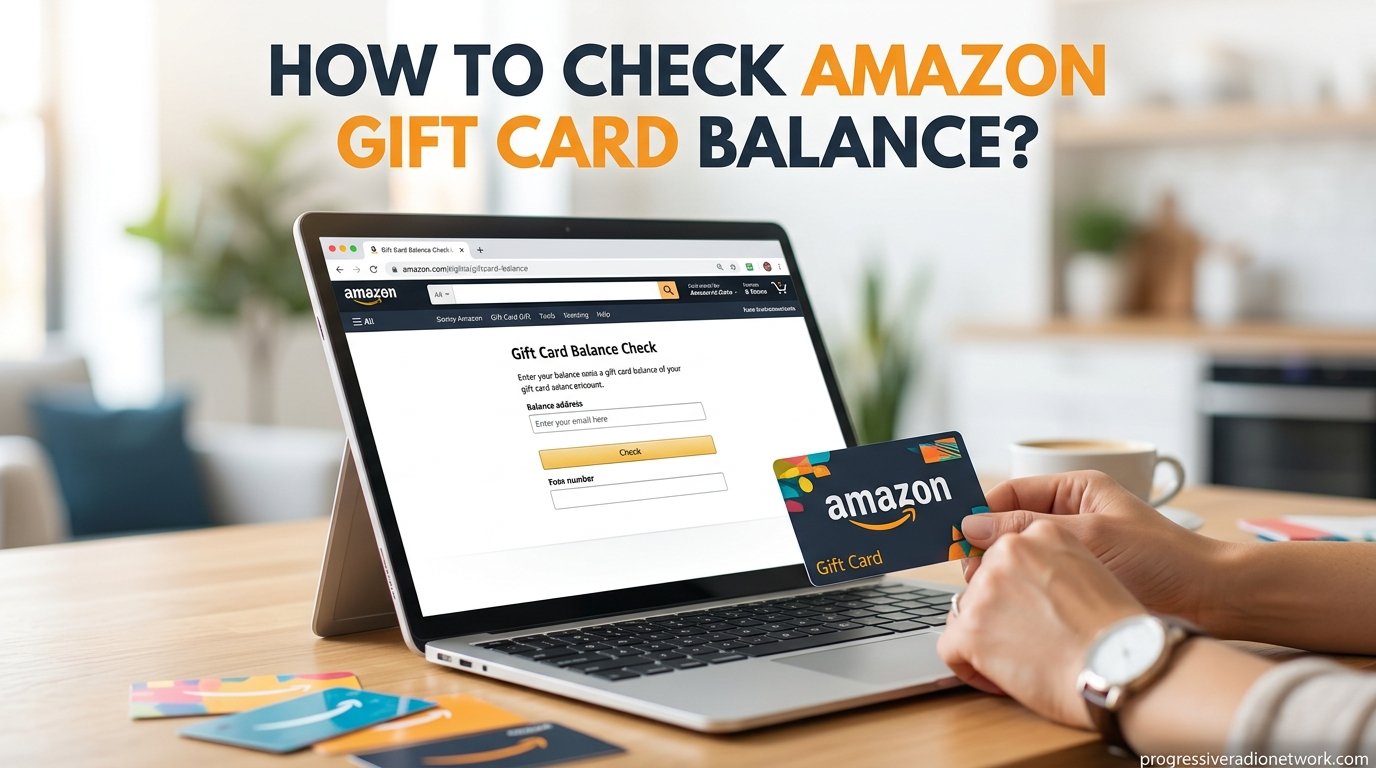
To check your Amazon gift card balance, log into your Amazon account, go to Account and Lists, then select Account and click Gift cards. Your current balance and gift card activity will be displayed on screen. For unredeemed cards, call Amazon customer service at 888-280-4331, as online checking for unredeemed cards is no longer available.
Knowing exactly how much sits in your Amazon gift card balance before you start shopping saves you from surprises at checkout. I have helped friends, family, and readers sort out their gift card confusion for years, and the process has shifted quite a bit since Amazon last updated its interface. This guide covers every method that works right now in 2026, including the important correction about unredeemed cards that many outdated articles still get wrong.
Whether you want to check Amazon gift card balance on your desktop browser, through the mobile app, or over the phone, the steps below walk you through each option. I also cover how to redeem a card, set up auto-reload, and troubleshoot when your balance goes missing.
What You’ll Discover in This Guide:
- The correct desktop navigation path using the current Amazon interface
- Updated mobile app steps reflecting the bottom navigation bar redesign
- The only way to check an unredeemed card (hint: it involves a phone call)
- Step-by-step instructions to redeem gift card codes on any device
- Auto-reload setup for keeping your balance topped up automatically
- Troubleshooting tips for when your gift card balance disappears
Also Read: Dropshipping vs. Amazon FBA: Ultimate Showdown for Entrepreneurs
How Amazon Gift Cards Work
Amazon gift cards come in three forms: physical plastic cards purchased from retail stores, electronic gift cards (e-gift cards) sent via email, and printed codes from kiosks. Each card carries a unique claim code that you enter into your Amazon account to transfer the funds. Once you redeem a gift card, the money leaves the card itself and moves into your overall Amazon gift card balance, which lives inside your account.
One detail that trips people up is how Amazon applies your balance at checkout. By default, Amazon automatically uses your gift card balance before charging your credit card or other payment method. You can opt out of this by deselecting the gift card option during the payment step, but most shoppers appreciate the convenience. When you return an item, Amazon sometimes offers the refund as a gift card credit instead of back to your original payment method, which can create unexpected balance increases.
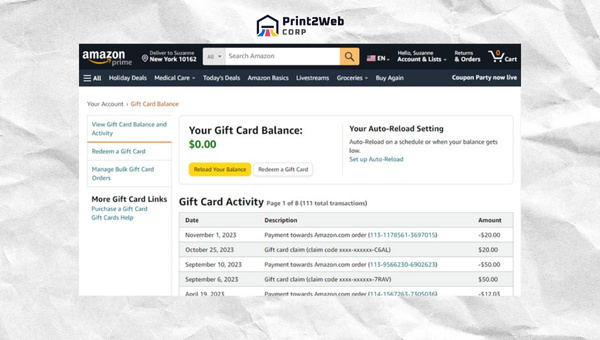
Understanding this flow matters because once a card is redeemed, the card itself holds zero value. The money now belongs to your account. That is why checking your balance always involves looking at your account rather than the physical or digital card.
How to Check Amazon Gift Card Balance on Desktop
Checking your gift card balance from a computer takes less than a minute once you know where to look. Amazon has reorganized its account layout over the past couple of years, so the old path through Amazon Wallet no longer applies. Here is the current navigation for 2026.
- Open your browser and go to Amazon.com.
- Sign in with the email and password linked to your Amazon account.
- Hover over Account and Lists in the top-right corner of the homepage.
- Click on Account from the dropdown menu that appears.
- Locate the Gift cards section and click on it.
- Your current gift card balance appears at the top of the page, along with your gift card activity and transaction history below it.
The gift card activity section shows every redemption, purchase deduction, and reload in chronological order. If you ever notice a charge you do not recognize, this transaction history is your first stop for identifying what happened.
What If I Have Multiple Gift Cards?
Amazon pools all redeemed gift card funds into a single balance. You will not see individual card amounts after redemption, only the combined total. The activity log does list each redemption separately, so you can track when each card was applied.
If you need to verify whether a specific card was already redeemed, check the activity log for a matching amount and date. You can also try entering the claim code again during the redemption process, and Amazon will tell you if the code has already been applied to an account.
How to Check Amazon Gift Card Balance on the Mobile App
The Amazon mobile app went through a significant redesign that replaced the old hamburger menu with a bottom navigation bar. If you followed older instructions telling you to tap three lines in the top-left corner, those steps no longer work. Here is the updated process.
- Open the Amazon app on your iPhone or Android device. If you do not have it installed yet, download it from the App Store or Google Play Store.
- Sign in using your Amazon account credentials.
- Tap the Profile icon (the person silhouette) in the bottom navigation bar.
- Scroll down and tap Your Account or Account depending on your app version.
- Find and tap Manage gift card balance within the payments or gift card section.
- Your available balance appears on screen, with a link to view your full gift card activity.
This method gives you portable access to your balance wherever you are. The app also lets you redeem new gift cards directly from this screen using the camera scan feature, which reads the claim code from a physical card without manual typing.
Also Read: Delete Addresses on Amazon: Streamline Your Account
How to Check an Unredeemed Amazon Gift Card Balance
This is where I need to correct a widespread misconception. Many older guides, including previous versions of articles across the web, claim you can enter a gift card claim code on Amazon and click a button to see its value without redeeming it. Amazon has removed this feature entirely. There is no online tool, webpage, or app function that displays the balance of an unredeemed gift card.
Reddit users on communities like r/beermoney and r/amazon have confirmed this repeatedly. One user on r/mildlyinfuriating described spending thirty minutes on a customer service chat just to learn a card’s balance, calling it the only method that works. The consensus across forums is clear: Amazon deliberately made this difficult.
The single way to check an unredeemed Amazon gift card balance is to call Amazon customer service at 888-280-4331. A representative can look up the card using its claim code or serial number and tell you the current value over the phone. Be prepared to verify your identity and provide the full code printed on the card.
Alternatively, you can simply redeem the card to your account. Once applied, the funds appear in your gift card balance immediately, and you will know exactly how much was on the card. This is the fastest option if you plan to use the card anyway.
How to Check Amazon Gift Card Balance by Phone
Calling Amazon customer service at 888-280-4331 serves two purposes: checking an unredeemed card and getting help with balance-related account issues. When you call, navigate the automated menu to reach the gift card department. Have your claim code or serial number ready before dialing to speed up the process.
The representative will ask you to read the claim code from the back of the card or from your email receipt for e-gift cards. They can then confirm the balance and tell you whether the card has already been redeemed by someone else. This is especially useful if you received a card as a gift and want to verify it still has value before adding it to your account.
Phone support hours vary, so check Amazon’s help pages for current availability. Some users report shorter wait times during weekday mornings. If you prefer not to call, the live chat option through Amazon’s website connects you with a representative who can perform the same lookup.
How to Redeem an Amazon Gift Card
Since checking an unredeemed card online is impossible, redeeming the card is often the simplest path to knowing its value. The process takes under a minute on both desktop and mobile.
Redeeming on Desktop
- Go to Amazon.com and sign in to your account.
- Hover over Account and Lists and click Account.
- Click Gift cards in the account dashboard.
- Click Redeem a Gift Card and enter your claim code in the text box.
- Click Apply to your balance and the funds appear instantly.
Redeeming on the Mobile App
- Open the Amazon app and tap the Profile icon in the bottom navigation bar.
- Tap Your Account then select Manage gift card balance.
- Tap Redeem another gift card and enter the claim code manually.
- Alternatively, tap the camera icon to scan the code directly from a physical card using your phone’s camera.
- Tap Apply and confirm the funds have been added to your balance.
The camera scan feature is a significant time-saver for physical cards, since scratching off the protective coating often leaves the numbers partially smudged. If the camera cannot read the code, you can still type it manually. Just double-check each character, as a single wrong digit will cause an error.
If your claim code is damaged beyond readability, contact Amazon customer service at 888-280-4331. They can sometimes recover the code using the serial number printed elsewhere on the card.
How to Check Physical Amazon Gift Card Balance
Physical Amazon gift cards work identically to their digital counterparts. The card itself is simply a delivery mechanism for the claim code. Once that code is redeemed, the card has no separate balance to check.
If you hold a physical card and want to know its value before redeeming, your only option is calling customer service at 888-280-4331. Scratch off the silver protective strip on the back to reveal the claim code before you call, since the representative will need those numbers.
For cards you have already redeemed, checking the balance works exactly like any other Amazon gift card balance. Log in on desktop or the app, navigate to Account and Lists then Gift cards, and view your combined balance and transaction history.
Also Read: eBay Vacation Mode: Navigate Selling While Away!
Leveraging Auto-Reload For Constant Available Balance
Keeping a steady gift card balance eliminates the need to check it constantly. Amazon’s auto-reload feature handles this automatically by adding funds whenever your balance drops below a threshold you set. I use this for recurring household purchases, and it removes the guesswork entirely.
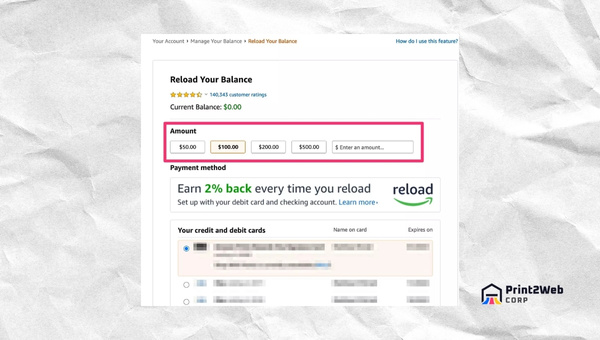
When this feature is active, your Amazon gift card balance is automatically topped up with your chosen amount whenever the balance falls below a specified threshold or on a recurring schedule you define. This keeps funds ready for purchases without manual intervention.
Scheduling Auto-reload Regularly
Setting up auto-reload on your Amazon gift card takes just a few moments. Here is how to configure it.
- Step 1: Visit Amazon.com and sign in using your registered email address and password.
- Step 2: Navigate to Account and Lists, then select Account, and click Gift cards.
- Step 3: In this section, select Reload Your Balance.
- Step 4: Look for the Auto-Reload option. This feature lets you set up automatic reloads of specific amounts at regular intervals or whenever your balance drops below a level you choose.
If you want more control over how frequently or when money gets reloaded onto your card, the interval settings give you several options. Here are the details for managing those settings efficiently.
- You can choose amounts starting from $0.50 up to $2,000 per transaction for reloading.
- If choosing the interval method, options range from daily, weekly (every one or two weeks), every month on a specific date, or multiple times per month on certain dates. Note that daily reloads only occur on weekdays.
Auto-reload is not just about never running out of funds. It removes one more task from your plate so you can shop without interruptions on Amazon.
Troubleshooting: What to Do If Your Gift Card Balance Is Missing
Reddit forums are filled with posts from panicked users who logged in to find their gift card balance had vanished. This happens more often than you might expect, and the causes range from simple glitches to serious fraud locks. Here is what to do based on real user experiences.
Balance Shows Zero After Redeeming
First, check your gift card activity log under Account and Lists, then Gift cards. The transaction history shows whether the redemption processed successfully. Sometimes a delay of a few minutes occurs between applying a code and the balance updating. If the activity log shows the redemption but your balance still reads zero, refresh the page or restart the app.
Balance Disappeared From an Established Account
Several Reddit users have reported balances of $1,000 or more being removed without explanation. In most documented cases, Amazon’s anti-fraud system flagged the account, often due to a large gift card balance triggering an automated security review. Contacting customer service at 888-280-4331 resolved the issue for most users, though some described needing multiple contacts.
To reduce the risk of fraud locks, avoid loading extremely large balances all at once. If you receive a high-value gift card, redeeming it in the normal way is fine, but combining many large cards in rapid succession can raise flags. For more on handling Amazon account issues, see our guide on what to do when Amazon sent the wrong item, since returns and refunds often interact with your gift card balance.
Unknown Gift Card Applied to Your Account
Some users discover gift card balances they never added themselves. This typically happens when a return was credited as a gift card refund rather than to the original payment method. Amazon sometimes defaults to gift card credit for returns because it processes faster. Check your order history for recent returns to confirm.
If you truly do not recognize the source of a balance, contact customer service immediately. It could indicate unauthorized access to your account. Change your password and enable two-factor authentication as precautionary steps. For help with returns that might be affecting your balance, read our tips on returning items to Amazon.
Claim Code Will Not Accept
If Amazon rejects your claim code, double-check that you entered every character correctly. Letters and numbers can look similar on scratched cards. Try the camera scan feature in the mobile app for better accuracy. If the code is physically damaged, call 888-280-4331 and provide the serial number printed on the card for assistance.
Is It Safe to Leave a Large Balance on Your Amazon Account?
Forum discussions reveal that many users keep hundreds or even thousands of dollars in their Amazon gift card balance for extended periods without problems. One r/beermoney contributor mentioned maintaining around $1,000 in their account for years, using a portion each month. For everyday use, balances are generally secure.
The main risk is account compromise. If someone gains access to your Amazon account, they could spend your gift card balance before you notice. Use a strong, unique password and enable two-step verification to protect your funds. Also be aware that very large balances can occasionally trigger fraud reviews, as mentioned in the troubleshooting section above.
If you prefer not to hold a large balance, consider spending it down on everyday essentials or digital content. Your gift card balance works for physical products, Kindle eBooks, Audible memberships, and even Amazon streaming services like Freevee.
Tips for Maximizing Your Amazon Gift Card Value
Saving your gift card balance for major sales events stretches every dollar further. Amazon Prime Day, typically held in July, and Cyber Monday in late November offer some of the deepest discounts of the year. If you can wait, holding your balance until these events can get you significantly more for the same amount.
Another strategy involves combining multiple smaller gift cards into one balance. Since Amazon pools all redeemed funds together, redeeming several $25 cards gives you a single $100 balance to spend in one transaction. This simplifies checkout and lets you purchase higher-priced items without juggling payment methods.
You can also opt out of automatic gift card application at checkout if you want to save the balance for a later purchase. During the payment step, simply uncheck the box that applies your gift card balance and choose a different payment method. The balance stays in your account until you are ready to use it.
Amazon Gift Card Balance FAQs
Can I check an Amazon gift card balance without redeeming it?
No. Amazon removed the online tool that let you check an unredeemed gift card balance. The only way to check a card you have not yet redeemed is to call Amazon customer service at 888-280-4331 and provide the claim code. Alternatively, you can redeem the card to your account and the balance will appear immediately.
How do I check the balance on my Amazon gift card on my phone?
Open the Amazon app, tap the Profile icon (person silhouette) in the bottom navigation bar, tap Your Account, then select Manage gift card balance. Your current balance and gift card activity will appear on screen.
How can I check my gift card balance without an Amazon account?
You cannot check a gift card balance without an Amazon account. Once a card is redeemed, the balance lives inside your account and requires you to sign in to view it. For unredeemed cards, you can call Amazon customer service at 888-280-4331 without an account, but you will need the claim code from the card.
How do I check if my Amazon gift card is already redeemed?
Try entering the claim code under Account, Gift cards, and Redeem a Gift Card. If the code was already applied to your account or another account, Amazon will display an error message stating the card has already been redeemed. You can also call 888-280-4331 and a representative can check the card status using the claim code or serial number.
Is it safe to leave a large balance on my Amazon gift card?
Generally yes, but take precautions. Use a strong password and enable two-step verification on your account. Be aware that very large balances loaded rapidly can occasionally trigger Amazon fraud reviews, which may temporarily freeze your funds. If your balance disappears unexpectedly, contact customer service at 888-280-4331 immediately.
How do I check my Amazon gift card balance in India?
Indian users can follow the same process. Sign in to your Amazon account, go to Amazon Pay, and select Gift Card Balance. Your total available gift card balance and transaction history will be displayed. The navigation steps are similar to the standard Amazon interface.
Also Read: Dropshipping vs. Amazon FBA: Ultimate Showdown for Entrepreneurs
Conclusion
Checking your Amazon gift card balance in 2026 boils down to two straightforward scenarios. If the card is already redeemed, sign in on desktop or the mobile app, head to Account and Lists, then Gift cards, and view your balance plus full transaction history. If the card is unredeemed, your only option is calling customer service at 888-280-4331, since Amazon no longer offers an online balance checker for unredeemed cards.
For anyone who frequently receives gift cards, setting up auto-reload and redeeming cards promptly eliminates most balance-checking headaches. If you ever spot a missing balance or an unknown charge, the troubleshooting steps above walk you through the recovery process. And remember to protect your account with two-step verification, especially when carrying a large gift card balance.
Once your balance is sorted, put it to good use. Whether you are stocking up on household essentials, grabbing Kindle eBooks, or saving for the next Prime Day sale, knowing your exact buying power makes every Amazon shopping session smoother. For help planning your purchases, check out our guide on what time Amazon delivers so your orders arrive exactly when you need them.
Leave a Reply