
Every Amazon seller knows the sting of waking up to a fresh 1-star review. Whether it came from a buyer who received a damaged package or someone whose expectations did not match the listing, that single rating can drag down your average and shake your confidence overnight. In 2026, the stakes are even higher because shoppers have more choices than ever, and a single negative review can tip them toward a competitor.
Here is a number that should grab every seller’s attention: roughly 93% of buyers read reviews before making a purchase. That means almost every shopper who lands on your product page is scanning what others have said before they click “Add to Cart.” Bad reviews on Amazon are not just frustrating, they directly cut into your conversion rate, your Buy Box eligibility, and your long-term revenue. But the good news is that you are not powerless.
I have spent years helping sellers manage their Amazon reputation, and I can tell you that dealing with negative feedback is a learned skill. Once you understand Amazon’s review removal policy, know how to identify violations, and build a proactive prevention strategy, those bad reviews lose their power over your business. This guide walks through every angle from removal tactics to competitor attack defense so you can protect your seller reputation and keep sales flowing.
What you will learn in this guide:
- How to identify which negative reviews qualify for removal under Amazon policy
- Step-by-step methods for contacting support and requesting removals
- How to use Brand Registry tools to reach unhappy buyers directly
- Strategies for defending against competitor review attacks and hijacking
- Prevention tactics that keep negative feedback from appearing in the first place
Understanding Bad Reviews on Amazon
A bad review on Amazon is any feedback that rates your product or service poorly, typically one or two stars out of five. But the label covers a wide spectrum of complaints. A buyer might say the product arrived broken, that shipping took too long, that the color did not match the listing photo, or that the item simply fell short of their expectations. Each of these scenarios has a different root cause and a different path to resolution.
Not all negative reviews stem from actual product defects either. Some buyers leave poor ratings because of fulfillment issues handled entirely by Amazon. Others may have confused your product with a similar one from a different seller. And in some cases, the review has nothing to do with the product at all but instead contains language or content that violates Amazon’s community guidelines. Knowing the difference between these types is the first step toward addressing them effectively.

What Constitutes a Bad Review?
Amazon defines a negative review as any rating below three stars that includes criticism of the product, the seller, or the buying experience. These reviews typically fall into four broad categories: product quality complaints, shipping or packaging issues, expectation mismatches, and policy-violating content. Each category requires a different response, and some are far easier to resolve than others.
Product quality complaints are the most common and often the hardest to dispute because the buyer is sharing their genuine experience. Shipping issues, on the other hand, may be eligible for removal if Amazon fulfilled the order and the complaint relates to late delivery or damaged packaging. Expectation mismatches usually signal that your listing needs better photos or clearer descriptions. Policy-violating content, which includes hate speech, personal information, or competitor sabotage, is the most actionable category because Amazon itself will remove these reviews once you report them.
Understanding these categories matters because it determines your next move. You cannot use the same approach for a buyer who genuinely disliked your product as you would for a competitor who left a fake 1-star review. Categorizing the review correctly saves you time and increases your chances of a successful resolution.
The Importance of Managing Bad Reviews on Amazon
With 93% of shoppers reading reviews before buying, even a handful of negative ratings can shift buyer behavior dramatically. A product sitting at 4.2 stars will consistently outsell an identical product at 3.8 stars, even if the lower-rated item is objectively better. That is the reality of social proof on Amazon. Buyers trust the crowd, and a declining star rating sends a loud signal that something might be wrong.

The impact goes beyond lost sales on a single listing. Negative reviews create a cascading effect across your entire seller account. Your overall health metrics dip, your conversion rate drops, and Amazon’s algorithm begins favoring competitors in search results. Over weeks and months, a few unaddressed bad reviews can quietly erode your organic ranking and force you to spend more on advertising just to maintain visibility.
Here is why active review management matters for every seller:
- Rating protection: Your star average is the first thing shoppers see. Letting negative reviews accumulate drags that number down and makes every future sale harder.
- Conversion rate preservation: Buyers who see multiple negative reviews are far less likely to click “Buy Now,” even if your product meets their needs.
- Account health maintenance: Amazon monitors your seller metrics closely. Excessive negative feedback can trigger performance warnings and eventually lead to suspension.
The Impact on Your Rating and Buy Box Chances
The Buy Box is where the vast majority of Amazon sales happen. When a shopper clicks “Add to Cart” or “Buy Now,” they are purchasing from whichever seller won that placement. Amazon uses several factors to decide who gets the Buy Box, and your seller rating is one of the most heavily weighted.
- A star rating below 4.0 can significantly reduce your Buy Box win rate, even when you are the lowest-priced offer.
- If multiple sellers offer the same product, Amazon gives preference to the one with stronger reviews and fewer negative ratings.
- Every additional 1-star review pushes your average down, making it progressively harder to compete for that placement.
Think of your star rating as a qualifying threshold. Once it drops below a certain point, Amazon’s algorithm stops putting you in front of buyers regardless of your price or inventory levels. That is why catching and addressing bad reviews quickly is not optional, it is survival on the platform.
Potential for Suspension of Amazon Selling Privileges
The most severe consequence of unchecked negative reviews is account suspension. Amazon’s performance team watches your Order Defect Rate, and customer complaints are a major input. If too many buyers report problems, Amazon may flag your account for review.
- A pattern of negative feedback triggers automated warnings from Seller Performance.
- If the trend continues without improvement, Amazon can suspend your selling privileges entirely.
- Reinstatement after suspension requires a detailed plan of action, which can take weeks to prepare and submit.
Suspension does not just pause your income. It damages your relationship with Amazon, resets your momentum, and gives competitors a wide-open window to capture your market share. The smartest sellers treat every negative review as an early warning system and address underlying issues before they snowball into something that threatens the entire account.
For a broader look at how reviews tie into your overall seller strategy, check out our Amazon review best practices guide, which covers building a strong rating from day one.
Knowing the Rules: Amazon’s Review Removal Policy
Amazon’s review removal policy exists to keep the feedback system trustworthy. The company wants buyers to share honest opinions, but it also recognizes that some reviews cross the line into policy-violating territory. Knowing exactly what qualifies for removal is essential because submitting a removal request that does not meet the criteria wastes your time and weakens your credibility with Amazon’s support team.

Positive Aspects:
- Builds buyer trust: Amazon filters out inauthentic and manipulative reviews, which keeps the review ecosystem credible for legitimate sellers.
- Creates a level playing field: Every seller operates under the same rules, so competitors cannot game the system with fake reviews without risking penalties.
- Drives product improvement: When sellers know reviews reflect genuine customer experiences, they are motivated to fix problems and improve quality.
Negative Aspects:
- Strict removal criteria: Amazon only removes reviews that clearly violate its guidelines, which means genuinely unfair reviews that do not technically break a rule often stay live.
- No direct seller control: You cannot delete a review yourself. Every removal must go through Amazon’s review process, and approval is never guaranteed.
- Inconsistent enforcement: Sellers frequently report that similar violation types get different outcomes depending on which support representative handles the case.
Review Violation Types and What Action to Take
One of the most effective ways to handle bad reviews on Amazon is to match the specific violation type with the correct action. Not every negative review qualifies for removal, and sending the wrong type of request to support will only slow you down. Below is a practical mapping that covers the most common review scenarios sellers encounter and the recommended response for each.
Use this as a quick-reference tool whenever a new negative review appears on your listing. The faster you categorize the review and take the right action, the better your chances of either getting it removed or minimizing its impact.
- Review contains profanity or hate speech: Open Seller Central and use the Report Abuse button. Reference Amazon’s community guidelines in your case description.
- Review includes personal information: Report immediately through the Help section. Amazon policy strictly prohibits sharing names, addresses, or contact details.
- Review is about shipping or fulfillment (FBA): If Amazon fulfilled the order, the review may qualify for removal under FBA-specific guidelines. Contact support and cite the fulfillment channel.
- Review mentions a different product: This is a mismatch and violates Amazon’s relevance policy. Report it with details showing the review does not match your item.
- Review appears fake or from a competitor: Document the reviewer’s purchase history and patterns. File a Report Abuse case with evidence of manipulation.
- Review is from a non-verified purchase: While not automatically removable, combine this with other violation signals to strengthen your case if you suspect manipulation.
- Review contains promotional content or links: Amazon prohibits reviews that include URLs or promotional material. Report through the standard abuse channel.
- Review is honest but negative (no violation): This type usually cannot be removed. Focus on buyer outreach, product improvement, and encouraging positive reviews to dilute the impact.
Sellers who frequent Amazon seller forums note that the most successful removal requests include specific references to the policy being violated. Instead of writing “this review is unfair,” identify the exact rule and quote it. That approach consistently gets better results from Amazon’s support team.
How to Remove Bad Reviews from Your Amazon Seller Account?
Removing a bad review on Amazon requires a strategic approach. You need to go through the right channels, provide clear evidence, and follow up persistently. Sellers who treat this as a one-and-done request rarely get results, but those who build a repeatable process see much higher success rates.
Initiating Contact with Customer Support for Negative Review Removal
The first step is opening a case with Amazon Seller Support through Seller Central. Log into your account and navigate to the Help section, then select the option related to products, reviews, and feedback. Choose the specific product listing where the negative review appears so the support agent can locate it immediately.
- Open Seller Central and go to the Help menu.
- Select “Products, Reviews, and Feedback” as your topic.
- Click “Contact Seller Support” and choose the relevant ASIN.
- Explain the policy violation clearly, citing the specific Amazon guideline the review breaks.
- Submit the case and track it in your case log for follow-up.
In your case description, be specific and professional. Identify the review by its date and content, quote the exact portion that violates policy, and reference the applicable Amazon guideline by name. Generic complaints like “this review is unfair and hurts my sales” will almost always be rejected. Detailed, policy-grounded requests get attention.
Support will not always approve your request on the first try. If the case is denied, read the response carefully, address whatever reasoning they provided, and resubmit with additional evidence. Many sellers report that persistence through multiple rounds eventually leads to removal, especially when the violation is clear.
Using the Brand Registry “Contact Customer” Feature
If you are enrolled in Amazon Brand Registry, you have access to a powerful tool that non-registered sellers do not. The Brand Registry “Contact Customer” feature lets you send a message directly to buyers who left negative reviews of 3 stars or below on your branded products. This is one of the most effective ways to resolve issues and potentially have a buyer revise their review.
The Contact Customer feature offers two message templates: a courtesy refund option and a customer service option. The courtesy refund template allows you to offer a full refund as a gesture of goodwill. The customer service template focuses on resolving whatever problem the buyer experienced. Both templates follow Amazon’s communication guidelines, which means you cannot directly ask the buyer to change their review. However, resolving the underlying issue often leads buyers to update their feedback voluntarily.
This tool is only available for enrolled brands, which makes Brand Registry one of the most valuable investments for serious sellers. If you are not yet enrolled, the review management benefits alone justify the application process. Beyond the Contact Customer feature, Brand Registry also gives you enhanced listing control and stronger protection against listing hijackers who can damage your review profile.
Requesting Customers to Remove or Alter their Feedback
For sellers without Brand Registry access, buyer communication happens through Amazon’s Buyer-Seller Messaging system. Find the buyer’s order in your seller account and send a polite, professional message addressing their concern. The goal is not to pressure them into changing the review but to genuinely solve whatever problem led to it.
- Locate the buyer’s order number associated with the review.
- Send a message through the Buyer-Seller Messaging Service.
Keep these communication principles in mind:
- Be genuinely helpful: Approach the conversation as a problem-solver, not a defender. Ask what went wrong and offer a concrete solution.
- Avoid review manipulation language: Never explicitly ask a buyer to remove or change their review. Amazon’s policies prohibit this, and violations can result in account penalties.
- Offer a real remedy: A replacement, a refund, or clear instructions for resolving the issue shows the buyer you stand behind your product.
- Be patient: Some buyers will not respond at all. Others may update their review days or weeks later once they see you are committed to making things right.
The sellers who get the best results from buyer outreach are those who focus on resolution rather than removal. When a buyer feels heard and receives a genuine fix, they often choose to revise the review on their own. That organic outcome is far more valuable than any forced request because it reflects an actual improvement in customer satisfaction.
For more on leveraging brand tools that improve review management, our Amazon Brand Registry guide breaks down every benefit available to enrolled sellers.
Defending Against Competitor Review Attacks and Hijacking
One of the most frustrating situations an Amazon seller can face is a coordinated review attack from a competitor. This happens when a rival seller pays for or orchestrates a wave of negative reviews on your listing, or worse, hijacks your listing by swapping product images and descriptions to mislead buyers. Forum discussions across seller communities reveal this is a growing pain point, and Amazon’s automated systems do not always catch it quickly.
Review hijacking is a specific tactic where a competitor takes over an existing product listing with strong reviews and changes the associated product to something inferior. Buyers who purchase based on the original reviews end up receiving a completely different item, which generates authentic negative reviews that tank your listing. This type of attack is particularly damaging because the reviews come from real, verified buyers, making them harder to dispute.
Here is how to defend against competitor attacks:
- Monitor your listings daily: Use review monitoring tools to catch suspicious negative review spikes before they gain traction. A sudden cluster of 1-star reviews from accounts with limited purchase history is a red flag.
- Document everything: Screenshot suspicious reviews, note reviewer account patterns, and track whether multiple negative reviews appeared within a short window. This evidence strengthens your case with Amazon.
- File a Report Abuse case with manipulation evidence: Reference Amazon’s review manipulation policy and provide specific examples of the coordinated activity.
- Escalate if necessary: If Seller Support does not act, escalate through the Brand Registry support team if you are enrolled, as they have dedicated review manipulation specialists.
- Protect your listings with Brand Registry: Enrolled brands have stronger tools for detecting and reporting listing changes, which makes hijacking attempts more visible and easier to reverse.
Sellers in Amazon FBA communities consistently report that documenting a clear pattern is the key to getting Amazon to act on competitor attacks. A single suspicious review will rarely trigger action, but a documented cluster of fake reviews with shared characteristics gives the support team something concrete to investigate.
Making Peace with the Unpleasant: Not All Negative Reviews Are Bad
Sometimes a negative review is simply an honest customer sharing a genuine experience. And while no seller wants to see a low star rating, those reviews can actually serve a purpose. They provide free feedback on where your product or process has room to improve, and they give your review profile a level of authenticity that shoppers expect.
Looking at the Positive Side of a Bad Review on Amazon
- They reveal real problems: If multiple buyers mention the same defect or issue, that is actionable data you can use to improve the product and prevent future complaints.
- They build authenticity: A listing with exclusively 5-star reviews can look suspicious to savvy shoppers. A mix of ratings signals genuine feedback and can actually increase buyer trust.
- They create an opportunity to shine: Your public response to a negative review shows future shoppers that you are engaged, responsive, and committed to customer satisfaction.
- They highlight expectation gaps: If buyers consistently mention that the product did not match the photos or description, that is a clear signal to improve your listing content.
- They guide product development: Negative feedback often points directly to features or improvements that would make your next product version better.
The next time a negative review lands on your listing, take a breath before reacting. Ask yourself whether it contains useful information, whether it exposes a problem you can fix, and whether your response might actually impress future buyers who scroll through the review section.
Steps to Prevent Negative Reviews from Rolling In
The best way to deal with bad reviews on Amazon is to prevent them before they happen. Every negative review has a root cause, and addressing those causes proactively is far more effective than chasing removals after the fact. A combination of quality control, listing accuracy, and customer communication can dramatically reduce the volume of negative feedback your listings receive.
- Quality control inspections: Check every batch of inventory for defects before it reaches Amazon’s warehouse. A faulty unit that reaches a buyer is a 1-star review waiting to happen.
- Clear, accurate product descriptions: Invest time in writing clear product descriptions that set accurate expectations. Most negative reviews stem from a gap between what the buyer expected and what they received.
- High-quality listing images: Use multiple angles, lifestyle photos, and size references so buyers know exactly what they are getting. Visual clarity prevents a large percentage of expectation-based complaints.
- Fast, helpful communication: Respond to buyer messages within 24 hours. A quick, helpful response to a pre-purchase question can prevent a post-purchase complaint.
- Proactive customer service: Include a package insert with contact information so buyers can reach you directly if something is wrong, rather than leaving a negative review as their first response.
- Careful packaging: Protect items adequately during shipping. Many negative reviews blame the product when the real issue was damage caused by inadequate packaging or rough handling.
- Review monitoring tools: Set up alerts so you know the moment a new review appears on your listing. Tools like Jungle Scout and other review automation platforms can notify you instantly and help you respond before the review influences other shoppers.
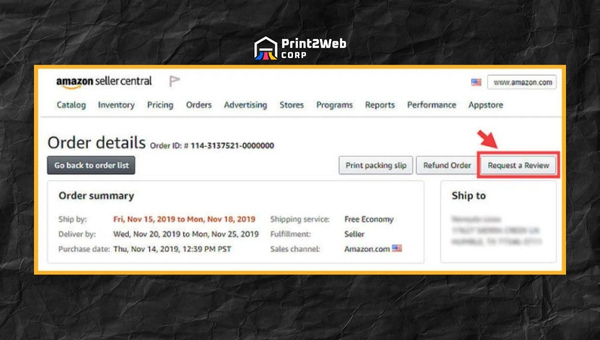
- Encourage positive reviews: Use Amazon’s “Request Review” button in Seller Central to ask satisfied buyers for feedback. A steady stream of positive reviews dilutes the impact of occasional negative ones.
Prevention is not glamorous, but it works. Sellers who invest in listing quality, packaging, and proactive communication consistently see lower negative review rates and higher star averages. For more strategies on building a strong review profile, check out our guide on Amazon review best practices and learn how review management ties into broader Amazon SEO strategies.
Frequently Asked Questions
How to deal with bad reviews on Amazon?
Start by categorizing the review. If it violates Amazon policy (profanity, personal info, competitor manipulation), report it through Seller Support with specific policy references. If it is an honest complaint, use Buyer-Seller Messaging or the Brand Registry Contact Customer feature to resolve the buyer’s issue. For non-violating reviews, focus on product improvement and encouraging positive feedback to offset the impact.
Does Amazon delete negative reviews?
Yes, but only when a review clearly violates Amazon’s community guidelines. Policy violations include hate speech, personal information, promotional content, fake or manipulated reviews, and feedback about shipping when Amazon fulfilled the order (FBA). Honest negative opinions, even if unfair, typically remain live.
Can I remove negative feedback from my Amazon seller profile by myself?
No, sellers cannot directly delete reviews from their own listings. You must request removal through Amazon Seller Support by opening a case that cites the specific policy violation. The Brand Registry Contact Customer feature allows you to message the buyer, but it does not guarantee review removal.
How can I ask my customer to change their review on Amazon?
You should never directly ask a customer to change or remove a review, as this violates Amazon’s communication policies. Instead, focus on resolving the underlying problem through Buyer-Seller Messaging or the Brand Registry Contact Customer feature. When a buyer feels their issue has been genuinely addressed, they often update the review on their own.
Will Amazon step in to remove unfair negative feedback?
Amazon will remove reviews that violate its community guidelines, such as those containing obscene language, personal information, or evidence of competitor manipulation. However, Amazon generally will not remove reviews simply because the seller believes they are unfair if no policy violation exists.
Can I reply publicly to a bad review on Amazon and how should I go about it?
Yes, you can post a public comment on any review of your product. Keep your response professional and solution-oriented. Thank the buyer for their feedback, acknowledge their concern, and offer a specific remedy. Future shoppers will see your response and judge your brand by how you handle criticism.
How do I report fake reviews from competitors?
Use the Report Abuse button on the review itself and open a case with Seller Support. Document the pattern with screenshots, reviewer account activity, and any evidence of coordinated manipulation. Brand Registry sellers can escalate through the dedicated brand support team for faster investigation.
Conclusion
Bad reviews on Amazon can feel like a personal attack, but they are a normal part of selling on the world’s largest marketplace. What separates successful sellers from struggling ones is not whether they receive negative feedback but how they respond to it. The sellers who thrive in 2026 are those who have a system for categorizing reviews, filing removal requests with specific policy citations, and resolving buyer issues through proper channels.
If you take one thing from this guide, let it be this: speed and specificity matter. The faster you identify a review violation and file a properly documented case, the better your odds of removal. And when removal is not possible, genuine problem-solving through Buyer-Seller Messaging or Brand Registry tools often leads to buyers revising their feedback on their own.
Pair your removal strategy with strong prevention habits like quality inspections, accurate listings, and proactive customer service, and you will find that negative reviews become far less frequent and far less damaging. Protect your star rating, defend against competitor attacks, and treat every piece of feedback as data that makes your business stronger. Your Amazon reputation is one of your most valuable assets, and with the right approach, it will continue driving sales for years to come.
Leave a Reply