
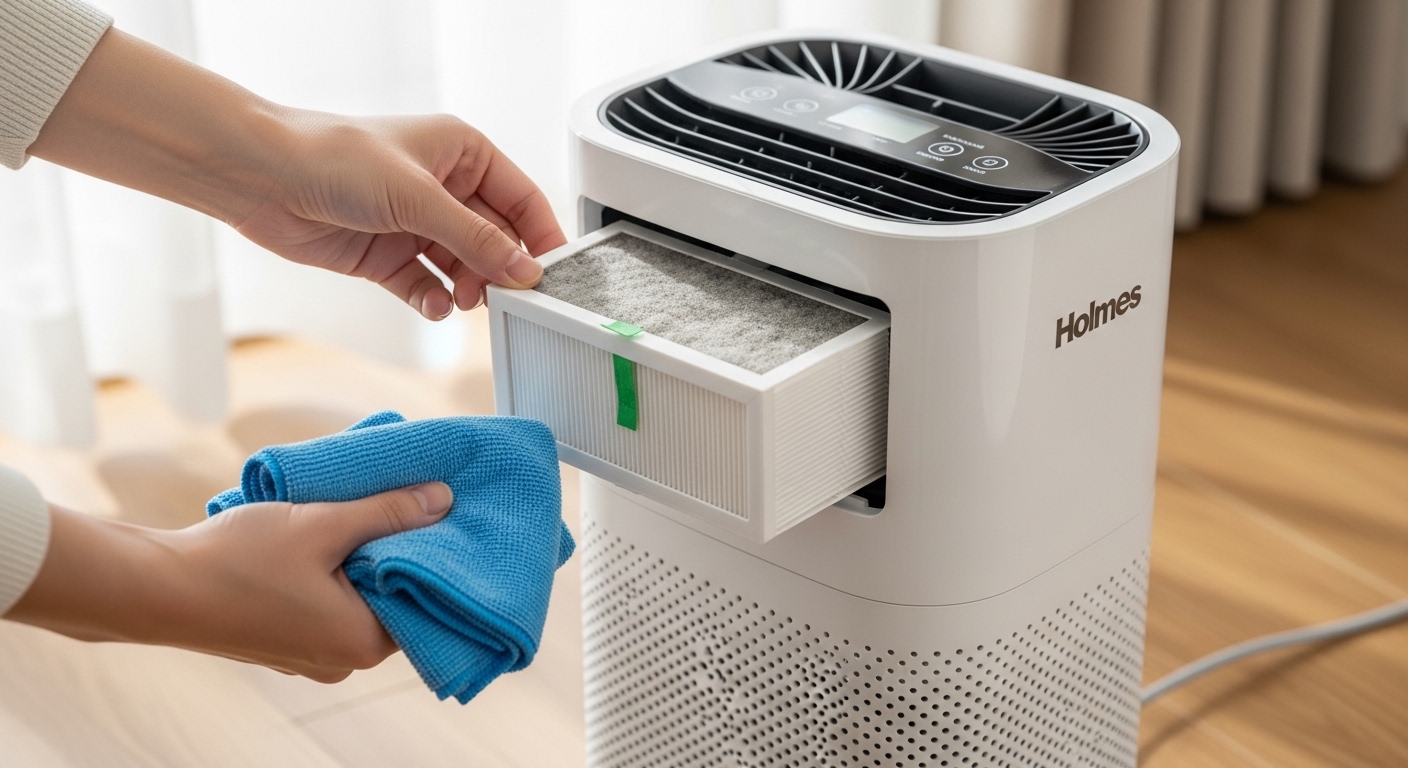
How To Clean Holmes Air Purifier is one of the most common questions I get from fellow air purifier owners. After running Holmes units in my home for over three years, I’ve learned that regular cleaning is the difference between a machine that lasts five years and one that stops working in eighteen months. A dirty air purifier doesn’t just work less effectively, it can actually become a source of indoor air pollution as trapped particles recirculate back into your room.
Your Holmes air purifier works hard every day, pulling air through multiple layers of filtration to remove dust, allergens, pet dander, and odors. Most people plug it in and forget about it until the warning light starts blinking or they notice reduced airflow. By then, the filters are already clogged and the unit is working overtime to move air through dirty media.
In this guide, I’ll walk you through everything you need to know about maintaining your Holmes air purifier, from the quick weekly tasks to the deep cleaning procedures that will extend its lifespan. I’ve tested these methods across different Holmes models, including the popular tower units and compact desktop models, so you can trust that these steps work regardless of which version you own.
Safety First: Always Unplug Before Cleaning
Before you touch any part of your air purifier, you must unplug it from the wall outlet. This isn’t just a suggestion, it’s critical for your safety. Air purifiers contain electrical components that can give you a nasty shock even when the power switch is in the off position. I always double-check that the unit is completely disconnected before beginning any cleaning procedure.
Check your owner’s manual for any specific warnings about your model. Some Holmes air purifiers have specific disassembly restrictions that, if violated, will void your warranty. The manufacturer typically advises against opening the main casing, and for good reason, the internal components are not designed to be user-serviceable. Stick to the accessible parts and you’ll avoid warranty issues.
Gather your cleaning supplies before you start. You’ll need a vacuum with a soft brush attachment, mild liquid dish soap, a soft cloth or sponge, and a clean towel for drying. Avoid harsh chemicals, bleach, or abrasive cleaners, these can damage the plastic housing and reduce the effectiveness of your filters.
Understanding Your Holmes Air Purifier Filters
Holmes air purifiers use a multi-stage filtration system, and understanding what each filter does is essential for proper maintenance. The first line of defense is the washable foam pre-filter. This thick mesh catches large particles like dust, pet hair, and lint before they can reach the more expensive HEPA filter. The pre-filter is designed to be removed and cleaned regularly.
The HEPA filter is the workhorse of your air purifier. True HEPA filters capture 99.97% of particles as small as 0.3 microns, including pollen, mold spores, and fine dust. Holmes uses both true HEPA filters and HEPA-type permanent filters, depending on the model. What they all have in common is that they cannot be washed, water destroys the delicate fiber structure that makes HEPA filtration effective.
Many Holmes models include an activated carbon filter, usually located behind the HEPA filter. Carbon filters are excellent at removing odors from cooking, pets, and smoke, but they have a limited lifespan. Once the carbon becomes saturated, it stops absorbing odors and simply becomes a barrier to airflow. Carbon filters cannot be cleaned or regenerated, they must be replaced when they no longer control smells.
Your Holmes air purifier likely has a filter indicator light to remind you when maintenance is needed. This light is typically based on a timer rather than actual filter condition, but it’s a helpful reminder system. Different models use different colored lights, so understanding what each color means will help you respond appropriately to the warnings.
How To Clean Holmes Air Purifier Pre-Filter?
The washable foam pre-filter is the only part of your Holmes air purifier that should be washed with water. This component is designed to be durable and reusable, making it one of the most cost-effective parts of the filtration system. Proper pre-filter maintenance can significantly extend the life of your more expensive HEPA filter.
Start by removing the pre-filter according to your model’s instructions. Some models have a front grille that pops off, while others require you to slide the filter out from the side. Pay attention to how the filter sits in its housing, some models have a specific orientation that must be maintained for proper airflow.
Take the pre-filter to a sink or bathtub and rinse it under lukewarm water. You’ll likely see a significant amount of dust and debris wash away during this initial rinse. Don’t be alarmed if the water looks dirty, this is exactly what you want to remove from the filter media.
Prepare a cleaning solution with warm water and a mild dish soap. Avoid harsh detergents or bleach, as these can leave residues that might affect air quality or damage the foam material. Submerge the pre-filter in the soapy water and let it soak for 5-10 minutes to loosen any stubborn dirt.
Gently agitate the filter while it’s soaking, using your fingers or a soft brush to work the soapy water through the foam. Focus on areas that appear heavily soiled or discolored. The foam is durable, but avoid aggressive scrubbing or pulling, as this can create tears or thin spots in the material.
Rinse the pre-filter thoroughly under running water until all soap residue is gone. This is crucial, any soap left in the foam could become airborne when the purifier is running. Continue rinsing until the water runs clear and you no longer see any suds.
Remove excess water by gently squeezing the foam between your hands or pressing it against the side of the sink. Do not wring or twist the pre-filter, as this can damage the cellular structure. Lay the filter flat on a clean, dry towel and roll the towel up to absorb more moisture.
Unroll the towel and lay the pre-filter flat in a well-ventilated area to finish drying. Ideally, place it outdoors in a shady spot or near an open window. Direct sunlight can degrade the foam over time, so avoid prolonged exposure. Allow the filter to dry completely, usually 4-6 hours, before reinstalling it in your air purifier.
For pet owners or those with allergies, I recommend cleaning the pre-filter more frequently, every 2-3 weeks during high-shedding seasons or allergy peaks. A clean pre-filter prevents pet hair and dander from reaching the HEPA filter, where it’s much harder to remove.
HEPA Filter Maintenance: Can You Wash It?
This is the most common misconception about Holmes air purifier maintenance: can you wash the HEPA filter? The short answer is no, absolutely not. HEPA filters rely on a complex matrix of microscopic fibers that trap particles through a combination of interception, impaction, and diffusion. Water damages this delicate structure, reducing filtration efficiency dramatically.
When water contacts HEPA filter media, several things happen that permanently reduce its effectiveness. The fibers can clump together, creating larger gaps that allow particles to pass through. The electrostatic charge that helps capture smaller particles can be neutralized. And the paper-like material can become weak and tear, especially when you try to wring it dry. A washed HEPA filter may look clean, but it simply won’t perform as intended.
Instead of washing, HEPA filters should be vacuumed regularly to remove surface dust. Use the soft brush attachment on your vacuum cleaner and gently run it over both sides of the filter. Work slowly and methodically, using light pressure. The goal is to remove loose particles without forcing any deeper into the filter media or damaging the fibers.
Pay special attention to the edges and corners of the HEPA filter, where dust often accumulates. These areas can become clogged even when the center of the filter appears relatively clean. Use a crevice tool if needed to reach into the filter housing and remove dust from around the edges.
There will come a point when vacuuming is no longer effective, and the HEPA filter needs to be replaced. Signs that your HEPA filter is spent include visible discoloration or darkening of the filter media, reduced airflow even with a clean pre-filter, and increased allergy symptoms despite the purifier running. On average, permanent HEPA filters should be replaced every 12-18 months, depending on your air quality and usage patterns.
Replacing a HEPA filter is more cost-effective than you might think, especially when compared to the health impacts of breathing unfiltered air. A new HEPA filter typically costs between $25 and $50, while running an air purifier with a clogged filter wastes electricity and provides little benefit. Think of filter replacement as preventative maintenance for your health.
Some users wonder if compressed air can be used to clean HEPA filters. While it might seem like a good idea, I advise against it. Compressed air can force dust deeper into the filter media rather than removing it, and the high pressure can damage the delicate fibers. Stick to gentle vacuuming, and replace the filter when it’s no longer effective.
Carbon Filter Care Instructions
The carbon filter in your Holmes air purifier serves a specific purpose: removing odors, volatile organic compounds (VOCs), and gaseous pollutants. Unlike mechanical filtration which physically traps particles, carbon filtration works through adsorption, a process where pollutants are attracted to and held on the surface of activated carbon granules.
Activated carbon has a finite capacity for adsorption. Once all the available surface area is saturated with odor molecules, the filter can no longer remove smells from your air. Unlike pre-filters which can be washed, carbon filters cannot be cleaned or regenerated in a home setting. The activation process that makes carbon effective at adsorption involves specialized equipment and high temperatures.
The primary indicator that your carbon filter needs replacement is the return of odors that were previously controlled. If you notice cooking smells, pet odors, or other unpleasant smells lingering in your room despite the air purifier running, the carbon filter has likely reached its capacity. Another sign is if you smell a slight musty odor coming from the unit itself, this can indicate that the carbon filter is releasing previously adsorbed compounds.
On average, carbon filters should be replaced every 3-6 months, but this varies widely based on your environment. Homes with smokers, multiple pets, or frequent cooking will go through carbon filters more quickly than homes in cleaner environments. Some users choose to replace carbon filters more frequently during high-odor periods, such as when cooking with strong spices during the holidays.
When replacing a carbon filter, dispose of the old one according to your local waste guidelines. While used carbon filters aren’t typically classified as hazardous waste, they may contain adsorbed chemicals that you don’t want ending up in landfills unnecessarily. If possible, look for recycling programs in your area that accept used air purifier filters.
Some Holmes models use combination filters that incorporate carbon with the HEPA media. In these cases, when the carbon capacity is exhausted, you’ll need to replace the entire filter assembly. It’s worth noting the cost difference between separate carbon filters and combination units when purchasing replacement parts.
How To Clean Holmes Air Purifier Exterior and Vents?
Keeping the exterior of your Holmes air purifier clean isn’t just about appearance, dust buildup on the outside can reduce airflow and force the unit to work harder. The exterior surfaces also act as the first line of defense, catching larger particles before they enter the filtration system.
Start with a dry cloth or duster to remove loose dust from the exterior housing. Work from the top down, allowing dust to fall to the floor where you can vacuum it up later. Pay special attention to the air intake grilles, where dust tends to accumulate in the gaps and slots.
For more thorough cleaning, use a slightly damp cloth with plain water. Microfiber cloths are ideal because they trap dust rather than just pushing it around. Wipe all accessible surfaces, including the control panel, top cap, and any exposed vents. Avoid using excessive water, you don’t want moisture to seep into the unit’s internal components.
If you encounter stubborn spots or stains, add a small amount of mild dish soap to your damp cloth. Gently wipe the affected area, then immediately go over it with a clean damp cloth to remove any soap residue. Never spray cleaning solution directly onto the unit, always apply it to your cloth first.
The air intake grilles deserve special attention. These openings can collect dust and pet hair that impedes airflow. Use the crevice tool on your vacuum to reach into the grille slots and remove debris from between the slats. For tower models with front intake panels, you may be able to remove the panel for more thorough cleaning, check your owner’s manual for instructions.
The exhaust vents are another area where dust accumulates over time. As clean air leaves the purifier, it can carry fine particles that settle in and around the exhaust louvers. Use a vacuum with a brush attachment to clean these vents, being careful not to damage the delicate plastic louvers.
Avoid using harsh chemicals, abrasive cleaners, or rough scrubbing pads on your air purifier. These can scratch the plastic housing, remove protective coatings, and potentially damage the electrical components. Stick to mild soap and water for exterior cleaning, and use gentle pressure throughout the process.
For models with ionizer features, be aware that the ionizing plates can collect a fine layer of particulate matter over time. Some Holmes models allow access to these plates for cleaning, while others are not user-serviceable. If your manual indicates that the plates can be cleaned, follow the specific instructions for your model, usually involving wiping with a damp cloth and allowing to dry completely before reassembly.
Deep Cleaning: How To Clean Inside Holmes Air Purifier?
One of the most common questions I see in forums is how to clean the inside of a Holmes air purifier. This is tricky because the manufacturer explicitly advises against opening the main casing, and for good reason. The interior components are not designed to be user-serviceable, and disassembly can void your warranty.
Before attempting any interior cleaning, check your owner’s manual for specific warnings and restrictions. Many Holmes models have labels indicating that opening the unit will void the warranty. If you’re still under warranty, I strongly recommend contacting Holmes support rather than attempting DIY repairs or cleaning beyond the recommended procedures.
For units that are out of warranty, or if you simply want to do what you can within safe limits, there are limited options for interior cleaning. The most accessible interior area is typically behind the pre-filter and HEPA filter. Once these filters are removed, you may be able to see into the main chamber and access some interior surfaces.
Use a vacuum with a crevice tool to remove dust from visible interior surfaces. Work carefully, avoiding contact with the fan blades or any electrical components. You may be able to reach dust that has accumulated around the edges of the filter housing and in the airflow path leading to the fan.
Some users have reported success using compressed air to blow dust out of hard-to-reach interior areas. If you attempt this, use short bursts of air at low pressure, and hold the can upright to avoid spraying propellant into the unit. Be aware that this will blow dust back into your immediate environment, so consider doing this outdoors or in a well-ventilated area.
The fan blades inside the unit can collect dust over time, which can affect performance and create imbalance. If the fan is accessible without disassembling the main housing, you can gently wipe the blades with a soft brush attached to your vacuum hose. Never insert your fingers or any object directly into the fan area while the unit is plugged in.
For truly stubborn interior dust or if you notice reduced performance despite clean filters, professional cleaning may be your best option. Some appliance repair services offer air purifier cleaning and maintenance. While this costs more than DIY, it ensures that the job is done correctly without damaging the unit or voiding any remaining warranty.
Remember that the goal of interior cleaning is to remove accumulated dust without damaging the delicate components or affecting the unit’s structural integrity. If at any point you feel uncertain or uncomfortable, stop and consult a professional. It’s better to leave some dust untouched than to damage your air purifier beyond repair.
Understanding Holmes Air Purifier Warning Lights
Most modern Holmes air purifiers feature some type of filter indicator system, typically using colored lights to alert you when maintenance is needed. Understanding what these lights mean will help you respond appropriately and keep your unit running efficiently.
The red warning indicator is the most urgent signal from your air purifier. When this light turns on, it means the filter needs immediate replacement. On many models, the red light appears after approximately 12 months of use, though heavy usage in dusty environments may trigger it sooner. This warning is based on a timer rather than actual filter condition, but it’s a good reminder to check your filter’s status.
Some users ignore the red light if their filters still look clean, but this is a mistake. Even if the HEPA filter appears visually clean, microscopic particles can clog the filter media over time, reducing airflow and efficiency. When the red light comes on, inspect all your filters and replace any that show signs of reduced performance.
The orange warning indicator serves as a heads-up that filter maintenance will be needed soon. This typically appears around 9-10 months of use, giving you time to purchase replacement filters before the red light activates. Some models use a blinking orange light to indicate that the filter is approaching the end of its life.
On certain Holmes models, the warning light will turn from orange to red as the filter ages. In these cases, orange means check your filter soon, while red means replace immediately. The specific behavior varies by model, so consult your owner’s manual for the exact meaning of each indicator on your unit.
Some advanced Holmes models have more sophisticated warning systems that may include additional lights or even numeric displays showing remaining filter life. These high-end units often use actual filter monitoring rather than simple timers, giving you a more accurate picture of when replacement is truly needed.
If your warning light activates unusually early, double-check that the filter is properly seated and that the reset procedure was performed correctly after the last filter change. A loose filter can sometimes trigger false warnings. Also ensure that you’re using genuine Holmes replacement filters, as third-party alternatives may not have the same expected lifespan.
How To Reset Holmes Air Purifier Filter Light?
After cleaning or replacing your filters, you’ll need to reset the filter indicator light so it can begin tracking the new filter’s lifespan. The reset procedure varies slightly between models, but the basic process is similar across most Holmes air purifiers.
First, locate the reset button on your unit. On tower models, this is typically found on the control panel, often labeled as “Filter Reset” or indicated by a small circular button. On compact desktop models, the reset button may be on the back or side of the unit. Some models use a combination of buttons, such as holding down the power button and the fan speed button simultaneously.
With the unit powered on, press and hold the reset button for 3-5 seconds. You should see the warning light blink or change color, indicating that the reset was successful. Release the button and observe the light, it should return to its normal state (usually green or off, depending on the model).
If your model uses a multi-button reset procedure, follow the specific sequence for your unit. This might involve turning the unit off, holding the reset button, then turning the unit back on while continuing to hold the button. The exact steps vary, so check your owner’s manual if the simple press-and-hold method doesn’t work.
After resetting the filter light, run the purifier for a few minutes to ensure normal operation. The warning light should remain off or in its normal “good” state. If it immediately returns to warning status, double-check that the filter is properly installed and that any protective packaging has been removed from replacement filters.
Some users forget to reset the filter light after cleaning their pre-filter. While the pre-filter is washable and doesn’t need replacement, the timer continues regardless of which filter you’ve serviced. Reset the light after pre-filter cleaning so the system can accurately track your HEPA and carbon filter life.
If the reset procedure doesn’t work and the warning light remains on, try unplugging the unit for 30 seconds, then plugging it back in and attempting the reset again. This can sometimes clear electronic glitches that prevent the reset from registering.
Document when you perform resets and filter changes in a simple log or calendar. This helps you track actual filter lifespan versus the timer-based warnings, allowing you to adjust your maintenance schedule based on real-world usage rather than arbitrary intervals.
Troubleshooting: Why Has My Purifier Stopped Working?
Even with regular maintenance, you may encounter issues where your Holmes air purifier stops working or performs poorly. Understanding common problems and their solutions can help you quickly troubleshoot and resolve issues without unnecessary service calls.
If your unit won’t power on at all, start with the basics. Check that the outlet is functioning by plugging in another device. Verify that the power cord is securely connected at both ends, looking for any signs of damage to the cord itself. Sometimes the issue is as simple as a tripped GFCI outlet or a blown fuse in your home’s electrical panel.
A common issue reported by users is that the unit powers on but produces no airflow. This is almost always caused by severely clogged filters. Even if your filters look clean, microscopic particles can pack the filter media so densely that air cannot pass through. Replace both the pre-filter and HEPA filter if airflow is significantly reduced.
Some users have discovered that their non-working units actually have a simple physical connection problem. The power switch on some Holmes models can become slightly disconnected from its internal contact point. Applying gentle pressure to the area around the switch while pressing the button can sometimes restore the connection. This is a temporary fix, but it can help confirm whether the issue is with the switch itself or something else.
If your unit powers on but immediately shuts off, it may be triggering a thermal overload protection. This safety feature activates when the unit overheats, typically due to blocked airflow or a failing fan motor. Check that all vents are clear and filters are clean. If the problem persists after ensuring proper airflow, the fan motor may be failing and require professional service.
Unusual noises from your air purifier can indicate several issues. A rattling sound often means something has come loose inside, possibly a screw or internal component. Whistling or high-pitched noises usually indicate restricted airflow through clogged filters. Grinding or mechanical sounds suggest a problem with the fan motor or bearings, which typically requires professional repair.
If you notice a burning smell coming from your unit, turn it off immediately and unplug it. This could indicate an electrical problem or overheating component. Don’t attempt to diagnose this yourself, contact Holmes support or a qualified appliance repair service. Electrical issues can create fire hazards and should be addressed by professionals.
Reduced effectiveness despite the unit running normally often means the filters need replacement. Even if the warning light hasn’t activated yet, if you notice increased allergy symptoms or odors returning, your filters are likely saturated. Holmes filters are rated for specific lifespans, but real-world usage in dusty environments can shorten this significantly.
When all troubleshooting steps fail and your unit is still under warranty, contact Holmes customer support. Have your model number and proof of purchase ready. Even if your warranty has expired, Holmes support can often provide troubleshooting tips specific to your model or recommend authorized repair centers in your area.
Maintenance Schedule: How Often To Clean?
Establishing a regular maintenance schedule is the key to getting the most out of your Holmes air purifier. Consistent care prevents problems before they occur and ensures that your unit is always performing at its best. Here’s a recommended maintenance timeline based on average usage in a typical home environment.
Weekly tasks should take no more than 5-10 minutes. Perform a quick visual inspection of your unit, checking the exterior for dust buildup and verifying that all indicator lights are in their normal state. Wipe the exterior with a dry or slightly damp cloth to remove surface dust. Check that the unit is running smoothly without unusual noises.
Monthly maintenance is the most important routine task for optimal performance. Remove and clean the washable foam pre-filter following the procedures outlined earlier in this guide. This is especially important for pet owners or those with allergies, as the pre-filter captures the majority of hair and dander. Vacuum the exterior vents and grilles to remove any accumulated dust that restricts airflow.
Every three months, perform a more thorough cleaning. Vacuum the HEPA filter using the soft brush attachment, paying special attention to the edges and corners. Inspect the carbon filter for signs of saturation, particularly if you’ve noticed odors returning to your home. Check all exterior vents for deeper dust accumulation that may require more vigorous vacuuming.
Semi-annual maintenance, performed every six months, involves replacing the carbon filter in most models. Even if you don’t notice odors, carbon filters typically reach their adsorption capacity within 3-6 months depending on usage. This is also a good time to inspect the HEPA filter more closely for signs that replacement will be needed soon.
Annual maintenance is the most comprehensive service your Holmes air purifier will need. Replace the HEPA filter at least once per year, or more frequently if you have allergies, pets, or live in a particularly dusty environment. Perform a deep clean of the unit, vacuuming all accessible interior areas and thoroughly cleaning all exterior surfaces. This annual refresh helps ensure your unit continues to perform effectively year after year.
For households with specific needs, adjust this schedule accordingly. Pet owners should clean pre-filters every 2-3 weeks during high-shedding seasons. Allergy sufferers may benefit from more frequent HEPA filter vacuuming or earlier replacement. Homes in areas with poor outdoor air quality, such as near wildfires or heavy traffic, will need more frequent filter changes.
Create a simple tracking system to remind you when maintenance is due. This could be a paper calendar, a phone reminder, or a dedicated app. Mark pre-filter cleaning dates, filter replacements, and annual service reminders. Consistency is more important than perfection, even if you’re occasionally a week late, maintaining a regular schedule is far better than sporadic cleaning or waiting until problems develop.
Keep a log of when you perform each maintenance task and note any observations about your unit’s performance. Over time, you’ll develop a sense of how quickly your filters accumulate dust based on your specific environment and usage patterns. This allows you to fine-tune your maintenance schedule to match your actual needs rather than following generic recommendations.
Frequently Asked Questions
How to clean inside of Holmes air purifier?
Cleaning the interior of a Holmes air purifier should be done carefully. Start by unplugging the unit and removing all accessible filters. Use a vacuum with a crevice tool to reach visible interior surfaces through the filter housing. Do not disassemble the main casing as this voids the warranty. For deeper cleaning, use compressed air with short bursts at low pressure to blow dust from hard-to-reach areas. If you need significant interior cleaning, consider professional service rather than DIY disassembly.
Can I clean my air purifier filter instead of replacing it?
You can clean the washable foam pre-filter with mild soap and water, but HEPA filters should never be washed. HEPA filters rely on a delicate fiber structure that water damages permanently. Instead, vacuum HEPA filters gently using a soft brush attachment to remove surface dust. Carbon filters cannot be cleaned at all and must be replaced when saturated with odors. Only the pre-filter is designed for regular washing.
Are Holmes air purifier filters washable?
Only the pre-filter is washable on Holmes air purifiers. The foam pre-filter can be removed and cleaned with mild dish soap and warm water. HEPA filters are not washable and should only be vacuumed to remove surface dust. Carbon filters cannot be cleaned or regenerated and must be replaced when they no longer control odors. Never wash HEPA or carbon filters as water damages their filtration capability.
How do I reset my Holmes air purifier filter light?
To reset the filter indicator light, locate the reset button on your unit’s control panel. With the purifier powered on, press and hold the reset button for 3-5 seconds until the warning light blinks. Release the button and verify the light returns to normal status. If this doesn’t work, try unplugging the unit for 30 seconds, then plugging it back in and repeating the reset procedure. Always reset after replacing filters.
How often should I clean my Holmes pre-filter?
Clean your Holmes pre-filter monthly for optimal performance. Pet owners should clean the pre-filter every 2-3 weeks during high-shedding seasons. Remove the foam filter, rinse with lukewarm water, wash with mild dish soap, rinse thoroughly, and air dry completely before reinstalling. A clean pre-filter prevents pet hair and large particles from clogging the more expensive HEPA filter, extending its lifespan.
Conclusion
Regular maintenance is the key to getting the most out of your Holmes air purifier. By following the cleaning procedures outlined in this guide, you’ll not only extend the lifespan of your unit but also ensure it continues to provide clean, healthy air for your home. A well-maintained air purifier is more effective, more efficient, and more reliable than one that’s neglected.
The most important habit to develop is monthly pre-filter cleaning. This simple task takes just a few minutes but prevents the majority of issues that plague air purifier owners. A clean pre-filter protects your HEPA filter from premature clogging, saves you money on replacements, and maintains optimal airflow throughout the unit.
Remember that different environments have different needs. Homes with pets, allergy sufferers, or poor outdoor air quality will require more frequent maintenance than homes in cleaner environments. Pay attention to how your unit performs and adjust your cleaning schedule accordingly. The warning lights on your Holmes air purifier are helpful guides, but your own observations about air quality and unit performance are equally important indicators.
When To Clean Holmes Air Purifier becomes a regular part of your household routine rather than a occasional chore, you’ll notice the difference in your home’s air quality and your unit’s performance. Set reminders, create a simple log, or find whatever system works for you to stay consistent with maintenance. Your Holmes air purifier is an investment in your health, and like any investment, it performs best when properly cared for.
Leave a Reply