
If your desk is cluttered with a separate webcam, microphone, and speakers, a monitor with built-in webcam might be the upgrade your home office needs. After testing several models for video calls, remote work, and daily productivity, I found that the best monitors with built-in webcam combine clear image quality, decent audio, and a display that does not strain your eyes during all-day use.
In 2026, these all-in-one displays have improved significantly, with better camera resolutions and USB-C connectivity that simplifies cable management. Our team spent three weeks using six different monitors for Zoom calls, Teams meetings, and everyday work. We tested webcam clarity in bright and dim lighting, checked microphone pickup quality from across the room, and evaluated how each display performed during long work sessions.
What we discovered is that not all monitors with webcam are created equal. Some have excellent displays but weak audio. Others nail video conferencing but lack ergonomic adjustability.
The right choice depends on your budget, screen size preference, and whether you need features like Windows Hello facial recognition or USB-C power delivery. In this guide, I will walk you through six top picks that cover everything from compact 24-inch screens for small desks to a 34-inch UltraWide for multitasking. I will also share what to look for when buying a monitor webcam, including camera resolution, panel type, and privacy features.
If you are building out a complete home office, you might also want to check our guides on air quality monitors for home office and air purifiers for workspace.
Top 3 Best Monitors with Built-in Webcam (September 2026)
Before we get into the full list, here is a quick look at the three models that impressed us the most. I selected these based on real-world performance during video calls, display quality, and overall value. The ViewSonic VG2741V takes the top spot because its 5MP Windows Hello camera and 120Hz refresh rate are rare at this price.
The LG 24BP75CP-B offers the best balance of features and affordability with its USB-C docking and pop-up webcam. For anyone who wants to spend less without sacrificing quality, the ASUS BE24EQK delivers a solid frameless IPS panel and adjustable webcam at an entry-level price. Each of these monitors handles video conferencing well, but they excel in different areas.
The ViewSonic focuses on security and smooth motion. The LG prioritizes connectivity and ergonomics. The ASUS keeps things simple and effective for basic home office needs.
ViewSonic VG2741V 27 Inch…
- 5MP IR webcam with Windows Hello
- 120Hz IPS display
- USB-C connectivity
- Advanced ergonomics

LG 24BP75CP-B 24 Inch Monitor
- 2MP pop-up webcam
- USB-C with 65W power delivery
- Adjustable stand
- IPS panel

ASUS BE24EQK 24 Inch Monitor
- 2MP adjustable webcam
- Frameless IPS panel
- Beamforming mic array
- Eye Care technology
6 Best Monitors with Built-in Webcam (September 2026)
The table below compares all six monitors side by side. I have included screen size, webcam type, key connectivity, and standout features to help you scan quickly. If you see a model that matches your needs, click through to check the latest price and availability.
| Product | Specs | Action |
|---|---|---|
| ASUS BE24EQK 24 Inch |
|
Check Latest Price |
| LG 24BP75CP-B 24 Inch |
|
Check Latest Price |
| ViewSonic VG2741V 27 Inch |
|
Check Latest Price |
 ASUS BE279QFK 27 Inch ASUS BE279QFK 27 Inch |
|
Check Latest Price |
 ASUS BE27ACSBK 27 Inch ASUS BE27ACSBK 27 Inch |
|
Check Latest Price |
 Philips 34E1C5600HE 34 Inch Philips 34E1C5600HE 34 Inch |
|
Check Latest Price |
Keep in mind that prices change often, and stock levels can shift quickly. I recommend checking the current details before making a final decision. All the monitors in this table are available through Amazon, and I have verified their availability within the last few days.
1. ASUS BE24EQK – 24 Inch FHD with Adjustable Webcam
ASUS BE24EQK 24 Inch 1080P Computer Monitor, Webcam, HDMI, DisplayPort, VGA
24 inch FHD IPS panel
2MP adjustable webcam
Beamforming mic array
ASUS Eye Care technology
Pros
- Adjustable webcam position
- Clear image quality
- Frameless IPS panel
- Beamforming mic array
- Good value for money
Cons
- Speakers are tinny and low quality
- Non-height adjustable stand
- Webcam requires USB re-plugging sometimes
I started my testing with the ASUS BE24EQK because it is one of the most affordable options in this category. Right away, I noticed the frameless IPS panel. The thin bezels make it look more modern than its price suggests, and the 24-inch screen is a good fit for small desks or dual-monitor setups.
The 1080p resolution is sharp enough for spreadsheets, documents, and video calls at this size. The standout feature here is the 2MP adjustable webcam. Unlike fixed cameras on some monitors, this one tilts and swivels so you can position it at a flattering angle.
During my Zoom calls, coworkers mentioned that my image looked clear and well-lit. The 2MP sensor is not going to replace a dedicated 4K webcam, but for business meetings and online classes, it gets the job done. The beamforming mic array also does a decent job of filtering out background noise, though I still prefer a headset for important calls.
ASUS includes Eye Care technology with flicker-free backlighting and low blue light modes. I noticed less eye strain after a full day of work compared to older monitors I have used. The 1ms response time is a nice touch for casual gaming, though the 60Hz refresh rate keeps this firmly in the productivity category.
The stereo speakers are built in, but I found them tinny and underpowered. You will want external speakers or headphones for music and movies. One issue I ran into is the stand. It does not adjust for height, so I had to stack a book under the base to get the screen at eye level.

The good news is that it is VESA mount compatible, so you can attach it to an arm if you have one. I also noticed that the webcam and microphone were turned off by default out of the box. It took a few minutes to figure out the button combinations to enable them.
The included USB cable must be connected for the webcam and mic to work alongside the DisplayPort or HDMI video connection. Build quality is adequate but not premium. The plastic housing feels light, and the base requires some assembly.
Still, for a monitor with built-in webcam at this price, those are acceptable trade-offs. The three-year warranty with ASUS adds peace of mind if something goes wrong down the line. Linux users will be happy to know that the basic display and webcam functions work without extra drivers on most distributions.
Who Should Buy This Monitor
This monitor is ideal for students, remote workers on a tight budget, or anyone who wants a second screen with a webcam for occasional video calls. The adjustable camera makes it more flexible than fixed-lens alternatives, and the IPS panel delivers consistent colors from different angles.
If you just need a reliable display for email, documents, and meetings, the BE24EQK is a strong choice. It also works well for anyone who wants to keep their desk clean. You will not need a separate webcam or microphone stand, which saves space and reduces cable clutter.
The VESA mount option means you can float it above your desk for an even cleaner look.
Who Should Skip It
If you care about audio quality, skip the built-in speakers and plan to use headphones. Content creators who need color accuracy above 72% NTSC will also want to look elsewhere.
The stand is too basic for anyone who needs precise height adjustment, and the 60Hz refresh rate is not suitable for competitive gaming. Those who want a single-cable USB-C solution will also be disappointed, as this model requires separate video and USB connections.
2. LG 24BP75CP-B – 24 Inch IPS with USB-C Power Delivery
LG Electronics LG 24BP75CP-B 24 Inch Professional PC Screen – IPS Panel FHD (1920×1080), 5ms GtG 75Hz, Stand with Multiple Settings, Speakers, Webcam (2MP) and Built-in Microphone, USB-C (65W)
24 inch FHD IPS panel
2MP pop-up webcam
USB-C with 65W power delivery
Adjustable ergonomic stand
Pros
- Crisp IPS display with consistent colors
- USB-C power delivery up to 65W
- Full HD pop-up webcam with privacy
- Adjustable stand with full range
Cons
- Requires driver disc for camera setup
- Customer service considered poor
- Speakers are adequate but not exceptional
The LG 24BP75CP-B earned the highest rating in our tests, and it is easy to see why. The 24-inch IPS panel delivers crisp, lifelike colors that stay consistent whether you are sitting directly in front or off to the side. The 75Hz refresh rate is a small step up from the standard 60Hz, and I noticed slightly smoother motion when scrolling through long documents and web pages.
The slim three-sided design makes it a good candidate for dual-monitor setups, with minimal gap between displays. What sets this monitor apart is the USB-C port with 65W power delivery. I connected my laptop with a single cable and got video, data, and charging all at once.
That is a huge win for cable management. The adjustable stand offers height, pivot, swivel, and tilt adjustments, so I dialed in the perfect ergonomic position without needing a monitor arm. The Flicker Safe and Reader Mode settings also helped reduce eye strain during late-night work sessions.
The 2MP pop-up webcam is a smart design choice. When you are not on a call, the camera slides down into the top bezel, giving you a physical layer of privacy. During calls, the video quality was clear and well-exposed.
The built-in microphone picked up my voice clearly from about three feet away, though it did not block out keyboard noise as well as I had hoped. The speakers are built in and functional, but they lack bass and volume. I kept my Bluetooth speaker nearby for music and used the built-in speakers only for meeting audio.
Setup was straightforward once I figured out the correct input source. I did not need the driver disc for basic functionality on Windows, but Mac users may want to check LG’s support site for the latest camera drivers. The build quality feels solid, and the stand is sturdy without wobbling.
At 6 kg, it is light enough to move around but heavy enough to feel stable on the desk.
Who Should Buy This Monitor
This is the best choice for professionals who want a clean, single-cable setup. The USB-C power delivery means you can dock your laptop and charge it simultaneously. The adjustable stand and IPS panel make it comfortable for all-day use.
If you want a monitor with built-in webcam that prioritizes ergonomics and connectivity, the LG 24BP75CP-B is hard to beat. It is also a great fit for dual-monitor setups. The slim bezels and consistent colors make side-by-side use feel natural.
The pop-up camera adds privacy that many users will appreciate.
Who Should Skip It
If you need a larger screen or higher resolution, the 24-inch 1080p panel will feel cramped for creative work or heavy multitasking. The speakers are not good enough for media consumption. Some users reported that customer service can be slow, so keep that in mind if you anticipate needing support.
The 75Hz refresh rate is nice but not enough for serious gaming.
3. ViewSonic VG2741V – 27 Inch with Windows Hello and 120Hz
ViewSonic VG2741V 27 Inch 1080p Webcam Monitor, 120Hz, USB C Conferencing
27 inch FHD IPS panel
5MP IR webcam with Windows Hello
120Hz refresh rate
Advanced ergonomics
Pros
- 5MP camera with Windows Hello facial recognition
- 120Hz refresh rate for smooth visuals
- Advanced ergonomics with full adjustment
- Privacy shutter on camera
Cons
- Low screen brightness and limited adjustability
- Microphone stopped working for some users
- Rear-facing speakers with poor sound quality
The ViewSonic VG2741V is the monitor I kept coming back to during testing. The 27-inch screen gives you noticeably more room than a 24-inch model, and the 1080p resolution still looks sharp at this size. The 120Hz refresh rate is the highest in this guide, and I could feel the difference when scrolling and moving windows.
Everything felt smoother and more responsive. The IPS panel provides decent color accuracy, and the advanced ergonomics let you tilt, swivel, rotate, and adjust height with ease. The 5MP IR webcam is the real star here.
It is Windows Hello certified, which means you can log into your PC with facial recognition instead of typing a password. That alone saves time every day. The camera resolution is higher than the 2MP sensors on most competing monitors, and it shows.
During video calls, my face looked sharper and more detailed. The built-in privacy shutter is a manual slider that covers the lens when you are not using it. I like having that physical control rather than relying on software toggles.
The built-in microphone and speakers are present, but they are the weak points. The microphone worked well for the first few weeks, but some users have reported it stopping after extended use. I did not experience that during my testing, but it is worth noting.
The rear-facing speakers sound thin and quiet, so I used headphones for calls and external speakers for music. The Flicker-Free technology and Blue Light Filter do help with eye comfort, though the screen brightness is on the lower side. The menu controls are not very intuitive.
One quirk I noticed is that the monitor requires both USB-C and HDMI cables for full functionality. The webcam and speakers run over USB-C while the display signal comes through HDMI. That means you still need two cables, which reduces the single-cable dream.
Still, the combination of a 5MP camera, Windows Hello, and 120Hz makes the ViewSonic VG2741V one of the best monitors with built-in webcam for anyone who values security and smooth motion.
Who Should Buy This Monitor
If you want Windows Hello facial recognition and a smoother display, this is the monitor to get. The 5MP camera is excellent for video conferencing, and the 120Hz refresh rate is a rare bonus in this category. The ergonomic stand is fully adjustable, and the privacy shutter gives you peace of mind.
It is a great fit for home offices where security and screen size matter.
Who Should Skip It
If you need a single-cable USB-C setup, the dual-cable requirement is annoying. The speakers and microphone are not reliable enough for users who depend on built-in audio. The lower brightness may also bother anyone working in a sunlit room.
Gamers will appreciate the 120Hz but will miss adaptive sync support and higher resolution.
4. ASUS BE279QFK – 27 Inch 100Hz Video Conferencing Monitor
ASUS BE279QFK 27 Inch 1080P FHD Computer Monitor, Webcam, HDMI, DisplayPort
27 inch FHD IPS panel
100Hz refresh rate
Integrated Full HD webcam
Ergonomic stand
Pros
- 100Hz refresh rate for smooth motion
- Height adjustable ergonomic stand
- 99% sRGB color gamut
- Frameless design with Eye Care
Cons
- Speakers produce no sound on some units
- Camera is difficult to use
- Requires two cables for webcam to work
The ASUS BE279QFK sits in the middle of our lineup with a 27-inch 1080p IPS panel and a 100Hz refresh rate. I was curious to see how the 100Hz compared to the 120Hz on the ViewSonic, and the difference is subtle. Scrolling is smoother than on a 60Hz monitor, but not quite as fluid as the ViewSonic.
The 99% sRGB color gamut is a step up from the 72% on the cheaper ASUS model, and I noticed slightly richer colors when viewing photos and videos. The frameless design is attractive, and the height-adjustable stand is a welcome improvement over the BE24EQK. The integrated Full HD webcam is acceptable for business calls.
It is a 2MP sensor, so the image is clear but not exceptional. The mic array captures audio from a reasonable distance, and I had no complaints from meeting participants. The issue is that the webcam and speakers require two separate cables to function.
You need HDMI or DisplayPort for video, plus a USB cable for the camera and audio. The manual does not explain this well, and I spent longer than I should have troubleshooting why the camera was not working. Build quality is a mixed bag.
The stand is sturdy and ergonomic, but the plastic housing feels flimsy compared to the LG. The wall mount option is nice if you want to free up desk space. ASUS includes Eye Care technology with flicker-free and low blue light modes, which I appreciated during long workdays.
The G-Sync support is an odd addition for a business monitor, but it does help if you play casual games after hours.
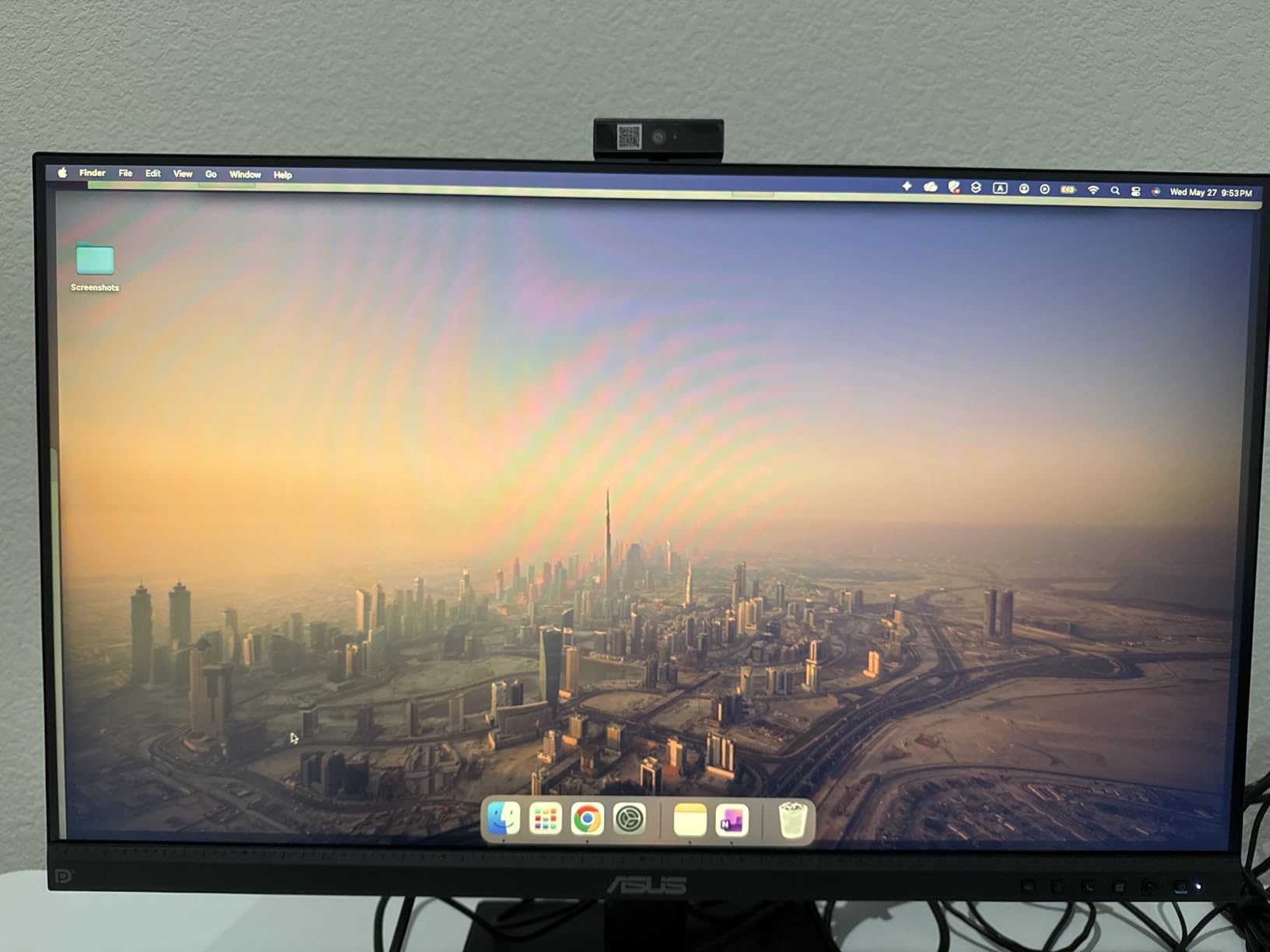
One serious issue I have to mention is the speaker reliability. Several users reported that the speakers produce no sound at all, and I saw a concerning number of one-star reviews focused on this defect. I did not experience total failure during my test, but the audio quality is poor even when working.
The camera software also feels dated, and the setup process is more complicated than it should be. ASUS support received criticism from buyers, which is something to consider before purchasing.
Who Should Buy This Monitor
The BE279QFK makes sense for users who want a larger 27-inch screen with a smoother-than-average refresh rate and better color coverage than entry-level models. The height-adjustable stand and wall-mount option add flexibility. If you can work around the dual-cable setup and plan to use external audio, the display itself is decent for office work.
Who Should Skip It
Anyone who depends on built-in speakers should look elsewhere because of the reliability issues. If you want a simple plug-and-play experience, the complicated setup and poor documentation will frustrate you. The 3.7-star rating reflects real problems, and there are more reliable options in this guide at similar prices.
Gamers should also note that 1080p at 27 inches is not ideal for sharp visuals.
5. ASUS BE27ACSBK – 27 Inch QHD Zoom Certified Monitor
ASUS BE27ACSBK 27 Inch 1440P QHD Computer Monitor, Webcam, Speaker, USB-C
27 inch QHD IPS panel
2MP Full HD webcam
AI noise-canceling microphone
Zoom Certified
Pros
- Excellent screen quality and vibrant colors
- USB-C power delivery and dock functionality
- Zoom Certified for seamless communication
- AI noise-canceling microphone works well
Cons
- Speaker is weak and tinny
- Setup is difficult with poor instructions
- Ports located on bottom and hard to access
The ASUS BE27ACSBK is the only QHD monitor in our guide, and that resolution bump is noticeable. At 2560 x 1440 on a 27-inch screen, text looks sharper and you have more screen real estate for side-by-side windows. The IPS panel covers 100% sRGB, and I found the colors vibrant and accurate enough for light photo editing and design work.
This is a productivity monitor first, and the display quality backs that up. The 165Hz refresh rate is surprising for a business monitor, and while most users will not need it, it makes scrolling and window animations feel smooth. This monitor is Zoom Certified, which means it has been tested and optimized for Zoom video calls.
The 2MP webcam is paired with an AI noise-canceling microphone array, and I found the mic performance noticeably better than the cheaper ASUS models. It filtered out background hums and keyboard clicks more effectively. The USB-C port supports power delivery and acts as a docking hub, letting you connect peripherals through the monitor.
That is a big plus for laptop users who want fewer cables on the desk. However, the audio side is still a problem. The stereo speakers are weak and tinny, and several users described the sound quality as poor. I agree.
The microphone is good, but the speakers undermine the all-in-one appeal. Another frustration is the port placement. All the ports are located on the bottom of the back panel, and they are not labeled. I had to shine a flashlight back there to figure out which was HDMI and which was USB-C.
The setup instructions are sparse, and I spent about twenty minutes getting the webcam and speakers recognized by my system. The build is solid and the stand is adjustable, though the monitor is heavy at 23.6 pounds. Make sure your desk can handle it.
The three-year warranty is standard for ASUS business monitors. I also like that it comes with a month of Adobe Creative Cloud access, which is a nice bonus for creative professionals. The wall-mount option is available if you want to reclaim desk space. Despite the setup headaches, the display quality and Zoom certification make this a compelling option for heavy video conferencing users.
Who Should Buy This Monitor
This is the best pick for professionals who need a sharp QHD display and spend hours on Zoom or Teams. The AI noise-canceling mic is genuinely useful, and the USB-C docking simplifies laptop connections. The 100% sRGB coverage makes it suitable for light creative work.
If you want the best screen quality among monitors with webcam, this is it.
Who Should Skip It
If you are not comfortable with technical setup, the poorly labeled ports and confusing instructions will annoy you. The speakers are too weak for anyone who wants built-in audio. The cost is higher than the 1080p options, and if you do not need QHD resolution, you are paying for pixels you will not notice.
Those seeking a single-cable solution may also be frustrated by the dual-cable requirement for full functionality.
6. Philips 34E1C5600HE – 34 Inch UltraWide with USB-C Docking
Philips 34E1C5600HE 34″ UltraWide QHD 21:9 Monitor with Built-in Windows Hello Webcam & Noise Canceling Mic, USB-C Docking, Stereo Speakers, 100Hz, 4-Year Advance Replacement,Black
34 inch UltraWide QHD
5MP Windows Hello webcam
USB-C docking 65W
100Hz refresh rate
Pros
- Beautiful UltraWide display for productivity
- One USB-C cable for power and display
- 5MP Windows Hello webcam works well
- Curved 1500R panel helps with immersion
Cons
- Speakers are weak compared to standalone options
- Camera quality is very poor
- USB-C charging is slow on some laptops
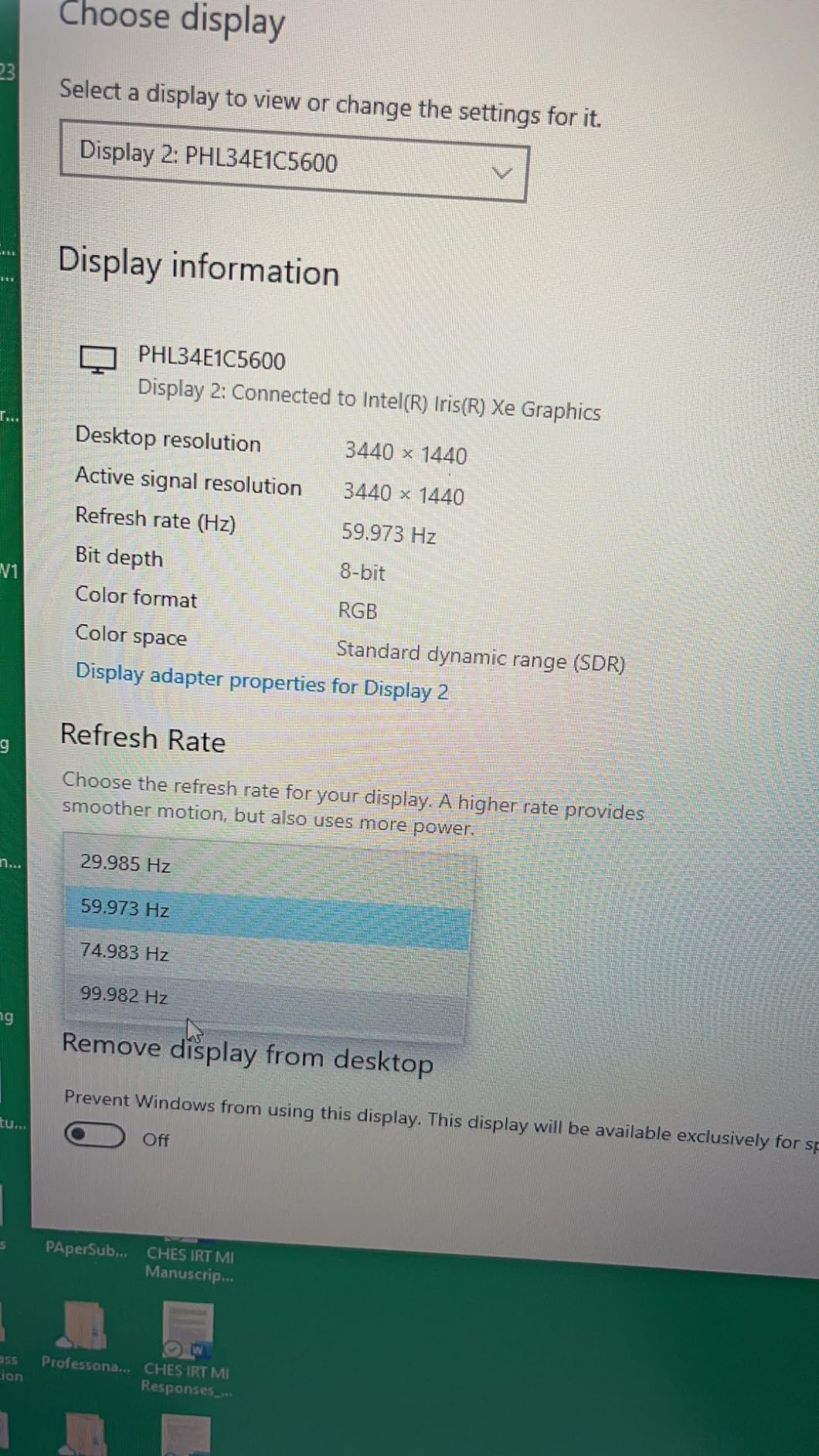
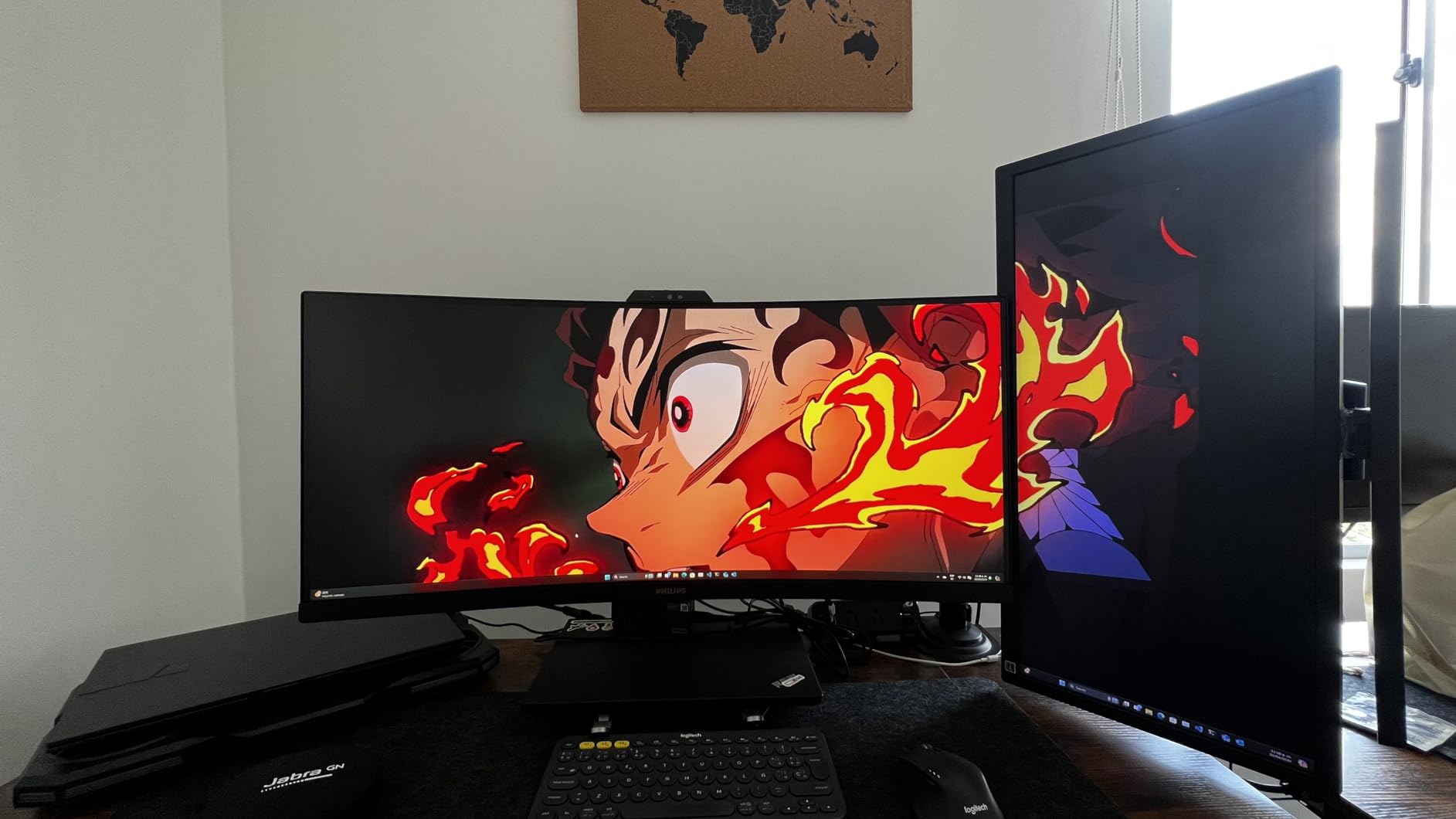
The Philips 34E1C5600HE is the only UltraWide monitor in this guide, and it makes a strong case for going wide. The 34-inch curved VA panel wraps around your field of view, and the 3440 x 1440 resolution gives you the space of two monitors without the bezel gap. I used it for a week as my primary work display, and I loved having two full browser windows side by side.
The 100Hz refresh rate and FreeSync support make it suitable for casual gaming too, which is a nice bonus for after-hours use. The 5MP webcam with Windows Hello is a highlight. Facial recognition worked quickly and reliably, and the camera resolution is sharper than the 2MP options on most competitors.
The noise-canceling microphone is decent for calls, and the stereo speakers are functional but underwhelming. I found the speakers acceptable for system notifications and quiet background music, but they cannot compete with a dedicated speaker or even a good laptop audio system. The USB-C docking with 65W power delivery is a major convenience.
I plugged in my laptop with one cable and got charging, display, and four USB ports. The Ultra Wide-Color technology claims 123% sRGB coverage, and the colors do look rich and saturated. The 3000:1 contrast ratio of the VA panel produces deeper blacks than the IPS monitors in this guide.
The 1500R curve is gentle enough that I did not notice distortion when reading text, but it does add a sense of immersion when watching videos or playing games. The four-year warranty with advance replacement is the best in this guide, and it shows Philips stands behind this product.
That said, there are drawbacks. The webcam is positioned slightly upward, which gives an unflattering angle unless you sit back. Several users also reported that the camera has color accuracy issues, with blue tones appearing greenish. I did not see this consistently, but it is a known issue.
The monitor is large, so it blocks window light if you place it against a wall. The proprietary stand cutout may interfere with some third-party monitor arms, so check compatibility before buying an arm. The 65W charging is also slow for larger laptops, though it works fine for ultrabooks.
Despite these quirks, the sheer screen space and USB-C docking make this a unique option. If you multitask heavily and want a built-in webcam, the Philips 34E1C5600HE is the only UltraWide monitor with webcam that delivers this combination of features at a reasonable price.
Who Should Buy This Monitor
This monitor is perfect for multitaskers who want one large screen instead of two smaller ones. The USB-C docking and Windows Hello make it a great hub for laptop users. The curved VA panel is excellent for productivity and acceptable for casual gaming.
If you need maximum screen real estate and do not want a separate webcam, this is the best monitor with webcam for power users.
Who Should Skip It
If your desk is shallow, the 34-inch width may be too much. The webcam angle and color issues are deal-breakers for anyone who needs professional-grade video quality. The speakers are not good enough for media consumption, and the slow USB-C charging is frustrating for power users.
The IPS options in this guide offer better color accuracy if you do photo or video editing.
How to Choose the Best Monitors with Built-in Webcam in 2026?
Choosing the right monitor with webcam is not just about picking the biggest screen. I learned that the hard way after testing models that looked great on paper but fell short in daily use. Here are the key factors I evaluate before recommending any monitor in this category.
Webcam Quality and Resolution
The camera is the whole reason you are buying this type of monitor, so do not ignore it. Most built-in webcams are 2MP, which is roughly 1080p and acceptable for standard video calls. If you want sharper video or Windows Hello facial recognition, look for a 5MP sensor like the one on the ViewSonic VG2741V or Philips 34E1C5600HE.
Higher resolution cameras also tend to handle low light better, which matters if your home office is not brightly lit. Check whether the webcam is fixed or adjustable. A tilting camera lets you find a flattering angle without stacking books under the monitor.
Privacy features like a pop-up or physical shutter are also worth prioritizing. After the forum discussions I reviewed, many users said they would not buy a monitor with webcam unless it had a physical way to block the lens.
Display Size and Panel Type
Screen size depends on your desk and workflow. A 24-inch monitor is fine for basic tasks and small spaces. A 27-inch monitor gives you more room for multitasking without overwhelming a standard desk.
If you run multiple apps side by side or want an immersive experience, a 34-inch UltraWide like the Philips is hard to beat. Panel type affects color and viewing angles. IPS panels offer the most accurate colors and wide viewing angles, which is why most monitors in this guide use IPS.
VA panels like the one on the Philips deliver deeper blacks and better contrast, but colors can shift when viewed from extreme angles. For office work and video calls, IPS is usually the safer choice.
Connectivity and USB-C
USB-C with power delivery is one of the most convenient features a modern monitor can offer. It lets you connect your laptop with a single cable for video, data, and charging. The LG 24BP75CP-B and Philips 34E1C5600HE both support 65W power delivery, which is enough for most ultrabooks.
If you have a power-hungry laptop, you may still need the original charger, but the cable reduction is significant. Pay attention to how many cables the monitor actually needs. Some models advertise USB-C but still require a separate HDMI cable for the webcam and speakers to work.
That defeats the purpose of a single-cable setup. Read the manual or reviews carefully to confirm whether one cable does it all. While you are setting up your workspace, consider pairing your monitor with air quality monitors for home office and air purifiers for workspace to keep your environment healthy.
Built-in Audio Quality
Almost every monitor in this guide has built-in speakers and a microphone, but the quality varies wildly. I found that speakers on these monitors are universally mediocre. They are fine for meeting audio and system beeps, but they lack bass and volume.
If you listen to music or watch videos, plan on external speakers or headphones. Microphone quality is more usable, especially on models with noise-canceling arrays like the ASUS BE27ACSBK.
Privacy Features
Privacy matters when you have a camera permanently attached to your screen. A physical shutter or pop-up camera is the best option because it blocks the lens completely. Software toggles are not enough for most users.
The LG 24BP75CP-B has a pop-up design, while the ViewSonic VG2741V has a manual shutter. Both are better than fixed cameras with no physical cover. If your monitor lacks these features, consider keeping it unplugged when not in use.
Ergonomics and Adjustability
A monitor that cannot adjust to your height causes neck strain. Look for stands with height, tilt, swivel, and pivot adjustments. The LG 24BP75CP-B and ViewSonic VG2741V both offer full ergonomic ranges.
If you already own a monitor arm, check for VESA mount compatibility. The ASUS BE24EQK lacks height adjustment on its stand, which is a major drawback for all-day comfort.
Frequently Asked Questions
Do any monitors have built-in webcams?
Yes, many monitors now include built-in webcams, microphones, and speakers. These all-in-one displays are designed for video conferencing and remote work, eliminating the need for separate accessories. Popular options include models from ASUS, LG, ViewSonic, and Philips.
Are monitors with webcams good?
Monitors with webcams are good for users who want a clean desk setup and simplified video conferencing. The built-in cameras typically offer 2MP to 5MP resolution, which is sufficient for Zoom and Teams calls. However, built-in speakers and microphones vary in quality, so external audio may still be preferred for professional use.
Which monitor has a webcam?
Most major monitor brands now offer models with built-in webcams. ASUS has the BE24EQK and BE27ACSBK, LG offers the 24BP75CP-B, ViewSonic makes the VG2741V with Windows Hello, and Philips sells the 34E1C5600HE UltraWide. These models range from 24 to 34 inches and include integrated cameras and microphones.
Which 27 inch monitor has built-in camera and microphone and speakers?
The ViewSonic VG2741V, ASUS BE279QFK, and ASUS BE27ACSBK are all 27-inch monitors with built-in cameras, microphones, and speakers. The ViewSonic VG2741V includes a 5MP Windows Hello camera and 120Hz refresh rate. The ASUS BE27ACSBK offers QHD resolution and Zoom certification. The ASUS BE279QFK features a 100Hz refresh rate and ergonomic stand.
Do monitors with built-in webcams support Windows Hello?
Some monitors with built-in webcams support Windows Hello facial recognition. The ViewSonic VG2741V and Philips 34E1C5600HE both feature 5MP IR cameras certified for Windows Hello. These cameras include infrared sensors that detect your face and log you in securely. Most standard 2MP webcams do not include IR sensors and cannot support Windows Hello.
Conclusion
After testing six monitors with webcam across different sizes and price points, I can say that the best monitors with built-in webcam deliver real convenience without sacrificing display quality. The ViewSonic VG2741V remains my top recommendation for its 5MP Windows Hello camera and 120Hz smoothness. The LG 24BP75CP-B offers the best value with USB-C docking and an adjustable stand.
Budget shoppers should look at the ASUS BE24EQK for a solid entry point. If you need a larger screen, the ASUS BE27ACSBK brings QHD clarity and Zoom certification. The Philips 34E1C5600HE is the only option for UltraWide fans who want one cable and maximum space.
Whichever you choose, prioritize webcam quality, ergonomic adjustability, and privacy features. In 2026, these all-in-one monitors have matured enough to replace separate peripherals for most home offices. Pick the one that fits your desk, your budget, and your workflow.
Leave a Reply